
Solutions / Machine Vision & AOI
Industrial PC for Machine Vision & AOI
BITECH industrial PCs for machine vision are sized around your camera topology, image rate, inspection method, cycle-time target and PLC/MES integration—not camera count or GPU model alone.
From classical vision and OCR to multi-camera AI defect detection, we configure x86, RK3588, Jetson and RTX MXM platforms around the complete camera-to-PLC data path.
Multi-camera acquisition — GigE / USB3 / GMSL2 / frame-grabber architectures
AI + classical vision — x86, RK3588, Jetson and RTX GPU options
PLC-ready integration — LAN, isolated I/O, CAN and serial interfaces
Production Validation — Bandwidth / Thermal / Watchdog / Drivers
For an initial recommendation, send the camera count and interface, resolution/FPS or trigger rate, pixel format or codec, inspection model, cycle-time target and PLC/I/O requirements.
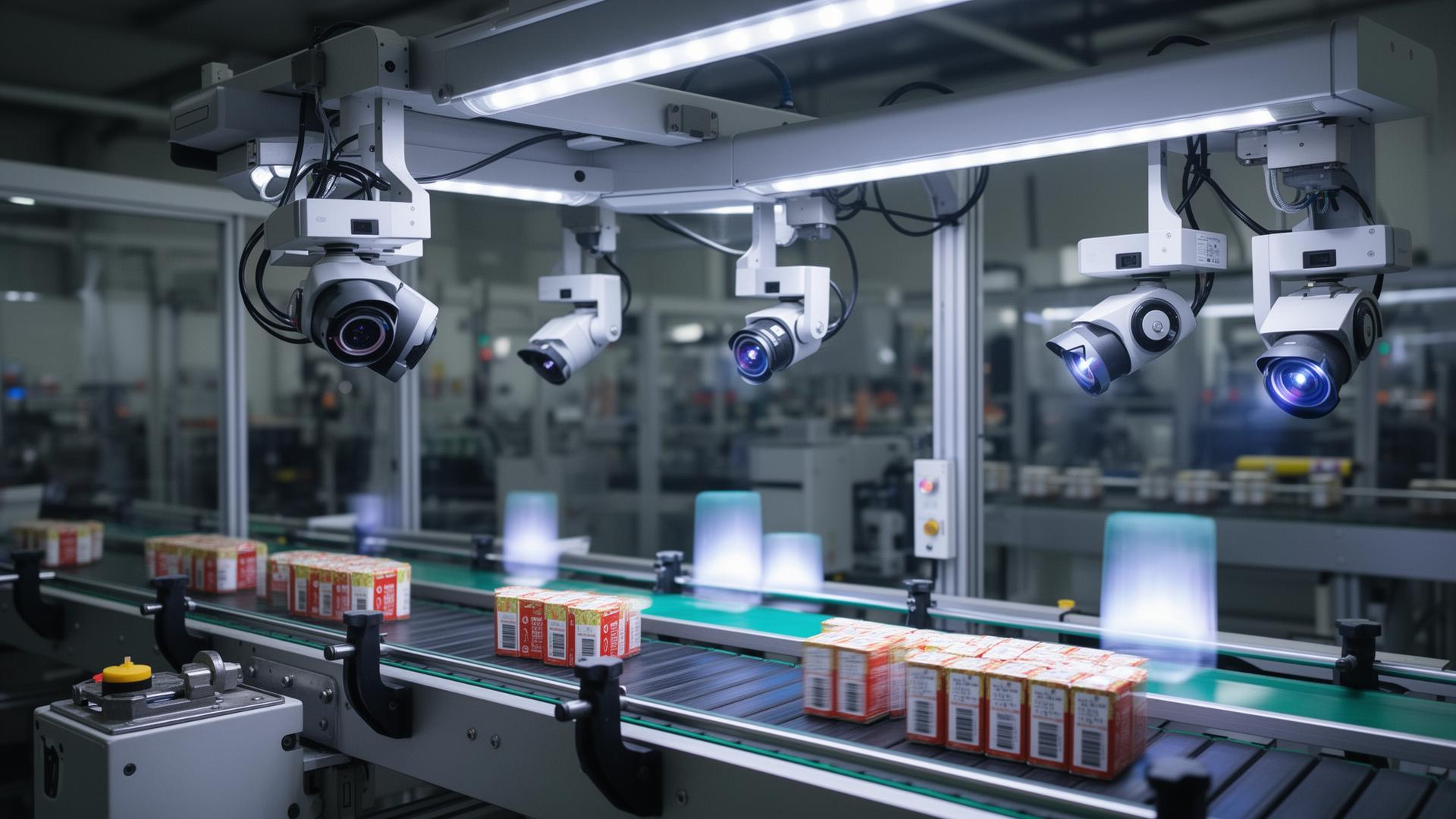
Do You Need a Smart Camera or an Industrial Vision PC?
Find your project below — if it’s here, we can size the compute for it.
Multi-Camera AOI
PCB · SMT · packaging · surface inspection
AI Defect Detection
scratch · crack · missing component · weld issue · incorrect assembly
High-Speed Image Acquisition
GigE Vision · USB3 Vision · CXP / frame grabber · triggered inspection
Vision + PLC Automation
PASS / FAIL · coordinates · sorting · reject · robot guidance
Do you actually need an industrial vision PC?
A smart camera and an industrial AI computer solve different machine-vision problems. Start here before choosing hardware.
| Requirement | Smart Camera | Industrial AI PC |
|---|---|---|
| One self-contained inspection | Excellent | – |
| Multi-camera / custom software | – | Excellent |
| Recognition + measurement + PLC/MES | – | Excellent |
A smart camera is often the simpler choice for one self-contained inspection using standard vision tools.
An industrial PC becomes more useful when the system needs multi-camera acquisition, custom AI, multiple vision tasks, databases, MES integration or scalable GPU compute.
Read the full architecture guide → Smart Camera vs Industrial AI PC
What determines the computer?
The GPU is chosen last, after the workload is defined.
 Camera Count  +  Resolution  +  FPS / Trigger Rate  +  AI Model
 +  Cycle Time  +  Concurrent Tasks  +  PLC / MES Integration
 =  Required Compute Platform
| Input | What it determines |
|---|---|
| Camera count | Concurrent acquisition |
| Interface | NIC / USB / GMSL2 / PCIe topology |
| Resolution | Image payload |
| FPS / trigger rate | Sustained acquisition rate |
| Pixel format / codec | RAW bandwidth or decode load |
| AI / rule-based workload | CPU / NPU / GPU direction |
| AI FPS | Actual inference throughput |
| Cycle time | End-to-end latency budget |
| PLC / MES | Industrial I/O and software integration |
| Recording policy | NVMe capacity/endurance |
| Ambient / duty | Thermal architecture |
The production vision architecture
The industrial computer is one part of the complete vision chain — designing it in isolation is why demos fail in production.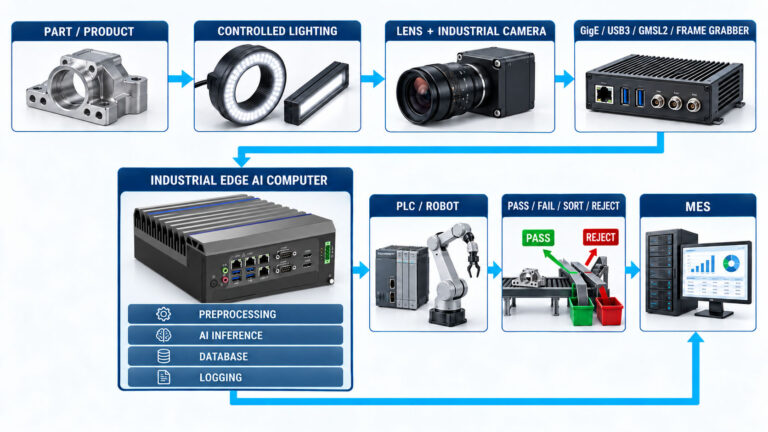
Where standard PCs become a risk in production vision
A consumer or office PC can pass a demo and still be the wrong foundation for a line that runs continuously. In production, the risks are:
Sustained CPU/GPU load — continuous inference generates heat a short benchmark never reveals
Long-term thermal stability — throttling under sustained load degrades throughput hours in
Industrial I/O — real fieldbus and digital I/O for the PLC link, not just USB
Wide-voltage input — cabinet and machine power is rarely a clean, fixed rail
Unattended operation — no operator standing by to reboot a hung system
Hardware watchdog — automatic recovery when software or the OS hangs
Controlled BOM —controlled BOM, PCN and long-lifecycle options
Lifecycle — availability for the life of the machine it inspects
Connector retention — locking connectors that survive vibration and handling
Expansion — the right PCIe slot for a frame grabber or high-speed NIC
Real Machine Vision & AOI Applications
Application type, inspection task, typical industries, and the compute considerations that usually drive platform selection.
| Application | Typical Inspection Tasks | Industry Examples | Main Compute Considerations |
|---|---|---|---|
| PCB & Electronics Inspection | Missing components, solder defects, polarity, connector inspection | Electronics, automotive electronics, industrial controls | Resolution, cycle time, multi-camera acquisition |
| Packaging & Label Inspection | OCR, barcode, label position, seal defects, missing parts | Food, pharmaceutical, logistics, consumer goods | Trigger rate, OCR workload, PLC integration |
| Surface & Structural Inspection | Scratches, cracks, corrosion, dents, coating defects, weld quality | Automotive, aviation, maritime, metal processing | Image quality, lighting, AI segmentation, GPU workload |
| Dimensional & Assembly Inspection | Gap, alignment, diameter, presence/absence, assembly verification | Automotive, machinery, aerospace manufacturing | Deterministic latency, high-resolution imaging, rule-based vision |
| Robot & Automated Handling Vision | Object localization, pick-and-place, pose estimation, obstacle detection | Manufacturing, logistics, AMR/AGV, agriculture | Multi-camera latency, synchronization, GPU/NPU |
| Safety & Video Analytics | PPE, intrusion, smoke, leak, restricted-zone monitoring | Factories, ports, vessels, airports, roadside infrastructure | Multi-stream decode, AI inference, 24/7 operation |
Choose the compute architecture by workload
Camera count alone does not determine the platform. Resolution, FPS, model complexity, cycle time and concurrent workloads must also be considered.
Before sizing CPU, NPU or GPU, decide whether the defect can be defined by rules or has to be learned. Our guide to AI vision vs traditional machine vision explains when rule-based, AI or hybrid inspection fits.
| Workload | Cameras / Interface | Compute direction | BITECH platform |
|---|---|---|---|
| Classical vision / OCR / presence check | GigE / USB3 | x86 CPU / iGPU | AX-130BT / AX-134BT |
| Compact AI defect detection | Moderate embedded camera workload | RK3588 NPU | AE-3588 family |
| Multi-camera deep learning | High-bandwidth / multi-camera | x86 + discrete RTX | AE-760EBT |
| Sustained high-load AI / airflow-constrained environments | Multi-camera / high bandwidth / continuous inference | x86 + RTX MXM + liquid cooling | AE-960EBT |
| Robot / mobile vision | GMSL2 / GigE / sensor fusion | Jetson Orin | AE-NJ60BT |
| CXP / Camera Link | Frame grabber required | PCIe expansion | Engineering review |
| Multi-GPU / very high bandwidth | Custom | Custom GPU platform | Contact engineering |
Engineering capability — sized to your project
We don’t publish blanket performance guarantees. Instead, the relevant numbers are validated against your camera topology, workload and environment.
Low-latency vision architecture
Platform and I/O architecture can be sized around project-specific cycle-time targets.
Sustained frame acquisition
Camera bandwidth, buffering, PCIe resources and thermal performance are validated against the customer’s actual camera topology and sustained workload.
Sustained-load thermal design
Thermal sizing is validated according to the selected CPU/GPU configuration, installation method and ambient environment.
Isolation options
Optional isolated serial, CAN and digital I/O configurations are available for high-EMI production environments. Isolation level depends on the selected platform.
What BITECH can validate before your sample order
Before you commit to a sample, we can review and test:
- Camera / network bandwidth review
- Frame-grabber compatibility
- GPU / NPU workload test
- Sustained CPU/GPU thermal test
- PLC / industrial I/O communication test
- BIOS auto power-on
- Watchdog behavior
- OS / driver compatibility
- Storage configuration
- Interface verification
Test reports and lab documentation from the BITECH validation lab are shared with the configuration proposal.
Project delivery
Requirement -> Sample -> Validation -> Production
OEM/ODM · sample evaluation · 24-month warranty · long-lifecycle platform options.
Get a platform recommendation
Tell us your camera setup. We'll size the compute.
Send your camera count, interface, resolution/FPS, AI model, cycle-time target and PLC protocol. BITECH engineering recommends the closest CPU/NPU/GPU platform and identifies any required I/O or frame-grabber expansion — the GPU is chosen last, after the workload is defined.
Send us six things
- Camera count
- Interface (GigE / USB3 / GMSL2 / CXP)
- Resolution & FPS / trigger rate
- AI model (or classical / rule-based)
- Cycle-time target
- PLC protocol & I/O
We come back with
- CPU / NPU / GPU architecture
- Camera / network topology
- Required industrial I/O
- Thermal / power assumptions
- The closest BITECH platform
- A sample configuration
OEM / ODM · Sample evaluation · 24-month warranty · Long-lifecycle platform options
Machine Vision & AOI
Frequently asked questions
-
Start with camera count, interface, resolution, FPS, AI model, cycle-time target, PLC protocol and environmental conditions. The GPU should be selected after the complete workload is defined.
-
No. Classical vision, OCR and simple inspection may run well on CPU or integrated graphics. Deep-learning workloads and multi-camera systems may require an NPU or discrete GPU.
-
A smart camera is often suitable for one-camera, standard inspection such as OCR, presence/absence and basic measurements. An industrial AI PC becomes more useful for multiple cameras, custom AI models, databases, MES integration or scalable GPU compute. They solve different problems — not one better than the other.
-
The correct platform depends on camera count, bandwidth, drivers and software stack. Camera topology should be reviewed before the final system configuration is selected.
-
Yes, depending on the selected platform and protocol. Integration methods may include Ethernet-based protocols such as EtherNet/IP, PROFINET, Modbus TCP or OPC UA, as well as serial communication and digital I/O.
-
Cycle time defines the total allowed window for acquisition, preprocessing, inference and communication. GPU selection should be based on sustained end-to-end workload rather than model TOPS alone.
-
Production vision systems run continuously. Short benchmarks may not reveal thermal throttling, fan behavior or long-term throughput changes, so sustained-load testing against the real camera topology and environment is what matters.
Engineering guides
Go deeper before you size the platform
These guides cover the decisions behind the workload you send us — architecture, sizing, interface and GPU form factor — before the platform recommendation.