
Smart Camera vs Industrial AI PC: Which Architecture Fits Your Machine Vision System?
Neither is universally better. The choice is a continuum from vision sensor to GPU vision workstation — decided by imaging, AI inspection load, camera count, PLC and MES integration, and who maintains the system in five years.
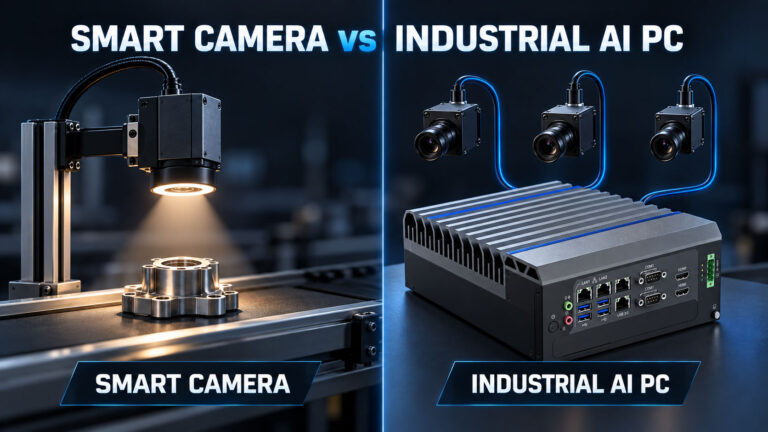
In short
- One fixed inspection, one camera, library tools, no in-house software team — smart camera.
- Two to four cameras, a trained model, changing inspection logic, MES reporting — industrial AI PC.
- High-resolution multi-stream inspection, model ensembles, frame grabbers — GPU vision platform.
- The label on the box decides nothing. Camera count, interface, framerate, model lifecycle and who maintains it decide everything.
There are not two options — there is a continuum
The question arrives as a binary: smart camera or PC. In practice there are four points on one line, and most projects sit at a point nobody named in the RFQ.
Vision sensor
Presence, absence, position, a code read. Fixed function, configured not programmed. Cheapest to deploy, no headroom.
Smart camera
Sensor, optics, processor and vendor toolchain in one housing. Fieldbus and discrete I/O out of the box. One camera, one station, one task.
AI vision controller
A fanless industrial computer with an NPU or embedded GPU, taking two to four cameras and driving results to the PLC. The point most AOI cells actually need.
GPU vision workstation
Discrete GPU, frame grabbers, PCIe expansion. High-resolution multi-stream inspection and model ensembles. Highest cost, highest ceiling.
What actually differs
| Dimension | Smart camera | Industrial AI PC |
|---|---|---|
| Cameras per unit | Normally one | Two to eight, depending on interface and bandwidth |
| Imaging chain | Sensor and optics fixed by the model chosen | Camera, lens and lighting selected independently |
| AI inspection | Small vendor-trained models | PyTorch / TensorFlow / ONNX models, retrainable |
| Camera interface | Built in | GigE Vision, USB3 Vision, CoaXPress, GMSL2, frame grabber |
| PLC integration | Fieldbus profiles and I/O ready | Specified by you — DIO, EtherCAT / PROFINET, OPC UA |
| MES / traceability | Limited image retention | Local image archive, database, MES reporting |
| Compute upgrade path | Replace the camera | Replace or upgrade the computer, keep the optics |
| Toolchain | Closed, vendor-supported | Open, your team’s responsibility |
| Deployment effort | Low | Moderate to high |
| Cost at 1–2 stations | Usually lower | Usually higher |
| Cost at 4+ stations | Multiplies per unit and licence | Amortises across cameras |
| Who maintains it in year five | The vendor’s toolchain | Your engineering team or your integrator |
The imaging chain decides before the compute does
Most vision projects that fail on the line fail on lighting, optics and part presentation, not on inference. A smart camera constrains that chain: choosing the unit fixes the sensor, and often the lens family and the lighting options with it. That is a feature when the part is cooperative and a hard wall when it is not.
A PC-based system lets you pick the sensor for the defect, the lens for the working distance, and the illumination for the surface — then size the compute around what the imaging produces. If your defect needs a specific wavelength, a telecentric lens or 20 MP resolution, the architecture question is already answered.
We wrote the full imaging-first argument in Machine Vision & AOI: why factory inspection fails outside the lab.
Camera count and synchronisation
One camera is not an architecture decision. Four are. Once several views contribute to one pass/fail verdict, something has to hold the frames together, timestamp them and apply the decision logic — and doing that across four independent smart cameras means doing it in the PLC, which is not what a PLC is good at.
A single host with four camera interfaces keeps the correlation in one place, in one memory space, with one clock. Size the bandwidth honestly: resolution × bytes per pixel × framerate × cameras, then compare against the interface and the storage path, not against TOPS.
Interface choice follows the installation. For fixed cells, GigE Vision versus GMSL2 is largely a distance and determinism question; for cameras on a moving chassis it is not close.
Integration is where PC-based projects overrun
A smart camera arrives knowing how to talk to a PLC. A PC does not, until you specify it. Four things need to be in the RFQ, not discovered during commissioning:
- Trigger and reject path. Hardware trigger in, reject signal out, with defined latency. Software triggering over Ethernet is fine until the line speeds up.
- Result transport. EtherCAT, PROFINET, Modbus TCP or OPC UA to the controller — and what the PLC does when a result does not arrive.
- Failure behaviour. What the machine does when the vision process dies, the disk fills, or an update reboots the computer mid-shift.
- Traceability. Image retention policy, storage sizing, and whether images and verdicts go to MES. This is usually the reason a PC was chosen in the first place.
Maintenance and the ten-year question
Ask who changes the inspection recipe two years after handover. If the answer is a maintenance technician with a tablet, the closed vendor toolchain of a smart camera is an asset. If the answer is your own software team retraining a model each quarter, a closed toolchain is a tax.
Then ask what happens when a unit fails in year six. A PC-based system separates the imaging chain from the compute: you can replace the computer, or move to a newer CPU generation, without requalifying optics and lighting. A smart camera couples them, so an obsolete model means requalifying the whole inspection. That is exactly the coupling our lifecycle and BOM-control programme exists to remove.
Mapping workload to platform
| Workload | Architecture | BITECH platform |
|---|---|---|
| Code reading, presence/absence, single fixed check | Vision sensor or smart camera | Not a PC problem — keep it simple |
| 1–2 GigE cameras, rule-based tools, HMI on the cell | Compact x86 vision controller | AX-130BT / AX-134BT |
| 2–4 cameras with a trained defect model, fanless cabinet | AI vision controller (NPU) | AE-3588BT / AE-3588LBT |
| Multi-camera perception on a moving chassis, GMSL2, ROS2 | Embedded GPU controller | AE-NJ60BT |
| High-resolution multi-stream AOI, model ensembles, frame grabber | GPU vision platform | AE-760EBT with MXM GPU |
| Legacy frame grabber or PCI vision card to retain | Expansion chassis | See the PCIe expansion guide |
Platform mapping is indicative. Final selection depends on camera bandwidth, model, cycle time and the thermal and power envelope of your installation, which our engineers review case by case.
Where teams get this wrong
- Choosing the architecture before the imaging. If lighting and optics are unsettled, no compute decision is safe.
- Buying a smart camera per station and calling it scalable. Four units plus licences plus PLC-side reconciliation is rarely cheaper than one host.
- Buying a PC and forgetting the integration budget. Trigger, fieldbus, failure behaviour and traceability are engineering work with a real cost.
- Sizing by TOPS. Decode, preprocessing and memory bandwidth cap most vision pipelines long before the inference engine does.
- Using a commercial mini PC in a cell. No sustained-load validation, no fieldbus I/O, no lifecycle commitment. See industrial PC vs commercial mini PC.
Get a vision architecture review
Smart camera, vision controller or industrial PC? Send the workload.
You don't have to pre-decide the architecture. Send BITECH engineering the inspection and the deployment, and we'll recommend the smallest architecture that reliably fits — smart camera, AI vision controller, or industrial AI PC — and only spec a CPU/NPU/GPU once the workload is defined.
Send nine things
- Inspection task
- Camera count & interface
- Resolution / FPS
- AI model or classical vision software
- Maximum cycle time
- PLC / robot protocol
- Image storage / MES requirement
- Operating environment
We return
- Smart camera / vision controller / industrial PC recommendation
- CPU / NPU / GPU direction — chosen last
- Camera & I/O architecture
- Closest BITECH platform if it's PC-based
- A sample configuration
Architecture-neutral advice · smallest system that fits · sustained-load validated · 10-year lifecycle for PC-based platforms
Machine Vision · Architecture
Frequently asked questions
-
Neither is universally better. A smart camera usually wins on deployment simplicity and maintenance; an industrial AI PC becomes more useful when the application needs broader compute, software flexibility, multiple cameras or deeper system integration.
-
Yes. Modern smart-camera and vision-controller platforms run substantial edge-AI workloads. The real constraints are model support, software ecosystem, camera topology, memory, compute and integration requirements — not whether AI runs at all.
-
No. CPU, integrated-GPU and NPU platforms handle many industrial vision workloads. PC-based vision scales through a ladder — CPU, CPU+iGPU, CPU+NPU, embedded NPU/Jetson, discrete GPU — and a discrete GPU should be selected only when the workload requires it.
-
There's no fixed camera-count threshold. Evaluate resolution, FPS, trigger rate, interface, preprocessing, AI model, concurrent jobs, storage and latency target together — camera count is only one input into the total vision load.
-
The more useful distinction: vendor systems generally prioritize deployment simplicity, support and maintainability; custom systems prioritize software flexibility and integration freedom. Choose by which you need to own over the system's life.
-
Usually not. Vision compute and deterministic machine control have different roles — the industrial AI PC calculates the inspection result while the PLC or motion controller handles machine sequence, interlocks and motion.
Related products & guides
If the answer is PC-based, match it to the workload
This article helps you choose the architecture; if it lands on an industrial AI PC, these platforms map to the PC side of the continuum — picked by workload, not by a fixed GPU. For a full deployment, the Machine Vision solution is the hub.