
Engineering guide · Updated October 2026
Future-Proof Industrial Computing: Modular Architecture for CPU, I/O & EOL Migration
Processors, memory, storage, Ethernet controllers, wireless modules, GPUs, operating systems and toolchains will all change during a long product lifecycle. A future-proof industrial PC is not one that never changes — it is one designed so those changes stay small.
In short
Design the system so that future changes affect the smallest possible part of the product. Put fast-changing compute on a replaceable SOM or COM module, keep industrial I/O, power input and connectors on a stable carrier board, reserve PCIe/M.2, power and thermal headroom, control the BIOS/OS/BSP baseline, and agree a migration contract before mass production. Modularity reduces redesign scope; it never removes revalidation.
A future-proof platform combines
Modular compute · stable industrial I/O · controlled expansion · power & thermal headroom · software compatibility planning · lifecycle governance · explicit migration rules
The result for OEMs
Smaller redesign scope, preserved mechanical and I/O architecture, simpler field upgrades and more predictable CPU or accelerator migration.
Looking for BOM control, PCN/PDN handling, EOL planning and last-time-buy strategy? See Industrial PC Lifecycle Management.
01 · Definition
Future-proofing does not mean hardware never changes
Industrial systems may remain in service for 5, 10 or more years, but the electronics inside them do not all change at the same speed.
What changes during a long lifecycle
- The processor moves to a new generation
- The GPU needs more power
- An SSD controller enters EOL
- A network controller is replaced
- A Linux BSP moves to a newer kernel
- A Windows image needs new drivers
What future-proofing means
Planning for these changes before they happen.
“Freeze every component forever.”
“Preserve the stable parts of the product and isolate the volatile parts.”
This is the architectural foundation of a maintainable industrial computing platform.
02 · Why industrial is different
Why industrial PCs face a different lifecycle problem
A consumer PC is often replaced as one complete unit. An industrial computer is usually part of something larger, so changing the PC can affect much more than CPU performance.
The industrial PC sits inside
AMR / AGVMachine vision systemSemiconductor toolPackaging machineBattery storage controllerVehicle platformMedical imaging systemKiosk / terminalEdge AI appliance
A PC change can also affect
- Enclosure cutouts
- DIN or wall mounting
- External cable locations
- CAN and RS-485 pinout
- Ethernet port numbering
- Power input & ignition logic
- BIOS behavior & device names
- OS image & software licensing
- Validation reports & EMC test scope
- Customer documentation
- Field-service procedures
This is why industrial product teams should think about migration architecture, not just component availability.
03 · Separate compute from I/O
Separate fast-changing compute from stable industrial I/O
One of the strongest future-proofing strategies is to separate the high-change compute domain from the low-change application domain. A modular industrial PC architecture keeps these two domains as independent as practical.
Compute domain · changes fast
CPU / SoC · RAM · high-speed memory · integrated graphics · high-speed PCIe logic · NPU · processor-specific firmware
Defined module interface
Application domain · stays stable
CAN · CAN FD · RS-485 · RS-232 · GPIO · isolated DIO · relay I/O · Ethernet connectors · DC input · ignition control · watchdog · physical mounting · customer-specific connectors
That does not remove migration work. It reduces the amount of the system that must change when compute requirements change.
04 · SOM + carrier
SOM + carrier board architecture
A System-on-Module (SOM), Computer-on-Module (COM) or similar modular compute approach moves the processor, memory and high-speed compute logic onto a replaceable module. The carrier board provides the application-specific functions.
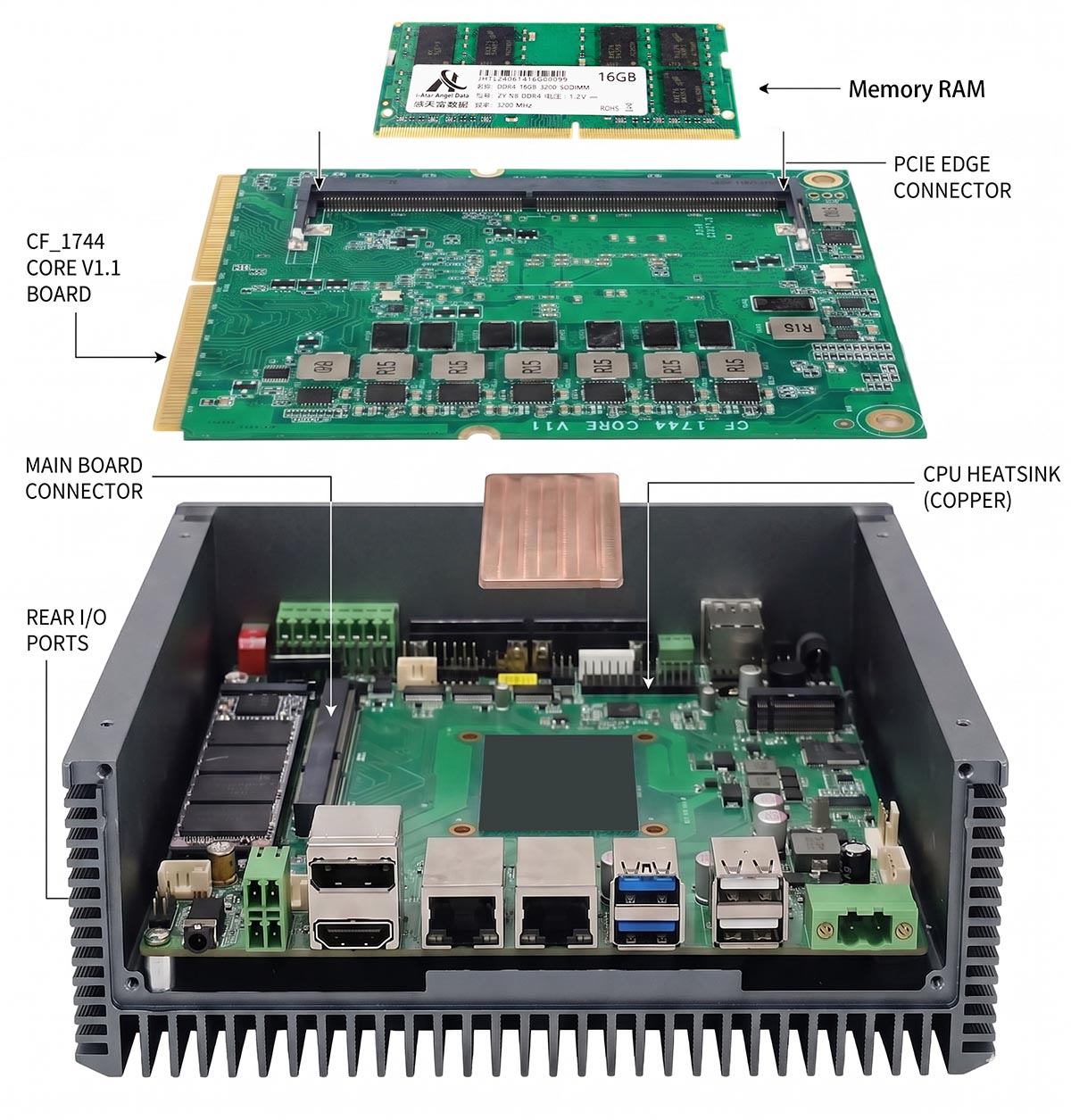
The carrier board provides
- Industrial Ethernet
- Isolated CAN
- RS-485
- GPIO
- Power conditioning
- M.2 expansion
- SIM
- Ignition
- Watchdog
- Customer connectors
- Display interfaces
- Field wiring
The practical advantage
If a compatible replacement module becomes available, the OEM may be able to preserve:
- Enclosure dimensions & mounting points
- External wiring & customer cable harnesses
- Industrial connectors & carrier-board I/O
- Power architecture
- Mechanical integration
That can reduce the migration surface significantly compared with a complete motherboard redesign.
05 · Limits of modularity
What a modular architecture can — and cannot — preserve
A modular architecture can reduce redesign scope, but it should never be presented as a guarantee of drop-in replacement.
A compatible module may preserve
- Board outline
- Mounting interface
- External connector placement
- Application-specific carrier I/O
- Enclosure
- Cable harnesses
- Some power architecture
- Some software abstraction layers
But it may still require revalidation of
- Power rails, sequencing & peak current
- PCIe compatibility
- USB behavior
- Ethernet controllers
- Display outputs
- BIOS / UEFI & firmware
- Linux BSP / Windows drivers
- TPM / Secure Boot
- Thermal performance
- EMC & regulatory impact
Mechanical compatibility is not the same as electrical, software or regulatory equivalence. This is a key rule for industrial computer migration.
06 · Change domains
Design around hardware volatility domains
Instead of treating the industrial PC as one lifecycle item, divide the platform into change domains. The correct lifecycle strategy is different for each one.
| Domain | Typical change speed | Future-proofing strategy |
|---|---|---|
| CPU / SoC / RAM | High | SOM / COM / modular compute |
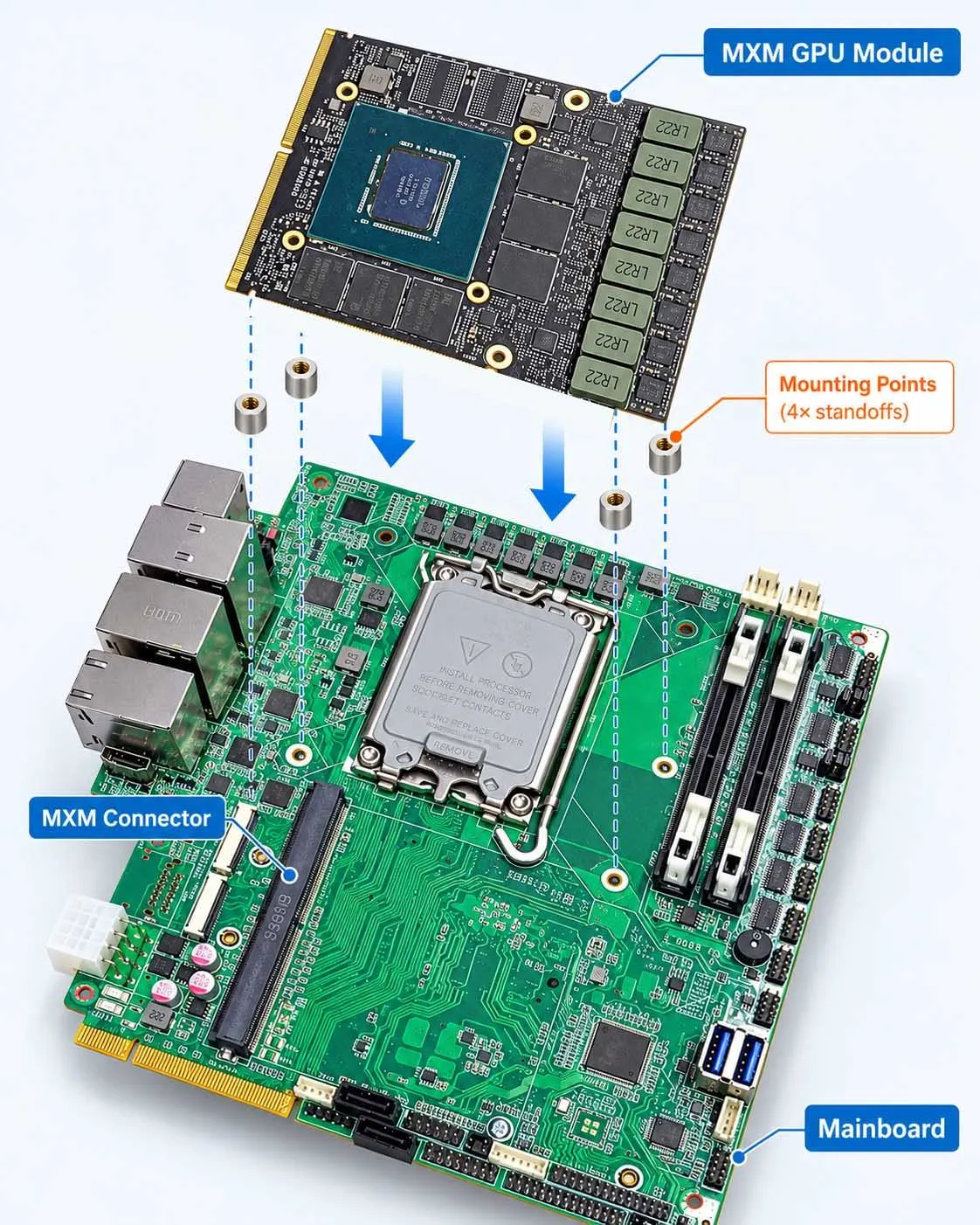
| GPU / NPU | High | MXM / M.2 / PCIe accelerator |
| Software | Medium / High | Controlled BIOS / BSP / OS baseline |
| Storage | Medium | Standardized M.2 / SATA |
| Wireless | Medium | M.2 B-Key / E-Key modules |
| Cooling | Workload dependent | Design thermal margin and serviceable components |
| Industrial I/O | Low | Stable carrier board |
| DC power input | Low | Separate protected power stage |
| Mechanical enclosure | Low | Stable mounting and connector positions |
Example: Edge AI GPU migration
May remain unchanged
- Enclosure
- Industrial I/O
- CPU
The MXM GPU moves a generation — and can still affect
- Power
- VBIOS compatibility
- Driver
- CUDA / TensorRT stack
- Cold plate
- Fan curve
- Liquid-cooling loop
- Thermal validation
The platform is still modular, but migration is not automatic.
07 · Architecture choice
SBC vs SOM + carrier vs full custom motherboard
There is no single correct architecture for every industrial OEM.
| Architecture | Advantages | Limitations | Best fit |
|---|---|---|---|
| SBC | Fast prototype, low initial engineering effort | I/O layout controlled by SBC vendor | Low volume, quick deployment |
| SOM + carrier | Stable custom I/O + replaceable compute module | Carrier-board engineering required | Industrial OEM platforms |
| Full custom motherboard | Maximum integration and optimization | Highest redesign burden when major silicon changes | High-volume stable product |
| Standard COM architecture | Module ecosystem + carrier customization | Cost, size and standard constraints | Long-life modular systems |
Why many OEMs move from SBC to SOM
An SBC is attractive during early development because the complete computer is already integrated. Once the product moves toward series production, OEMs often want tighter control over:
Connector placementPowerI/OField wiringEnclosureLong-term serviceability
A SOM + carrier approach can provide that control while keeping compute on a replaceable module. This is one reason modular compute architectures are common in embedded and industrial systems.
08 · Industry reference
Industry reference: COM Express and COM-HPC
Open module standards such as COM Express and COM-HPC (PICMG) follow the same design philosophy: separate the replaceable compute module from the application-specific carrier board.
Principle 1
High-change compute is modular.
Principle 2
Low-change application I/O stays stable.
Principle 3
Migration is managed through a defined interface.
For BITECH projects, the actual module architecture may vary according to:
PerformanceCostSizeI/OThermal limitsCPU familyGPU requirementProduction volume
The key requirement is not the module name. It is whether the chosen architecture provides a realistic migration path.
09 · Expansion
Reserve expansion before you need it
Future-proofing also means leaving controlled headroom for requirements that are likely to grow. An industrial computer designed with no spare bandwidth or expansion capacity may require a full redesign as soon as the application grows.
Expansion headroom to consider
Spare PCIe lanesM.2 NVMeM.2 B-KeyM.2 E-KeyExtra LAN2.5GbE / 10GbEMore memory capacityExtra storageGPU / NPU expansionFrame grabberAdditional CAN / serial I/O
Common growth paths
Machine vision
At launch
2 cameras · CPU inference · 512GB SSD
Later
6 cameras · GPU inference · 10GbE · 2TB NVMe
AMR
At launch
2D LiDAR · one camera · CAN
Later
3D LiDAR · multi-camera perception · 5G · CAN FD · GPU acceleration
The expansion strategy should be defined before volume production.
10 · Power headroom
Power headroom for the next compute generation
A platform can be mechanically modular but still be impossible to upgrade if the power architecture was designed too close to the original load.
Future generations may require
- Higher CPU PL1 / PL2
- Higher GPU TGP
- More RAM
- Faster NVMe
- Additional Ethernet PHYs
- PoE load
- 5G modem
- More USB devices
So the design should consider
- DC input range
- Connector current
- Regulator capacity
- Transient load
- PCB copper
- PSU efficiency
- Inrush current
- Protection devices
- Peak system power
The goal is not to oversize everything. It is to avoid a platform where a modest compute upgrade forces a complete power redesign.
11 · Thermal headroom
Thermal headroom is part of future-proofing
A system that operates safely only because the original CPU stays below its nominal TDP may have no migration margin.
Future compute modules may produce
- Higher sustained package power
- Different hotspot locations
- Higher VRM load
- Hotter NVMe devices
- Higher GPU load
A future-proof thermal design considers
- Cold-plate or heat-spreader footprint
- Mounting compatibility
- Heat-pipe capacity
- Chassis thermal resistance
- Fan reserve
- Liquid-loop capacity where used
- Ambient temperature
- Thermal throttling
- Component hotspot limits
Future-proofing requires thermal margin, not only connector compatibility. For Edge AI systems, thermal validation is often the limiting factor in GPU migration.
Edge AI GPU thermal throttling →Industrial PC Design Guide →
12 · Software compatibility
Pin compatibility is not software compatibility
One of the most underestimated migration risks is software. A replacement compute module can fit the same carrier board and still require substantial software revalidation.
x86 migration may affect
- BIOS / UEFI
- Chipset drivers
- Ethernet drivers
- Graphics drivers
- TPM
- Secure Boot
- Windows image
- Linux kernel
- Power-management behavior
- Serial device enumeration
ARM migration may affect
- BSP
- Device tree
- Kernel
- Bootloader
- NPU runtime
- Multimedia pipeline
- GPIO mapping
- CAN driver
- Camera stack
NVIDIA / GPU migration may affect
- GPU driver
- VBIOS
- CUDA
- TensorRT
- Container image
- Power limit
- Application compatibility
Not: “Will the new module boot?”
Ask: “Can the complete validated software stack migrate with acceptable effort?”
13 · Software baseline
Treat software as a managed baseline
Long-life industrial systems should define a software baseline alongside the hardware baseline. This is especially important for customers who require repeatable field deployment.
A software baseline may include
- BIOS version
- BIOS settings
- OS build
- Linux kernel
- BSP version
- Driver versions
- CUDA / TensorRT version
- CAN driver
- Watchdog interface
- GPIO mapping
- Secure-boot configuration
- Recovery image
- Application dependencies
A hardware platform is not truly future-proof if every replacement module requires rebuilding the software stack from zero.
14 · GPU & accelerators
GPU and edge AI accelerator lifecycle
Edge AI introduces another high-volatility domain: the accelerator. A long-life industrial platform may need to move between several accelerator types:
iGPUNPUM.2 acceleratorJetson moduleMXM GPUPCIe GPU
Check every new accelerator for
Physical fitConnectorPCIe compatibilityPowerVBIOSDriverCUDA / inference frameworkThermal interfaceCold plateSustained workloadEMC impact
An MXM platform can simplify GPU replacement compared with a soldered GPU architecture, but MXM compatibility is not defined by connector shape alone.
MXM vs Desktop GPU for Edge AI →MXM GPU compatibility & thermal validation →Edge AI Industrial Computers →
15 · Migration contract
Define a migration contract before mass production
One of the most useful OEM practices is to define a migration contract before the design is frozen. It does not need to be complicated: it defines what must remain compatible and what may change.
Must remain compatible
- Enclosure dimensions
- Mounting points
- External connector locations
- Power input
- CAN pinout
- RS-485 pinout
- Ethernet connector mapping
- Device naming where required
- Storage interface
- Boot behavior
- Customer cable harness
- Application API
May change with revalidation
- CPU generation
- RAM technology
- SSD vendor
- Ethernet controller
- Wi-Fi module
- BIOS version
- Linux kernel
- GPU
- Thermal solution
- Internal board layout
This gives engineering, purchasing and the customer a common expectation for future upgrades.
16 · Revalidation
What must be revalidated after a compute upgrade?
Even when the carrier board and enclosure remain unchanged, a compute upgrade should trigger a controlled validation plan.
Electrical
- Input current
- Peak load
- Startup
- Sleep / shutdown
- Rail stability
- I/O levels
- Ethernet PHY behavior
- USB compatibility
Software
- Boot & BIOS
- OS & drivers
- Device enumeration
- CAN & serial ports
- Watchdog & GPIO
- TPM
- Secure Boot
Performance
- CPU
- GPU
- Memory
- Storage
- Network
- Latency
- Workload stability
Thermal
- Idle
- Sustained CPU
- Sustained GPU
- Combined CPU + GPU
- High ambient
- Storage temperature
- VRM hotspot
Regulatory impact
- EMC
- Wireless
- Safety
- Product certification scope
- Documentation
Future-proofing is strongest when this migration test plan is defined before the first product ships.
17 · Beyond the CPU
The real question is not “Will this CPU last 10 years?”
A processor roadmap is only one part of system longevity. A long-life industrial computer also depends on many other components, and any one of them can create redesign pressure.
NICPower-management ICStorageMemoryWireless moduleConnectorsTPMDisplay bridgeGPUCooling components
Not: “How long will this CPU be available?”
Ask: “What happens when any critical component changes?”
Extended product availability can help, but it should always be checked for the exact processor and platform. PCN/PDN monitoring and lifecycle governance remain necessary.
18 · Architecture + governance
Architecture strategy vs lifecycle governance
Future-proofing and lifecycle management solve different parts of the same problem. A good industrial product needs both.
Future-proofing architecture
- Modular compute
- Stable I/O
- Expansion
- Migration path
- Thermal headroom
- Power headroom
- Software compatibility
- Revalidation scope
Lifecycle governance
- Fixed BOM
- AVL
- PCN
- PDN
- EOL
- Last-time buy
- Change approval
- Revision control
A modular architecture without lifecycle governance can still suffer unmanaged component changes.
A fixed BOM without migration architecture can still create a major redesign when the platform eventually reaches EOL.
Industrial PC Lifecycle Management: Fixed BOM, PCN, EOL & Long-Term Supply →
19 · OEM checklist
Future-proofing checklist for OEM projects
Before freezing an industrial computer design, ask:
Compute
- Can the CPU / SoC be migrated without replacing the entire application board?
- Is memory capacity sufficient for future software?
- Is there a clear next compute option?
I/O
- Which interfaces must remain stable?
- Are external connectors tied directly to a short-life motherboard?
- Can CAN / RS-485 / GPIO remain unchanged across CPU generations?
Expansion
- Is spare PCIe available?
- Is there room for NVMe growth?
- Is 2.5/10GbE likely to be needed later?
- Can a GPU or NPU be added?
Power
- Is there enough regulator and connector headroom?
- Can the platform support a higher-power CPU or accelerator?
- Are transients and inrush covered?
Thermal
- Is the original design already near the thermal limit?
- Can the heat-spreader or cooling module be upgraded?
- Has combined CPU/GPU load been considered?
Software
- Is BIOS controlled?
- Is there a fixed OS/BSP baseline?
- Are drivers available for the expected lifecycle?
- Can the application tolerate device-name or driver changes?
Mechanical
- Which dimensions and mounting points must remain unchanged?
- Which connector positions are frozen?
- Can the compute board change without changing the enclosure?
Lifecycle
- Is the BOM controlled?
- Are PCN/PDN monitored?
- Is there an EOL escalation path?
- Is a migration plan defined before the current platform reaches EOL?
Glossary
Key terms in future-proof industrial PC design
- SOM / COM
- System-on-Module / Computer-on-Module: a replaceable board carrying the processor, memory and high-speed compute logic, mounted on a carrier board.
- Carrier board
- The application-specific board that provides industrial I/O, power conditioning, connectors and expansion around a compute module.
- Change domain
- A group of components with a similar rate of change (for example compute, I/O, power or software), each with its own lifecycle strategy.
- Migration contract
- A document agreed before mass production that lists what must remain compatible and what may change with revalidation.
- Software baseline
- The controlled set of BIOS, OS, kernel/BSP, driver and runtime versions validated with a hardware revision.
- PCN / PDN
- Product Change Notification / Product Discontinuance Notice issued by component suppliers.
- EOL / LTB
- End of life and last-time buy: the final availability point for a component and the final order opportunity before it.
- COM Express / COM-HPC
- PICMG open standards for computer-on-module architectures with a defined module-to-carrier interface.
FAQ
Frequently asked questions
What makes an industrial PC future-proof?
A future-proof industrial PC is designed so that future CPU, GPU, storage or component changes affect the smallest practical part of the product. This usually requires modular architecture, stable I/O, expansion headroom, power and thermal margin, controlled software baselines and lifecycle governance.
Is a SOM better than a single-board computer for industrial products?
Not always. An SBC is often faster and cheaper for prototyping or low-volume deployment. A SOM + carrier architecture becomes more attractive when the OEM needs custom I/O, stable external connectors, controlled power architecture and a more defined compute migration path.
Can I upgrade the CPU without redesigning the carrier board?
Sometimes. A compatible compute module may allow the carrier board, enclosure and external wiring to remain unchanged. However, power, thermal behavior, BIOS, drivers, high-speed interfaces and regulatory impact must still be reviewed.
Does a pin-compatible SOM guarantee software compatibility?
No. A pin-compatible module may still use different silicon, firmware, Ethernet controllers, graphics, power management or BSP components. Software revalidation remains necessary.
How can I reduce industrial PC EOL redesign risk?
Separate fast-changing compute from stable application I/O, control the BOM, choose lifecycle-appropriate components, keep expansion margin and define a migration plan before production.
What should remain unchanged during an industrial PC platform migration?
For many OEM projects, the preferred stable items are the enclosure, mounting points, external connectors, power input, field wiring, industrial I/O pinout, boot behavior and software-facing interfaces. The exact migration contract should be agreed before mass production.
Is long-life CPU availability enough for a 10-year project?
No. The product lifecycle also depends on memory, storage, NICs, power ICs, wireless modules, connectors, firmware, operating-system support and other critical components. Long-life CPU availability helps, but it is only one part of the lifecycle strategy.
How should GPU lifecycle be managed in an Edge AI computer?
Prefer an architecture that separates the accelerator from stable system I/O where possible. For every GPU migration, validate PCIe compatibility, power, driver, VBIOS, CUDA or inference framework, thermal interface, cooling and sustained workload. A modular GPU form factor reduces redesign scope but does not eliminate revalidation.
Architecture review
Design the migration path before the EOL notice arrives
The best time to plan the next industrial computer generation is before the current platform reaches end of life. BITECH can help define a platform architecture that reduces the redesign impact of future compute and component changes.
SOM / COMCarrier boardMXM GPUBIOS / BSPLifecycle
BITECH can review
- Current CPU / SoC
- Required lifecycle
- Industrial I/O
- Enclosure constraints
- Power input
- OS / BSP
- GPU or NPU requirements
- Expansion plan
- Thermal environment
- Expected future workload