
• Home /
  • Industrial pc oem odm
Engineering Domain

Industrial PC & Edge AI: OEM / ODM Engineering Services

Comprehensive hardware customization, EVT/DVT/PVT validation, and 10-year lifecycle governance for mission-critical industrial computing.

ON THIS PAGE


OEM vs ODM in Industrial Computing

The terms OEM and ODM are often used interchangeably, but they represent fundamentally different engineering relationships. Understanding this distinction is critical for defining project scope and expectations.

OEM (Original Equipment Manufacturing)

Customer designs the product; manufacturer builds to specification. Full engineering ownership remains with the customer.

  • Customer provides complete design files
  • Manufacturer handles PCB fabrication, assembly, testing
  • Customer owns all IP and design decisions
  • Suitable when customer has internal hardware team

ODM (Original Design Manufacturing)

Manufacturer designs and builds based on customer requirements. Engineering partnership with shared responsibility.

  • Customer provides requirements and specifications
  • Manufacturer handles design, validation, production
  • IP ownership negotiated per project
  • Faster time-to-market, lower engineering investment

Our Approach: Most industrial computing projects fall between pure OEM and pure ODM. We typically start from a validated platform and customize specific layers based on customer requirements—reducing risk while enabling differentiation.


Hardware Customization & Architecture

Lowest layer, highest impact

Rapid I/O Deployment

For systems requiring specific isolated interfaces, we utilize our exclusive modular mainboard architecture (found in the AX-130BT and AX-134BT series). This allows for deep I/O customization without the lead time of a high-complexity PCB redesign.

High Complexity Redesign

  • • Full PCB layout modification
  • • Custom form factors & chassis
  • • Native Fieldbus integration (e.g., configuring AE-660EBT for native low/mid/high speed CAN)

Customization Layers


Hardware Customization

Lowest layer, highest impact

Low Complexity

  • • Custom enclosure color / branding
  • • Alternative connector types
  • • Different memory / storage configurations
  • • Additional mounting options

High Complexity

  • • Custom I/O combinations
  • • Modified PCB layout
  • • Different form factor
  • • Application-specific interfaces

BIOS / Firmware Customization

System behavior and boot configuration
  • • Custom boot logo and splash screen
  • • BIOS password and security settings
  • • Boot sequence and watchdog configuration
  • • GPIO / COM port mode defaults
  • • Power-on behavior settings
  • • Feature enable/disable (USB, network boot)

Certification & Compliance

Market access and regulatory requirements
  • • CE / FCC / UKCA certification
  • • E-Mark (automotive / vehicle)
  • • UL / cUL listing
  • • MIL-STD environmental testing
  • • Industry-specific (railway EN 50155)
  • • Customer-specific test protocols

White-Label Goes Into the Firmware, Not Just Onto the Chassis

SMBIOS programming, serial numbering, and OEM strings make the unit report as your product in deployment tooling and asset systems.

Most suppliers offering “OEM branding” mean a silkscreen on the front panel and a boot logo. That is the visible layer. It is not the layer your deployment tooling reads.

Enterprise Systems Identify Machines by SMBIOS Strings

SCCM, Intune, Ansible, and effectively every asset management platform pull Manufacturer, Product Name, and Serial Number directly out of firmware — not from a label.

If those fields say BITECH, three things happen:

  • Your asset system does not recognise the unit as your product
  • Deployment scripts that branch on vendor name take the wrong path
  • Your end customer opens System Properties and sees our name, not yours

What We Write at Production

SMBIOS fields are set during production programming, per unit, to your specified format. Serial numbers follow your numbering scheme, not ours.

SMBIOS TypeFields Written
Type 1 — System InformationManufacturer, Product Name, Version, Serial Number, UUID, SKU Number, Family
Type 2 — Base BoardManufacturer, Product Name, Version, Serial Number
Type 3 — System EnclosureManufacturer, Version, Serial Number, Asset Tag
Type 11 — OEM StringsFree-form strings for your provisioning or licensing scripts

Serial numbers follow your numbering scheme. If your asset system expects a specific prefix, length, or check digit, we program to that format and reserve the ranges against your project.
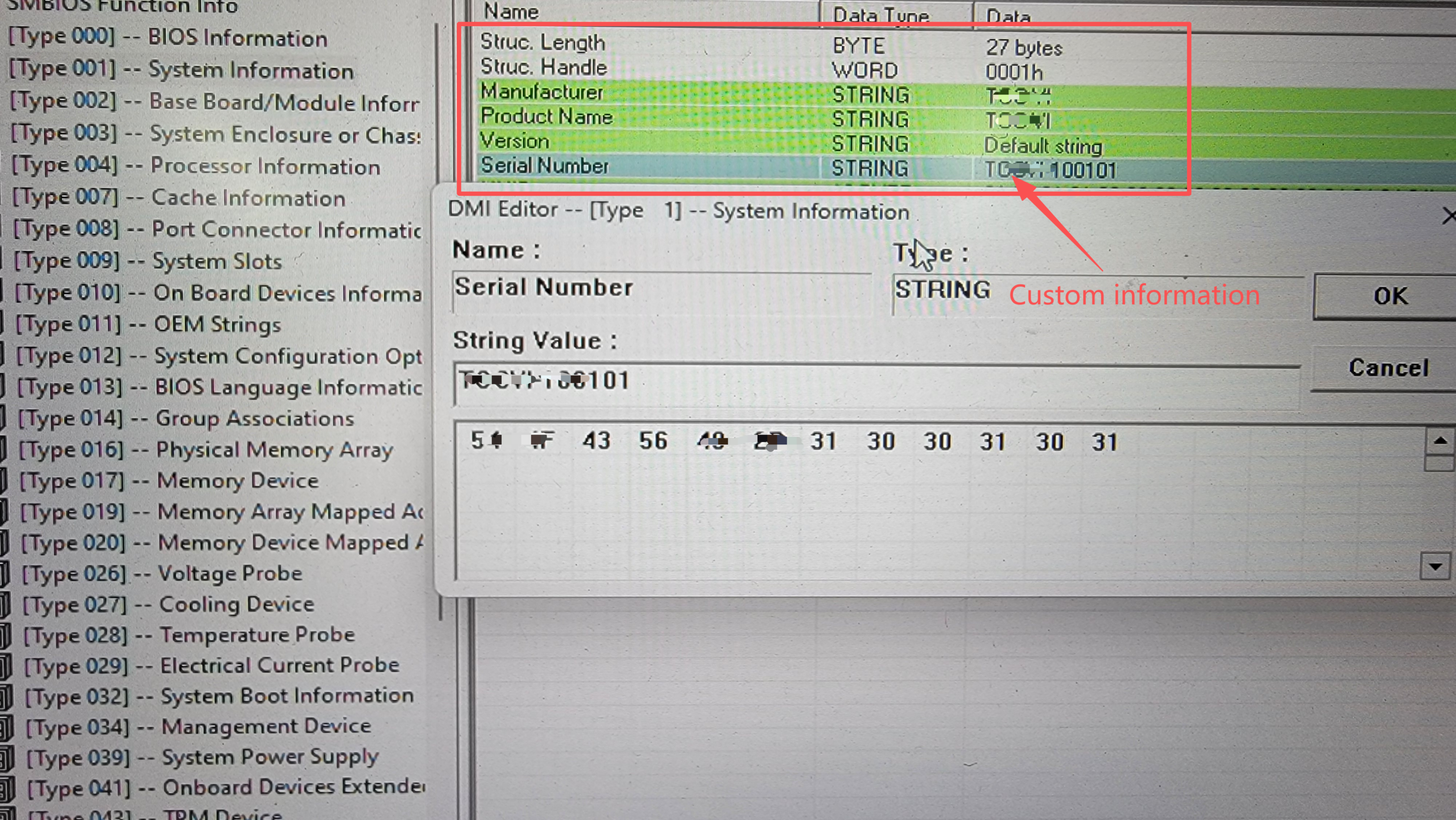
SMBIOS Type 1 fields written at production

SMBIOS Type 1 fields programmed per unit during production

Type 11 Is the One Most People Miss

OEM Strings are free-form entries readable from the OS without admin rights, on Windows via WMI (Win32_ComputerSystemProduct) or on Linux via dmidecode -t 11.

Common uses in deployments we have built:

  • A hardware revision marker your software checks at startup, so one binary can behave correctly across two board revisions
  • A licence or entitlement token bound to the machine
  • A build or configuration code so support can identify the exact variant from a screenshot

It costs nothing extra to program and saves a surprising amount of support time later.

Firmware Branding Is One of Three Parts

Branding in SMBIOS makes the unit report as your product. On its own that is cosmetic. It becomes real white-label when combined with two other things:

SMBIOS Branding

Unit reports as your product in asset systems and System Properties

Versioned Driver Package

Archived and redeployable in year four, independent of our download page

Frozen BOM with PCN

The image validated on unit 1 still works on unit 200

Together these three mean the product is yours — in the asset system, in the rebuild process, and in the qualification record. Any one of them alone is branding. All three is a platform you own.

What to Specify at RFQ

Send the exact strings you want written, and the format for anything sequential:

  • Manufacturer, Product Name, Version — exact text, including capitalisation
  • Serial number format — prefix, length, numbering scheme, and whether you want ranges reserved
  • Asset Tag — fixed value or per-unit
  • OEM Strings — content and order
  • Whether your provisioning scripts read any of these, and how

We will confirm what is programmable on your chosen platform before the project starts. A small number of fields are locked by the silicon vendor’s reference firmware; we tell you which at the quote stage rather than after the first article.


Engineering Process: EVT / DVT / PVT

1

EVT

Engineering Validation Test

Initial prototypes for design verification. Focus on functionality, not cosmetics. May have known issues that will be addressed in DVT.

  • • Functional verification
  • • Initial thermal testing
  • • Interface validation
  • • Software bring-up
2

DVT

Design Validation Test

Pre-production samples with all design fixes implemented. Full environmental and compliance testing performed.

  • • EMC compliance testing
  • • Environmental qualification
  • • Reliability testing
  • • Certification submission
3

PVT

Production Validation Test

Final production-intent units. Process validation, yield verification, and production line qualification.

  • • Production process verification
  • • Yield and quality metrics
  • • Test fixture qualification
  • • Documentation finalization

Typical Timeline: Simple customizations (BIOS, branding) may skip EVT and proceed directly to DVT. Full ODM projects typically require 3-6 months from specification freeze to PVT completion, depending on complexity and certification requirements.


Risk Management and Design Trade-offs

Common Project Risks

Specification Creep

Requirements change after design starts, causing rework and delays. Mitigate with clear specification freeze and change control process.

Certification Surprises

EMC or safety failures discovered late in development. Mitigate with early pre-compliance testing and experienced design.

Component Obsolescence

Key components become unavailable during project lifetime. Mitigate with component lifecycle monitoring and alternate sourcing.

Design Trade-off Decisions

Platform vs Custom

Starting from a validated edge platform—such as the AE-3588BT—drastically reduces risk. Leveraging its pre-validated 32 TOPS neural processing power enables a faster time-to-market compared to engineering a custom ARM-based AI board from scratch.

Performance vs Thermal

Higher TDP processors require larger enclosures or active cooling. We assist in right-sizing the compute for the actual workload, ensuring strict adherence to fanless thermal constraints (-40°C to +85°C).

I/O Density vs Cost

More interfaces require larger PCB and enclosure. Include only interfaces that will actually be used in deployment.


Long-term Project Governance

Quality Assurance

  • 100% production testing
  • Statistical process control (SPC)
  • Traceability by serial number
  • Regular quality metric reporting

Ready to Start Your OEM/ODM Project?

Our engineering team can help define project scope, customization requirements, and timeline expectations for your industrial computing needs.

View Responsibility Matrix

OEM / ODM FAQ

Frequently asked questions

Firmware-level branding, serial number schemes, OEM strings, and what separates real white-label from a silkscreen.

Can you write our brand into the BIOS, not just onto the chassis?

Yes. SMBIOS fields are programmed per unit during production to your specified format:

  • Type 1 System Information — Manufacturer, Product Name, Version, Serial Number, UUID, SKU Number, Family
  • Type 2 Base Board — Manufacturer, Product Name, Version, Serial Number
  • Type 3 System Enclosure — including Asset Tag
  • Type 11 OEM Strings — free-form entries for your provisioning scripts

This matters because enterprise deployment tooling such as SCCM, Intune and Ansible identifies machines by their SMBIOS strings rather than by a label. If those fields carry the manufacturer’s name rather than yours, your asset system does not recognise the unit as your product, and deployment scripts that branch on vendor name take the wrong path.

A small number of fields are locked by the silicon vendor’s reference firmware. We confirm which are programmable on your chosen platform at the quote stage — not after the first article.

Can serial numbers follow our own numbering scheme?

Yes. If your asset system expects a specific prefix, length or check digit, we program the SMBIOS Serial Number field to that format and reserve the ranges against your project rather than using our internal numbering.

Serial numbers are written per unit at production programming and logged against the unit’s test record, so a field return can be traced back to its exact shipped configuration and component lots.

What are SMBIOS Type 11 OEM Strings used for?

Type 11 OEM Strings are free-form entries readable from the operating system without administrator rights — through WMI on Windows via Win32_ComputerSystemProduct, or through dmidecode -t 11 on Linux.

Common deployment uses:

  • A hardware revision marker that application software checks at startup, so one binary behaves correctly across two board revisions
  • A licence or entitlement token bound to the machine
  • A build or configuration code that lets support identify the exact variant from a screenshot

Programming them costs nothing extra and typically saves significant support time later.

What does complete white-label mean beyond branding?

Three things together.

  • SMBIOS branding — the unit reports as your product in every asset system and deployment script that reads firmware.
  • A complete versioned driver package — archived and redeployable in year four, so rebuilding a unit does not depend on the manufacturer’s download page still existing.
  • A frozen BOM with formal PCN — the image validated on unit 1 still works on unit 200, and you are told before anything changes rather than after.

Any one of the three alone is branding. All three together is a platform you own.

Scroll to Top
POPUP Form

Contact Us