
Solutions / AMR & AGV Industrial Computer Controllers
AMR & AGV Industrial Computer Controllers
ROS 2-ready computing architectures for autonomous mobile robots, automated guided vehicles, and industrial robot fleets.
An AMR computer is the onboard computing platform that processes robot sensor data, runs localization and navigation software, coordinates with motion-control hardware, and exchanges information with a fleet system. An AGV computer performs similar supervisory functions in automated guided vehicles, which may follow predefined tracks or constrained routes. The real selection criteria are not just processor speed or TOPS: they include sensor bandwidth, Linux and driver compatibility, CAN bus integration, DC power behavior, thermal performance, and lifecycle control.
For perception-intensive robots, the computer may also need a discrete GPU: the AE-760EBT is an actively air-cooled x86 + RTX MXM platform, while the AE-960EBT is a liquid-cooled engineering platform that relocates heat rejection to a remote radiator. Neither is a default requirement for basic navigation; both should be justified by measured camera, AI, power and thermal demands.
ROS 2 / Nav2 / SLAM — qualified against the exact Linux image, driver stack and navigation configuration
CAN / CAN FD / EtherCAT — motor and battery network integration with documented driver and master-stack evidence
ARM to RTX MXM — AE-3588BT, AE-NJ60BT, AX-238BT through AE-760EBT and AE-960EBT
Planning an AMR or AGV deployment? Send your robot architecture and I/O requirements for a configuration review.
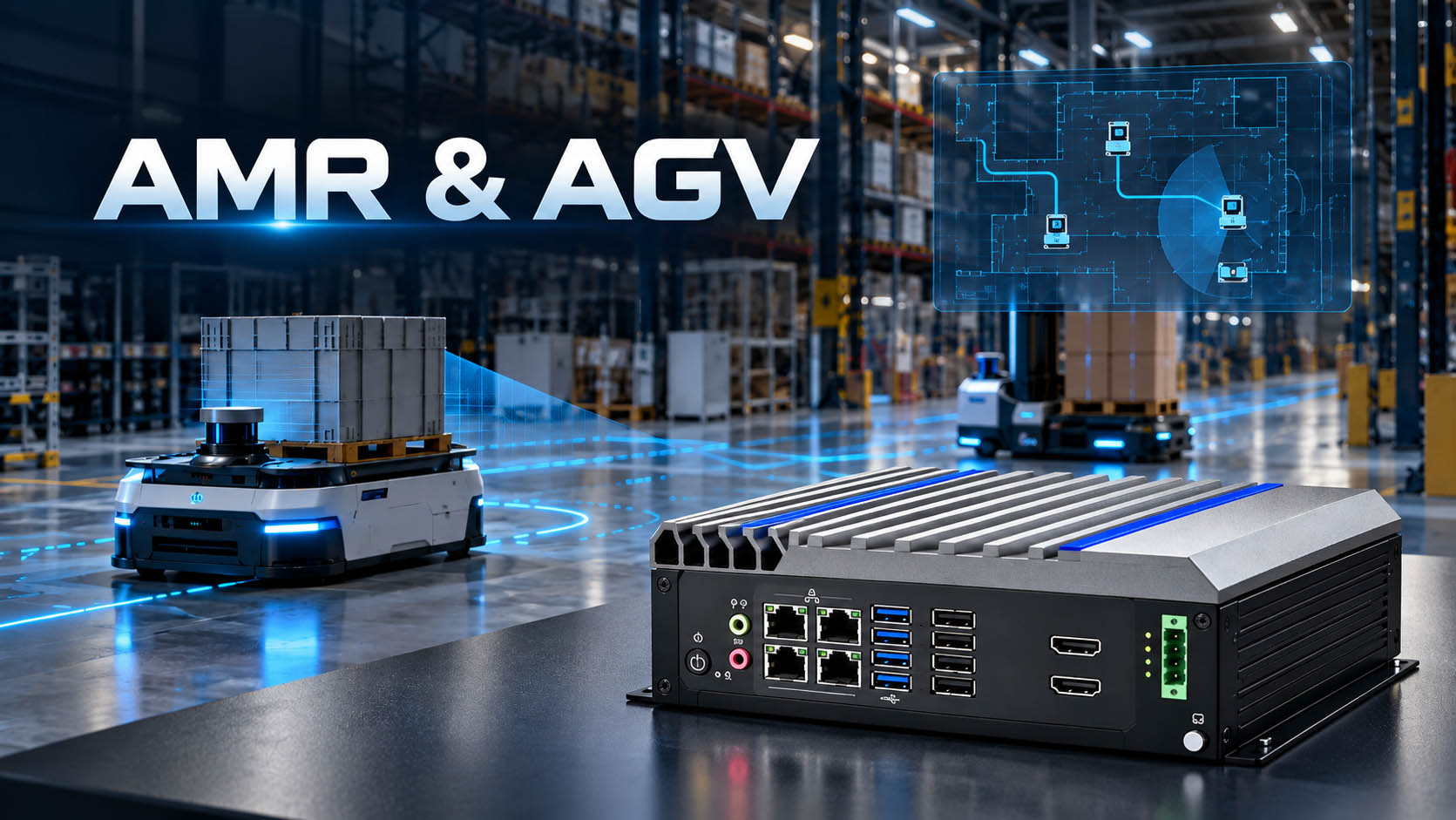
Industrial Computer for AMR & AGV Control
Unlike a desktop mini PC, an industrial computer for AMR and AGV deployment must be engineered around moving equipment: battery-power variation, EMI from motors, cable retention, vibration, enclosure temperatures, and long-term maintenance. The computer often hosts ROS 2 middleware, Nav2, SLAM, a mission application, and diagnostic services. It does not automatically replace the dedicated motor drives, safety controller, or safety-rated sensing chain.
| Robot requirement | Computing question to resolve | Design direction |
|---|---|---|
| 2D LiDAR + wheel encoders + IMU | Can the CPU sustain localization, Nav2, logs and diagnostics together? | ARM RK3588-class or compact x86, validated with the complete stack |
| Stereo/3D LiDAR and multiple cameras | What are the actual camera links, frame rates, AI models and memory needs? | Jetson Orin-class edge AI platform or a suitable x86 GPU system |
| CAN/CAN FD motor and battery networks | Which CAN controller, transceiver, driver, isolation and protocol are required? | Confirm SocketCAN, CANopen or vendor-specific driver compatibility per SKU |
| EtherCAT drives or distributed I/O | Who acts as EtherCAT master, and what are the cycle time and jitter targets? | Validate NIC, Linux RT setup, master stack, licensing and drive profile; an Ethernet port alone is not proof |
| 24V robot battery | What happens during startup, braking, brownout and shutdown? | Wide-range DC input plus system-level transient, hold-up and shutdown strategy |
| 10–100+ robots | How will firmware, configuration, diagnostics and change control be managed? | Fixed BOM options, fleet software integration, versioned images and staged rollout |
Industrial Computer for AMR & AGV Control
Unlike a desktop mini PC, an industrial computer for AMR and AGV deployment must be engineered around moving equipment: battery-power variation, EMI from motors, cable retention, vibration, enclosure temperatures, and long-term maintenance. The computer often hosts ROS 2 middleware, Nav2, SLAM, a mission application, and diagnostic services. It does not automatically replace the dedicated motor drives, safety controller, or safety-rated sensing chain.
| Robot requirement | Computing question to resolve | Design direction |
|---|---|---|
| 2D LiDAR + wheel encoders + IMU | Can the CPU sustain localization, Nav2, logs and diagnostics together? | ARM RK3588-class or compact x86, validated with the complete stack |
| Stereo/3D LiDAR and multiple cameras | What are the actual camera links, frame rates, AI models and memory needs? | Jetson Orin-class edge AI platform or a suitable x86 GPU system |
| CAN/CAN FD motor and battery networks | Which CAN controller, transceiver, driver, isolation and protocol are required? | Confirm SocketCAN, CANopen or vendor-specific driver compatibility per SKU |
| EtherCAT drives or distributed I/O | Who acts as EtherCAT master, and what are the cycle time and jitter targets? | Validate NIC, Linux RT setup, master stack, licensing and drive profile; an Ethernet port alone is not proof |
| 24V robot battery | What happens during startup, braking, brownout and shutdown? | Wide-range DC input plus system-level transient, hold-up and shutdown strategy |
| 10–100+ robots | How will firmware, configuration, diagnostics and change control be managed? | Fixed BOM options, fleet software integration, versioned images and staged rollout |
Domain Controller Architecture: Keep Compute, Motion and Safety Roles Clear
The original Domain Controller Architecture concept remains useful: one primary computer can host perception, localization, planning, robot applications, logging and fleet communication. But consolidating these workloads does not make a standard Linux PC a functional-safety controller.
Recommended architecture
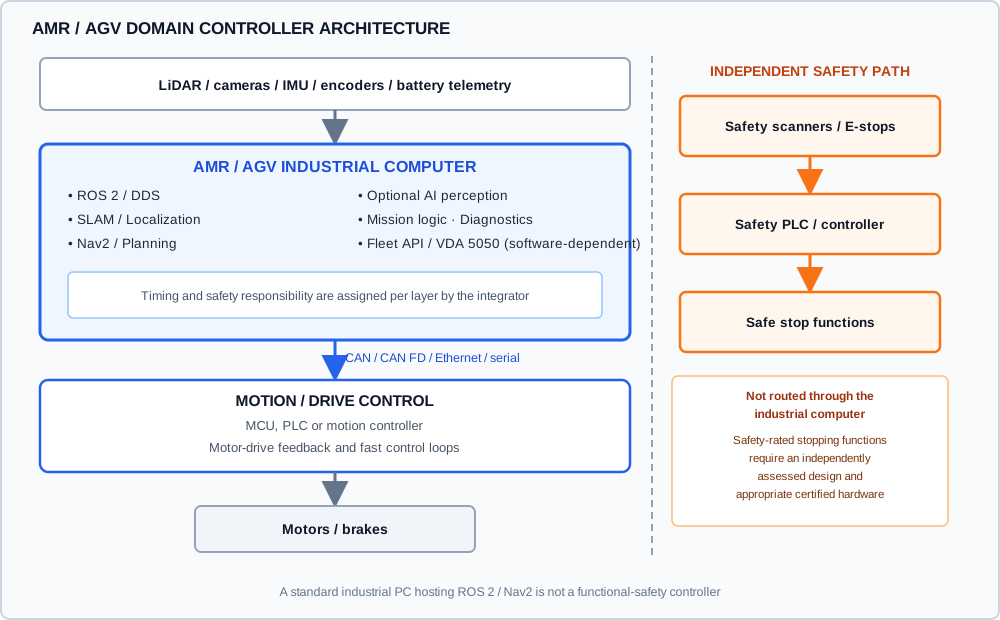
The robot integrator assigns timing and safety responsibility to each layer. ROS 2 navigation can calculate and publish velocity requests; the selected MCU, PLC, servo controller or drive closes time-critical control loops according to the verified system design. Safety-related stopping and protective functions require an independently assessed design and appropriate hardware. For industrial driverless trucks, review ISO 3691-4:2023 and its revision status as part of the full machine risk assessment; buying an industrial PC does not confer certification on the robot.
ROS2, CAN Bus, EtherCAT & Robot I/O
ROS 2, Nav2 and SLAM: validate the entire software stack
A production ROS 2 computer should be qualified with the customer’s exact Linux image, kernel, middleware implementation, sensor drivers and navigation configuration. ROS 2 Jazzy is an LTS option on Ubuntu 24.04 with support planned to May 2029; ROS 2 Lyrical is the newer 2026 LTS. Existing deployments may still use Humble. Choose the release by its OS, vendor BSP and dependency compatibility rather than assuming every board supports every distribution natively.
A practical qualification environment includes Nav2 navigation, SLAM Toolbox or another mapping pipeline, robot_localization/odometry fusion, ros2_control if used, sensor drivers, and recording/diagnostics. Measure CPU, memory, storage writes, missed deadlines and recovery behavior while the complete application runs—not just an idle ROS installation.
Nav2’s Route Server supports navigation over defined route graphs, which is relevant to warehouses with lanes, zone rules and repeatable transport paths. The docking framework also supports charging and non-charging destinations such as conveyors and pallets. These are software capabilities; integration still depends on suitable sensors, control hardware and validation.
CAN, CAN FD, SocketCAN and CANopen
A robot may use CAN for motor drives, battery management, lift actuators or auxiliary devices. Requirements must identify classic CAN vs CAN FD, channel count, bitrate, isolation, physical connector, termination, Linux controller driver, and higher-layer protocol. Having two CAN connectors is not proof of SocketCAN compatibility or ready-to-use CANopen software. Request the exact Linux device enumeration, driver version and a loopback/field-device test where these functions are mandatory.
Where motor drives and a computing chassis can have different electrical reference potentials, consider galvanic isolation and grounding design. Read BITECH’s Isolated vs Non-Isolated Industrial I/O guidance and confirm the final port-level specifications.
EtherCAT is a system-integration requirement, not a checkbox
EtherCAT can be a good fit for synchronized drive networks and distributed industrial I/O, but a standard RJ45 Ethernet port does not, by itself, establish EtherCAT master support or deterministic performance. The design must specify a suitable network controller, software master, real-time OS/kernel configuration if needed, drive profiles, measured cycle-time jitter and fault behavior. Use a dedicated motion controller or PLC where the timing and safety design requires it.
Robot I/O and sensors
Check LiDAR Ethernet/USB bandwidth, camera interfaces (GigE, USB3, MIPI or GMSL2), IMU time stamps, encoders, digital I/O voltage levels, serial ports, emergency-stop separation, GNSS if outdoors, and expansion options. Request drawings and electrical interface documentation before harness design.
Engineering Problems That Often Appear Only on Real Robots
Recent discussions in the ROS community repeatedly describe robots that map correctly in simulation but drift, diverge from Nav2 paths or fail to move in hardware. Those threads are useful problem signals, not benchmarks proving one computer is universally better than another.
Localization drift and TF-frame mistakes
Validate the map → odom → base_link → sensor transform chain, sensor time synchronization, wheel odometry calibration, IMU fusion and AMCL/SLAM configuration. Compare commanded displacement with measured encoder motion and an external ground-truth check. Increasing CPU performance will not fix wrong transforms or uncalibrated odometry.
Nav2 plans a path, but the chassis does not follow it
Trace the full chain: Nav2 controller output (/cmd_vel) → ros2_control or gateway → CAN/EtherCAT → drive controller → wheels → feedback. Check velocity limits, kinematics, wheel signs, drive-enable states, controller frequency, watchdogs and stale-data behavior. Review local costmaps and collision constraints after basic teleoperation and odometry are confirmed.
Communication load interrupts navigation
Test the selected DDS/RMW configuration with the full sensor and fleet traffic. Track discovery events, QoS choices, packet loss, Wi-Fi handoff and ROS graph scaling. A 2D LiDAR + IMU pilot and a 50-robot deployment have very different networking and observability demands.
Compute performance drops after an hour, not a minute
Measure sustained CPU/GPU/NPU usage, heat-sink temperature, chassis ambient, throttling and battery draw under concurrent localization, inference, logging and charging conditions. A peak TOPS claim is not a sustained robot workload test.
Engineering takeaway: choose the computer using an end-to-end workload and I/O test, not an isolated CPU benchmark.
AMR Computing Trends in 2026: Routing, Docking and Mixed Fleets
Three developments matter for a new robot controller design:
Route-aware navigation
Nav2 Route Server allows predetermined graphs and policy-controlled paths alongside local obstacle avoidance. This can simplify behavior in known warehouse lanes, but still requires operational validation.
More sophisticated docking
ROS 2/Nav2 docking workflows cover charging stations and non-charging interfaces. Reliable docking requires sensor, calibration, contact and recovery validation—not just a plugin installation.
Mixed-fleet communication
VDA 5050 Version 3.0, released in 2026, introduces mechanisms for more freely navigating mobile robots, including zones and path sharing. It is a fleet-to-robot communication specification, not a motor-control fieldbus. Integration requires compatible application software and fleet-system implementation.
For security and maintainability, add authenticated updates, staged deployment, rollback testing, long-term OS patching, telemetry and fixed hardware/driver release baselines to the qualification plan.
Which BITECH AMR / AGV Computer Should You Evaluate?
The following are candidate compute platforms, not claims that an entire ROS 2 robot stack is pre-certified. Final selection depends on required operating system, BSP, camera adapter, I/O wiring, power and application test results.
| Platform | Best starting use case | Key advertised interfaces / capabilities | Engineering validation before selection |
|---|---|---|---|
| AE-3588BT (RK3588J) | Cost-conscious Linux robot gateway, SLAM with moderate vision, harsh EMI fieldbus | RK3588J, onboard 6 TOPS NPU, 3× GbE, 2× isolated classic CAN, wide DC input | Exact Ubuntu/Debian BSP, ROS 2 build, sensor driver, NPU model compatibility, fieldbus interfaces |
| AE-NJ60BT (Jetson Orin NX) | Vision-heavy AMR, multiple cameras, CUDA/TensorRT perception | Jetson Orin NX, GMSL2 camera option, 4× GbE, 2× CAN FD, wide DC input | JetPack and chosen ROS 2 release, camera carrier BOM, sustained GPU/NPU performance, CAN drivers |
| AX-238BT (Intel x86) | x86 ROS 2 applications, multi-CAN integration and legacy industrial peripherals | Intel Core platform, 2× CAN, 2× 2.5GbE, wide DC input, fanless enclosure | Linux and SocketCAN driver evidence, isolation option, drive master stack, thermal envelope |
| AE-760EBT (Core i9 + RTX MXM) | High-throughput AMR perception, multi-camera AI, 3D obstacle detection and local model inference where clean chassis airflow is available | Core i9-13900, RTX MXM option, 4× 2.5GbE, 2× CAN FD, isolated DI/DO; dual 80 mm fans; MXM GPU capped at 115 W TGP | Sustained ROS 2 + AI workload, GPU/driver and memory support, camera ingest, 24V rail transients, fan dust exposure and enclosure temperature |
| AE-960EBT (liquid-cooled RTX MXM; DVT) | High-GPU mobile robots with enclosed or airflow-constrained compute bays, where the radiator can reject heat in a separate location | Intel Core i7 platform + RTX MXM; CPU/GPU liquid cold plates, fanless compute zone and external fan-cooled radiator; exact I/O and power pending final validation | Pump and coolant-loop reliability, radiator inlet ambient, heat soak, vibration/leak checks, CPU/GPU TGP, actual ROS 2 drivers and power budget; engineering validation in progress |
For platform comparisons, see Jetson vs RK3588 and MXM GPU compatibility and thermal validation.
How to choose: if the requirement is primarily navigation and moderate sensor fusion, begin by measuring the workload on an ARM or compact x86 platform. Choose Jetson when the actual camera topology and accelerated models justify its software ecosystem and power budget. Select compact x86 for required software compatibility and peripheral drivers; move to AE-760EBT or AE-960EBT only when sustained RTX MXM-class workloads justify the extra energy, space and thermal engineering. Do not choose by headline TOPS alone.
High-Performance AMR Perception: AE-760EBT vs AE-960EBT
For autonomous delivery robots, inspection AMRs and perception-intensive mobile machinery, the bottleneck may be simultaneous camera acquisition, image decoding, 3D perception and AI inference—not SLAM alone. An x86 computer with an RTX MXM GPU can run demanding onboard inference alongside navigation and fleet communications, provided CPU/GPU utilization, PCIe/camera bandwidth and system power are validated as a complete workload. The computer remains a high-level perception and navigation computer, not a safety PLC or a substitute for a qualified motor drive.
AE-760EBT — active-cooled x86 + RTX MXM
With a Core i9-13900, four 2.5GbE ports, dual CAN FD and optional RTX MXM GPU, this is the starting point for high-throughput robot vision where the chassis has adequate clean airflow. Dual 80 mm PWM fans remove heat directly at the computer enclosure. The current mainboard limits sustained MXM GPU TGP to 115 W: a higher-tier GPU may add VRAM or inference features without unlocking its nominal desktop power. Confirm Linux/NVIDIA driver stack, ROS 2 integration, CAN driver and fan-maintenance plan.
Explore AE-760EBT specificationsAE-960EBT — liquid-cooled x86 + RTX MXM, engineering validation in progress
This platform is aimed at mobile robots with a protected or restricted-airflow electronics compartment. CPU and MXM GPU cold plates transfer heat through a coolant loop to a remote radiator with external fans. Thus the compute zone is fanless, but the complete cooling system is not. Radiator mounting, cooling-air temperature, pump serviceability, tubing vibration/leak containment, GPU power, I/O and input-power topology are project-specific engineering decisions. Published product information identifies a Core i7-class architecture; final operating limits and configuration require DVT confirmation.
Review AE-960EBT architectureOutdoor and hot-climate AMRs: do not infer full-load 55°C ambient suitability merely from a liquid-cooling label. The current AE-960EBT product page lists a 0–50°C operating range while final thermal validation remains pending. At 55°C outdoor ambient, or inside a compartment warmer than outdoor air, review the actual radiator inlet temperature, CPU/GPU sustained load, coolant temperature, available fan airflow, dust exposure, pump life and peak battery demand. A remote radiator still needs a cooler heat-rejection environment; liquid cooling moves heat, it does not eliminate it.
OEM selection principle: choose AE-760EBT where airflow and fan maintenance are manageable. Consider AE-960EBT when separating hot airflow from the electronics is an actual packaging requirement—and only after the loop, remote heat exchanger and entire vehicle power/thermal design are qualified.
Industrial Reliability: Battery, Thermal, EMI and Lifecycle
12V/24V battery integration
Verify the actual minimum/maximum battery-rail voltage, startup inrush, braking/regeneration effects, brownout, transient protection, ignition/wake behavior where applicable, and graceful shutdown. An advertised 9–36V input range is useful but does not automatically prove that the entire vehicle power requirement is satisfied. See Powering an Industrial PC in a Vehicle.
Thermal and environmental validation
A fanless enclosure still needs a heat path to its surroundings. Validate at the highest expected ambient and installation orientation, including sealed chassis compartments and charging cycles. Test cable strain relief, connectors, motor EMI, shock/vibration and sustained logging/storage writes using project-defined acceptance criteria. For AE-760EBT, qualify sustained GPU performance and fan/filter exposure to dust. For AE-960EBT, qualify the complete liquid loop—including pump, fittings, coolant, radiator fans and heat rejection at the radiator inlet—and establish coolant service and fault-recovery procedures.
Production continuity and field service
BITECH can review fixed-BOM requirements, change notifications, stable software images, hardware watchdog needs, custom I/O and extended lifecycle options. Confirm a written, model-specific lifecycle/PCN commitment as part of the OEM specification; do not assume every configuration has the same availability window.
Robot Applications
Warehouse AMR and AGV
LiDAR localization, defined travel lanes, pallet stations, fleet traffic rules and charging/docking workflows.
Autonomous delivery and service robots
Camera perception, person-aware navigation, offline task handling and high-reliability connectivity.
Inspection and security robots
Sustained onboard vision, telemetry, remote diagnostics and environmental robustness.
Cleaning robots and mobile service equipment
Repeatable navigation, battery/power strategy, water- and dust-resistant system packaging, and maintenance access.
Talk to an engineer
Building an AMR, AGV or delivery robot?
Send us the sensor stack, navigation software and battery budget. A hardware engineer will size the compute to the real workload — often a Jetson or RK3588 node rather than an RTX system — and tell you which interfaces, power input and thermal design the robot actually needs.
Send us these and we can quote samples
- SensorsCamera count, resolution, FPS and interface (GMSL2 / USB / GigE); LiDAR or mmWave radar model
- SoftwareROS 2 distro, Nav2 / SLAM stack, perception models and target latency
- Motion & I/OCAN / CAN FD / EtherCAT to drives, BMS link, DIO for e-stop, lights and docking
- PowerBattery voltage (24 / 48V), compute power budget and required runtime per shift
- EnvironmentIndoor warehouse or outdoor; ambient range, dust, rain, vibration and mounting space
- FleetPilot and annual volume, fleet interface (VDA 5050), image preload and branding
Direct to hardware engineers — no sales gatekeeping. Evaluation samples, ROS 2 bring-up support and custom mainboards in 1–3 months for OEM / ODM programs.
Keep motion and safety separate. The robot computer handles perception, localization and planning; drive loops and safety functions stay on separately assessed hardware (ISO 3691-4). See the control vs compute split →
AMR / AGV engineering FAQ
Choosing a robot computer — frequently asked questions
The questions robot OEMs and integrators ask most often when sizing compute, I/O, power and cooling for AMR, AGV and delivery robots.
01Which BITECH computer should I use for an AMR with four cameras and a LiDAR?
For most camera-plus-LiDAR robots, start with the AE-NJ60BT (Jetson Orin NX). It provides GMSL2 camera ingress, 4× GbE for LiDAR and network, 2× CAN FD and the CUDA / TensorRT stack at a power draw a robot battery can sustain. Lighter AGV nodes with one or two cameras often fit the RK3588-based AE-3588BT. An RTX MXM platform is only worth its power and thermal cost when the perception models genuinely need it.
02Should the robot computer also run motion control and safety functions?
No. The robot computer should own perception, localization, planning and fleet communication. Drive control loops belong on the motor drives or a motion controller, and safety functions such as protective stops and speed limiting belong on separately assessed safety hardware, as ISO 3691-4:2023 expects for driverless industrial trucks. Keeping the roles separate means a software update or a perception fault cannot compromise the safety chain. See the control vs compute layer split.
03Jetson Orin or RK3588 — which is better for an AMR?
Choose by camera interface, software toolchain and power budget rather than peak TOPS. Jetson Orin (AE-NJ60BT) is the stronger fit for multi-camera perception, GMSL2 cameras and teams already using CUDA, TensorRT or Isaac ROS. RK3588 (AE-3588BT) suits lower-power nodes, lighter vision models and wiring that needs 4000V isolated CAN and serial. Compare the two side by side.
04When does an AMR need an RTX MXM GPU, and should it be air- or liquid-cooled?
An RTX MXM platform makes sense for heavy perception: many high-resolution cameras, large segmentation or BEV models, or on-device language and vision-language models. The AE-760EBT is the simpler choice when the robot body has clean airflow; it caps the MXM GPU at 115 W TGP so clocks stay repeatable under sustained load. The AE-960EBT keeps the compute zone fanless and moves heat through liquid cold plates to a remote radiator, for dusty or airflow-constrained designs; it is currently in DVT. Both draw far more battery power than a Jetson or RK3588 node, so size the workload first.
05Do the platforms support ROS 2, Nav2 and SLAM?
Yes. The x86 platforms run Ubuntu 24.04 with ROS 2 Jazzy, the current LTS release supported to May 2029, together with Nav2 and common SLAM packages. On Jetson, the Ubuntu and ROS 2 versions follow the installed JetPack release, so confirm the distribution your stack depends on at RFQ. BITECH validates drivers for cameras, CAN and network interfaces on the shipped image; your navigation and perception stack still needs validation on the real robot.
06How do CAN, CAN FD and EtherCAT connect to the drives?
CAN and CAN FD ports appear as standard SocketCAN interfaces under Linux, so ROS 2 drivers and CANopen stacks work without vendor-specific APIs. Isolated CAN is standard on the AE-3588BT and available as an option on other platforms when the drive or BMS wiring does not share a ground. EtherCAT runs as a software master on a dedicated Ethernet port; the achievable cycle time depends on the CPU, kernel configuration and load, so it is validated per configuration rather than promised as a platform figure. Commissioning tip: the CAN 60Ω check.
07Can the computer run directly from the robot's 24V or 48V battery?
The standard platforms accept 9–36V DC, which covers 12V and 24V battery systems with margin for sag. A 48V battery (typically 40–54.6V for a 13S lithium pack) is above that range, so it needs either a 48V-input ODM variant or a regulated DC-DC stage in front of the computer. In both cases the input should be validated against the robot's real bus behaviour, including motor regeneration spikes, low-battery sag and controlled shutdown. How DC bus behaviour affects an industrial PC.
08How do you prevent thermal throttling inside a robot body?
Throttling usually appears only after the robot has run for a while in a closed body, so it is tested under sustained load rather than in a short benchmark. BITECH matches the cooling architecture to the power class: fanless conduction for RK3588 and most Jetson nodes, active air cooling for the AE-760EBT and liquid cold plates for the AE-960EBT. Each configuration is validated by logging temperatures, clocks and inference throughput through thermal equilibrium at the specified ambient. Share the robot's enclosure volume, airflow and ambient range so the review reflects the real installation.
09Does BITECH hardware work with VDA 5050 fleet management?
VDA 5050 is implemented by the fleet manager and the robot's software client, not by the computer hardware. The BITECH platform hosts that client and provides the connectivity it relies on: Ethernet, Wi-Fi and 4G/5G through M.2 slots. If your fleet software is moving to VDA 5050 version 3.0, confirm with your software vendor which client and network requirements apply.
10Can BITECH customize the computer for our robot, and how long is the lifecycle?
Yes. As an OEM/ODM manufacturer, BITECH adapts I/O, connectors, power input, enclosure and system image to the robot, with custom mainboards typically in 1–3 months. Production units run on a controlled BOM with formal PCN notice and a 10-year platform lifecycle; GPU and compute modules follow their silicon vendor's roadmap, and successors are qualified into the same mechanical design where possible. Send your robot requirements.
Compare & go deeper
Size the robot computer to the sensor stack
Camera count, LiDAR, navigation stack and battery budget decide the platform — not peak TOPS. These BITECH platforms cover the range from an efficient NPU node to RTX-class perception, and the guides explain how to keep compute, motion and safety on the right hardware.