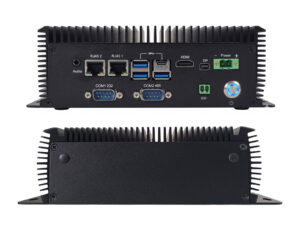
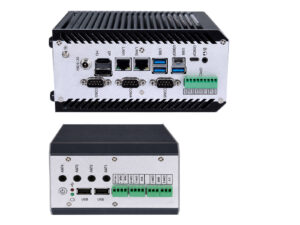
AX-234BT vs AX-238BT: which fanless platform fits your deployment?
In short: These are two branches of the same fanless x86 platform, not upgrade steps. The AX-238BT drives four independent displays and carries two CAN channels, six serial ports and dual USB4 at 40 Gbps. The AX-234BT carries fewer ports but adds Intel AMT out-of-band management, a discrete TPM 2.0, a third storage path, and a newer 13th Gen CPU. Same 210 × 150 × 70 mm chassis, same 9–36V input, same fanless thermal envelope, same 7+ year lifecycle.
Choose the AX-238BT when port count or display count is the binding constraint. Choose the AX-234BT when you need remote management on unattended units, or when the third storage path matters more than the fourth display.
The 30-second verdict
If your project…
Choose
Drives 3 or 4 separate screens
AX-238BT
Talks to two independent CAN networks
AX-238BT
Connects 5+ serial devices on the rear panel
AX-238BT
Needs USB4 / 40 Gbps for capture or docking
AX-238BT
Runs unattended and needs remote KVM / BIOS access
AX-234BT
Requires a hardware TPM fitted as standard
AX-234BT
Needs three independent storage devices
AX-234BT
Runs a single-screen inference workload
AX-234BT
What actually differs
Everything below is where the two platforms diverge. Everything not in this table is identical between them.
Specification
AX-234BT
AX-238BT
Pictures
CPU (shipping)
Intel Core i5-1345U (13th Gen, up to 4.7 GHz)
Intel Core i5-1235U (12th Gen, up to 4.4 GHz)
CPU options
13th Gen U series
12th / 13th Gen U and P series
Memory ceiling
64 GB DDR5-5200
64 GB (12th Gen) / 96 GB (13th Gen)
Independent displays
2 + Type-C DP-Alt
4
Display outputs
HDMI 2.1, Mini DP 1.4b, USB-C (DP-Alt), LVDS/eDP optional
9–36 V, Phoenix terminal + DC jack + 2-pin remote power on/off
Operating temperature
−20 °C to +60 °C standard; −40 °C to +80 °C extended configuration
Storage temperature
−40 °C to +85 °C
Shock / vibration
15 G 11 ms; 5–500 Hz, 1 Grms
Wireless expansion
M.2 B-Key (4G/5G) + M.2 E-Key (Wi-Fi/BT)
Mounting
Wall / side / DIN-rail / VESA
GPIO
8-bit, expandable
Platform lifecycle
7+ years, Fixed BOM Control, 6-month PCN
QC
18 h bare-board burn-in + full interface test + 18 h assembled burn-in, per unit
OEM terms
MOQ 100, NRE refundable at 2,000 units, ~35-day lead time
If you have already designed an enclosure, cable harness or mounting bracket around one of these, it fits the other.
Four displays: the headline difference
Most industrial box PCs give you two display outputs and call it multi-display. That is fine until a deployment actually needs four independent screens — and then you are choosing between a second PC, a video splitter that breaks independence, or a USB display adapter that adds latency and a failure point.
The AX-238BT drives four genuinely independent outputs from the same Iris Xe 80 EU engine:
•LVDS 24-bit (LVDS/eDP selectable) — for an integrated panel
•2× USB4 Type-C with DP-Alt Mode — additional screens, or a single-cable dock
Each carries its own framebuffer. No mirroring, no splitting, no software compositing overhead.
Two things to know before you count on all four
LVDS/eDP is a build-time selection. If you do not order the LVDS variant, that output is not there.
The second USB4 port is dual-purpose. If you need it for a 40 Gbps capture device instead of a screen, you are back to three displays.
The AX-234BT drives two displays (HDMI 2.1 + Mini DP 1.4b) plus a Type-C with DP-Alt, with LVDS/eDP as an option. For a single operator screen, or a screen plus a diagnostic monitor, that is enough.
CAN: one channel or two?
The AX-234BT has one CAN 2.0A/B channel. The AX-238BT has two. One channel is enough when the device is a node on a single bus — an AGV reading motor feedback, a gateway polling a BMS, a controller on a machine’s fieldbus.
Two channels matter when you need network separation:
•Vehicle deployments — powertrain bus on one channel, body/telemetry on the other. Mixing them means diagnostic traffic adds jitter to the control path.
•AMR platforms — motion control on one, safety and battery management on the other.
•Gateway roles — bridging two networks that must not share arbitration.
On both platforms, galvanically isolated CAN rated to 4000 V withstand is available as an ODM configuration rather than a standard fit. If your CAN crosses ground references — vehicle chassis segments, motor drives, long cable runs — specify it at RFQ.
Serial ports: six on the panel, or six behind a bracket
This one is more subtle than the spec sheet suggests.
•AX-238BT — six COM ports on the rear panel. COM1/2 are BIOS-selectable between RS-232 and RS-485; COM3–6 are RS-232.
•AX-234BT — two COM ports on the panel (RS-232/422/485), expandable to six via an internal header.
Both can reach six. The difference is what it costs you: on the AX-234BT, ports 3–6 come out of an internal header, which means a ribbon cable and a bracket, or a custom I/O panel as part of an ODM configuration. That is fine if you are already doing a custom enclosure. It is friction if you are deploying a catalogue unit into a rack.
If you need more than two serial devices and you are not doing mechanical customisation, the AX-238BT saves you a step.
USB4 vs USB 3.2: when 40 Gbps actually matters
The AX-238BT carries two USB4 Type-C ports at 40 Gbps. The AX-234BT carries USB 3.2 Gen1 (5 Gbps) Type-A plus one Type-C. USB4 earns its place for two reasons, and bandwidth is only the first.
Bandwidth — 40 Gbps handles high-bitrate camera capture or external NVMe storage that would saturate USB 3.2. If you are pulling uncompressed frames off a capture device, this is the difference between working and dropping frames.
Cable count — USB4 Type-C carries display, data and power on one connector. A docking station or camera module that would otherwise need three separate cables runs on one. In a vehicle cabin or a crowded control cabinet, that often matters more than the raw number.
If your peripherals are barcode scanners, keyboards and USB storage, USB 3.2 Gen1 is not a limitation and USB4 is not a reason to choose.
Where the AX-234BT wins: remote management
This is the difference most spec comparisons miss, and for unattended deployments it is the one that matters most. The AX-234BT’s second Ethernet port uses the Intel i226-LM, which supports Intel AMT — out-of-band management that works independently of the operating system:
•Remote KVM (see and control the screen and keyboard even at BIOS level)
•Remote power cycling
•BIOS configuration changes
•OS recovery when the host is unresponsive
The AX-238BT uses two i226-V controllers. The V variant does not carry AMT. Combined with the AX-234BT’s discrete TPM 2.0 fitted as standard (on the AX-238BT, TPM is an external module and optional), this makes a concrete difference for:
•Roadside cabinets and outdoor enclosures where a site visit costs hundreds of euros
•Machines deployed at customer sites across multiple countries
•Any 24/7 unattended installation where “reboot it” currently means sending someone
If your deployment is a screen an operator stands in front of, AMT is irrelevant. If it is a box in a locked cabinet 400 km away, it changes your service economics.
Memory and storage
Memory ceiling — both take two DDR5 SO-DIMMs. The AX-234BT tops out at 64 GB. The AX-238BT reaches 64 GB on 12th Gen and 96 GB on 13th Gen. 96 GB matters for in-memory workloads: large vision buffers, multi-stream video capture, or running OT and IT workloads in separate VMs on one box. For most edge inference, 32 GB is already generous.
Storage path
AX-234BT
AX-238BT
M.2 NVMe
PCIe Gen4 ×4
PCIe 5.0 ×4
2.5″ SATA
Yes
Yes
Half-slim SSD
Yes
—
Three independent devices on the AX-234BT lets you separate OS, application data and logging onto different drives — useful when a logging partition filling up should not take the system down, or when data retention policy requires a physically separate drive.
The AX-238BT’s PCIe 5.0 ×4 M.2 slot is faster on paper, though few industrial NVMe drives currently saturate Gen4, let alone Gen5.
The CPU generation question
On paper, the AX-234BT ships a newer CPU: 13th Gen i5-1345U (up to 4.7 GHz) against the AX-238BT’s 12th Gen i5-1235U (up to 4.4 GHz). Three things keep this from being a decisive gap:
Both are 10-core / 12-thread Raptor/Alder Lake-U parts with 12 MB L3 and the same Iris Xe 80 EU graphics. Real-world difference on inference and vision workloads is single-digit percent.
Both configure to the same 55 W turbo ceiling, and both are fanless in the same chassis — so sustained performance is governed by the thermal envelope, not the silicon.
The AX-238BT platform supports 12th and 13th Gen U and P series. A P-series configuration has more headroom than either U-series part.
If CPU throughput is genuinely your binding constraint, neither of these is the right platform — that conversation should start with a P-series configuration or a discrete-GPU platform.
Five questions that settle it
Work through these in order. The first “yes” usually decides.
1. Do you need more than two screens?
Yes → AX-238BT. This is the difference that cannot be worked around.
2. Do you need two independent CAN networks?
Yes → AX-238BT.
3. Will the unit run unattended somewhere expensive to visit?
Yes → AX-234BT, for Intel AMT out-of-band management. This cannot be added later.
4. Do you need more than two serial devices without a custom I/O panel?
Yes → AX-238BT. The AX-234BT reaches six COM ports via an internal header, which means a ribbon cable and a bracket.
5. Do you need three physically separate storage devices?
Yes → AX-234BT, which adds a half-slim SSD path alongside M.2 NVMe and 2.5″ SATA.
Still deciding?
Send us the constraint that is binding — screen count, bus topology, serial device list, whether the unit will be reachable for service. We will confirm which platform fits and quote against your actual configuration. Response within 2 business days from a hardware engineer.
Upgrade path, mechanical compatibility, isolation options, temperature configurations and OEM terms — the questions integrators ask when choosing between these two platforms.
Is the AX-238BT an upgrade from the AX-234BT?
No. They are parallel branches of the same fanless x86 platform.
The AX-238BT adds display outputs, CAN channels, serial ports and USB4 bandwidth. The AX-234BT adds Intel AMT out-of-band management, a fitted discrete TPM 2.0, a third storage path, and ships a newer 13th Gen CPU.
Neither supersedes the other.
Can I switch between the AX-234BT and AX-238BT without redesigning my enclosure?
Yes. Both use the same 210 × 150 × 70 mm unibody chassis at 1.8 kg, the same mounting options (wall, side, DIN-rail, VESA), and the same 9–36V Phoenix terminal power input.
Mechanical integration carries over directly. Rear-panel I/O layout differs, so a custom cutout or cable harness designed for one may need adjustment.
Do the AX-234BT or AX-238BT support isolated CAN as standard?
No. Both ship non-isolated CAN as standard.
Galvanically isolated CAN and RS-485 rated to 4000V withstand is available as an ODM configuration on both platforms.
Specify it at RFQ if your bus crosses ground references — vehicle chassis segments, motor drives, or cable runs long enough for ground potential differences to matter.
Which is better for machine vision, the AX-234BT or AX-238BT?
It depends on where the bottleneck sits.
•If it is inference throughput on a single camera stream, the AX-234BT's slightly newer CPU and third storage path suit it well.
•If it is capture bandwidth or multi-monitor inspection stations, the AX-238BT's USB4 at 40 Gbps and four independent displays are the deciding factors.
For genuinely heavy multi-camera deep-learning workloads, neither integrated-graphics platform is the right answer — that calls for a discrete-GPU or Jetson platform.
Do both platforms support the extended temperature range?
Yes. Both run −20°C to +60°C as standard and both offer an extended-temperature configuration at −40°C to +80°C, chamber-verified per unit with cold-soak boot at −40°C and sustained full-load operation at +80°C.
Extended temperature is a build-time selection, not a field upgrade, so specify it at order.
Is the platform lifecycle the same for both?
Yes. Both are AX series modular x86 platforms with 7+ years availability, Fixed BOM Control with no silent component substitutions, and formal Product Change Notification issued six months in advance with a last-time-buy window.
What are the OEM terms for the AX-234BT and AX-238BT?
Identical on both: MOQ 100 units for light customization covering I/O layout, wireless pre-integration, storage, front-panel branding and preloaded system images.
NRE is quoted upfront and refundable at 2,000 units, with approximately 35-day lead time for standard light customization.
Manage Consent
To provide the best experiences, we use technologies like cookies to store and/or access device information. Consenting to these technologies will allow us to process data such as browsing behavior or unique IDs on this site. Not consenting or withdrawing consent, may adversely affect certain features and functions.
Functional
Always active
The technical storage or access is strictly necessary for the legitimate purpose of enabling the use of a specific service explicitly requested by the subscriber or user, or for the sole purpose of carrying out the transmission of a communication over an electronic communications network.
Preferences
The technical storage or access is necessary for the legitimate purpose of storing preferences that are not requested by the subscriber or user.
Statistics
The technical storage or access that is used exclusively for statistical purposes.The technical storage or access that is used exclusively for anonymous statistical purposes. Without a subpoena, voluntary compliance on the part of your Internet Service Provider, or additional records from a third party, information stored or retrieved for this purpose alone cannot usually be used to identify you.
Marketing
The technical storage or access is required to create user profiles to send advertising, or to track the user on a website or across several websites for similar marketing purposes.