
MXM vs Desktop GPU for Edge AI: Size, Cooling & Upgradeability
The same GPU architecture in two form factors solves two different system problems — decide by enclosure, thermal path, power budget, service plan and lifecycle, not by benchmark score.
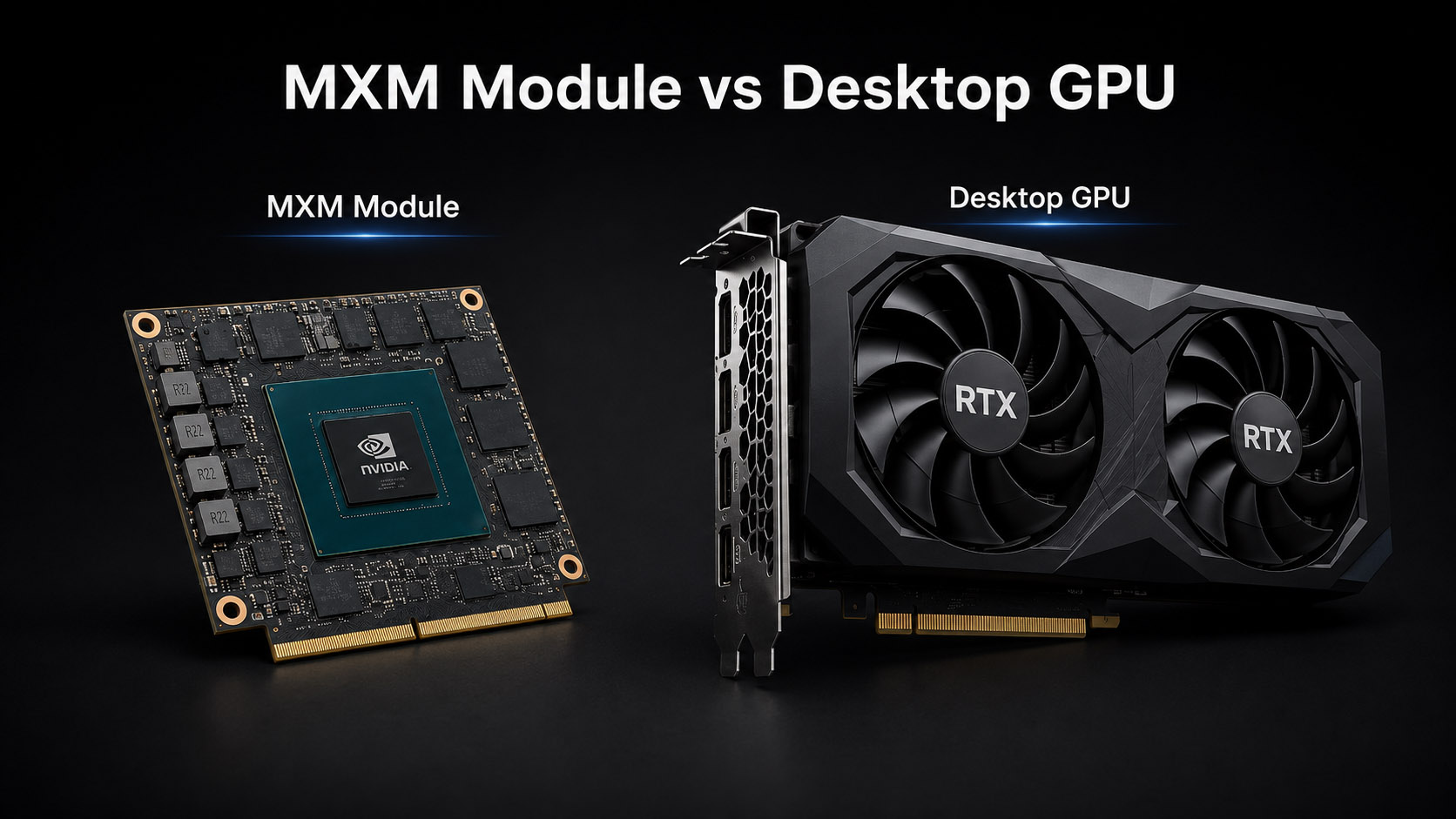
The module is small because the cooling, power and retention moved into the machine around it.
Table of Contents
A desktop PCIe graphics card and an MXM GPU module can share the same GPU architecture, the same CUDA and TensorRT stack, and the same class of AI acceleration. They still answer different system-design problems. A desktop card is self-contained — GPU, VRAM, VRM, heatsink, fans, connectors, bracket and a standardized slot. An MXM GPU is a compact, removable module board; the host has to supply the socket, power delivery, mechanical retention, cooling, BIOS support and enclosure-level thermal design.
The useful question is not “which GPU is faster,” but: which GPU form factor fits the mechanical, thermal, power, service and lifecycle requirements of the complete system?
1. A desktop card carries its own system; an MXM module borrows the host’s
A desktop GPU installs as a PCIe add-in card, and the card carries almost everything: GPU, VRAM, VRM and power circuitry, heatsink, fans or a passive assembly, video connectors, the standardized edge connector and a mechanical bracket. Drop it into a slot with enough airflow and power, and it works.
An MXM GPU is also a discrete GPU board, but a much smaller one, and it usually does not include the card-level cooling assembly. The signal path and the heat path split:
Motherboard → MXM connector → MXM GPU module (GPU + VRAM + power circuitry)
                                        ↓
              system-level cooling: copper plate → heat pipe → fin array → fan → ambient
That single difference is why MXM can make sense inside an industrial edge AI computer even though a desktop card is easier to buy and replace — and why an MXM GPU can never be evaluated on its own, separate from the machine that holds it.
2. An MXM GPU is a removable board, not an integrated GPU and not a cooling system
MXM is a modular graphics format built for space-constrained systems: a small, removable graphics board carrying the GPU, VRAM and supporting electronics, connected to the motherboard through an MXM connector. Embedded GPU vendors keep using compact module formats like MXM where a desktop card is simply too large — NVIDIA positions its embedded RTX portfolio for industrial automation, robotics, medical imaging, edge AI, aerospace and professional visualization. Two distinctions are commonly misread.
It is a separate module, not a GPU baked into the CPU or board
The module installs through a dedicated connector, but the GPU stays on its own board and that board is physically removable — unlike an integrated GPU inside the CPU package or a GPU permanently mounted on the system board.
It ships without the matched heatsink a desktop card includes
The host computer has to be designed around the module’s GPU and VRAM locations, heat-spreader contact, power envelope, mounting points and airflow. This is the crux of the whole comparison.
3. Desktop PCIe wins on ecosystem standardization, not on raw speed
The strongest advantage of a desktop GPU is a standard slot, known card dimensions, standard auxiliary power connectors, integrated card cooling, broad driver support and wide market availability. For a team with enough chassis volume, that makes desktop GPUs far easier to deploy and replace.
Replacement shows it clearest. If a desktop GPU fails, a technician powers down, pulls the card, installs a compatible one, verifies the driver and returns the system to service. An MXM replacement can involve thermal pads, heatsink pressure, module mounting, and BIOS/vBIOS and power-limit compatibility. For field-service-heavy deployments that difference is real and worth weighing early.
4. MXM hands the mechanical architecture back to the system designer
A desktop GPU tends to dictate chassis height and depth, the airflow path, the power-supply size and even the mounting orientation. An MXM module reverses that: mount the module on the motherboard and build the cooling and enclosure around it. That freedom matters in machine-vision cabinets, AMR and AGV systems, robots, medical imaging equipment, inspection machines, roadside units, vehicle computers and compact edge servers.
The value isn’t “a smaller GPU.” It is a compact, removable GPU module that gives you control over the mechanical architecture of the whole computer.
5. Modular does not mean universally plug-and-play
The common misconception: because the GPU is a module, people assume you pull the old MXM GPU, drop in a new one, done. Real upgrades are often harder. An early-2026 community discussion captures it — a ZBOX-class mini PC owner running a GTX 1080 MXM wanted an RTX 4060 MXM, and the thread immediately filled with the real variables: physical fit, heatsink and water-block compatibility, power delivery, BIOS, vBIOS and missing documentation.
A replacement module may still need to match the connector type, electrical design, board dimensions, mounting-hole positions, heatsink contact points, GPU power limit, and BIOS/vBIOS/driver support. MXM upgradeability therefore depends on the host platform, not only on the connector.
On a validated industrial platform with a defined GPU list, an MXM swap is routine. On an undocumented consumer box, it is a research project.
6. With MXM, the host motherboard becomes part of the GPU’s power architecture
A desktop card makes its power needs visible: the spec defines board power and connectors, and the PSU either meets them or does not. With MXM the designer has to confirm the module power limit, motherboard VRM capacity, DC input capability, PSU headroom, transient margin, cable and connector rating — and, critically, thermal capacity at sustained power.
That last point separates edge AI from desktop use. Inference holds the GPU loaded for long stretches: continuous machine vision, multiple camera streams, local LLM inference, medical imaging, video analytics, robotic perception. A GPU that sails through a short benchmark can still hit power or thermal limits during continuous inference. On a compact MXM system, system-level power validation is not optional.
Can an MXM GPU Edge AI Computer Be Fanless?
An MXM GPU system can use a fanless compute zone if CPU/GPU heat is transported through conduction or liquid cooling to an external heat-rejection system. BITECH AE-960EBT uses this architecture: the compute zone contains no cooling fans, while external radiator fans reject the heat away from the electronics.
7. The full thermal path, not the GPU spec, decides sustained clocks
GPU die → thermal interface → copper plate → heat pipes → fin array → system fans → ambient
Every stage affects the clock the GPU can hold. A desktop card brings its own GPU, VRAM and VRM cooling plus fans and fan-control firmware, which reduces card-level thermal work for the PC designer — though the chassis still needs enough airflow to carry that heat out. An MXM module puts the cooling design in the system vendor’s hands: copper contact plates, heat pipes, fin arrays, industrial PWM fans, airflow paths, fan curves and combined CPU/GPU thermal monitoring. That is what lets an MXM build be smaller. The cost is that the entire thermal solution must be engineered and validated, not assumed.
Ask these eight thermal questions instead of reading peak benchmark numbers
- What GPU power limit is configured on the module?
- At what ambient temperature was the run performed?
- Were CPU and GPU loaded at the same time?
- What GPU and VRAM temperatures were reached?
- Did the platform throttle at any point?
- What clock was sustained, not peaked?
- How long did the test run?
- What fan speed and acoustic level were needed?
Those answers predict field behaviour. “Which GPU is installed” does not. How BITECH measures them is documented in the validation lab.
8. VRAM sizing does not change because the GPU is an MXM module
MXM is a form factor; it does not change the memory requirements of the workload. For local LLMs, machine vision and medical AI, VRAM still comes down to model size, quantization, context length, KV cache, image resolution, batch size, number of streams and concurrent models. A compact MXM system with 8GB can be memory-limited; a desktop card with 24GB can still be too small for some jobs. Evaluate form factor and VRAM as two separate decisions — the memory side is worked through in How Much VRAM Do You Need for a Local LLM? 8GB vs 16GB vs 24GB.
9. The form-factor answer changes with LLM, vision and medical workloads
Local LLM nodes: MXM when the box must live inside the equipment
These need VRAM capacity, memory bandwidth, GPU compute, system RAM, NVMe, sustained cooling, low noise and controlled power. MXM fits a factory knowledge assistant, a local RAG node, a medical-document assistant, a machine-side AI workstation or a secure offline appliance — compact, mechanically fixed, running 24/7. A desktop GPU fits better when size matters less, GPU choice must stay wide open, upgrades are frequent, very high GPU power is needed, or serviceability outranks compactness — which describes most lab and development workstations.
Machine vision: one compact box can replace a workstation plus an I/O gateway
The system handles more than inference: camera input, image decoding, preprocessing, network traffic, storage and PLC or fieldbus communication. A compact MXM computer can combine a removable GPU module with multiple LAN ports, CAN, RS232/RS485, digital I/O and wide-voltage DC input in one chassis. When the line needs very large models, multiple high-end GPUs or very high camera throughput, a desktop or rackmount PCIe architecture scales further.
Medical edge AI: a validated GPU configuration beats upgrade freedom
Priorities differ from a lab workstation: compact installation, controlled hardware configuration, low acoustic noise, long lifecycle, predictable thermals, local data processing and DICOM/PACS connectivity. A compact MXM module lets a discrete GPU go inside an enclosure with no room for a tower. In regulated equipment, changing a GPU can trigger software verification, thermal re-verification, EMC testing, documentation updates and application validation — so “upgrade whenever a new GPU launches” is usually the wrong goal.
10. Lifecycle comes from the supplier’s program, not from the connector
MXM does not automatically mean long lifecycle, and desktop does not automatically mean short. Lifecycle depends on the GPU vendor program, the module supplier, BOM control, driver support, availability agreements and the PCN/EOL process. NVIDIA markets long-life availability for its embedded RTX portfolio, but the availability that protects your project is the one your system supplier commits to in writing — see lifecycle management.
- Is this exact GPU module part of a long-life program?
- How long is availability expected to run?
- What happens at EOL, and is there a last-time-buy process?
- Will a replacement GPU require BIOS or vBIOS changes?
- Will the heatsink and mounting stay compatible?
11. Field service favours desktop; platform control favours MXM
On pure field-replacement speed a desktop PCIe card usually wins: wider availability, a standardized slot, card-integrated cooling, easier physical access and less custom thermal hardware. MXM serviceability depends on how the system was designed — a well-built industrial MXM computer narrows the gap with a removable top cover, accessible module mounting, replaceable thermal pads, documented torque values, replaceable fans and a defined supported-GPU list. So the question is not “is MXM replaceable” but “has this system been designed and documented for MXM replacement.”
For an OEM machine builder, uncontrolled hardware changes are expensive, and a fixed MXM configuration supports a controlled platform: engineering sample → GPU validation → thermal validation → golden configuration → mass production → PCN/EOL management. A development workstation wants the opposite — swap GPUs often, test multiple generations, run high-power cards, change VRAM, compare drivers — and there desktop PCIe gives more flexibility with less integration effort.
Desktop PCIe is usually better for open-ended GPU flexibility. MXM is usually better when a compact, removable GPU module has to live inside a space-constrained edge system.
12. Fourteen engineering factors compared side by side
| Engineering factor | MXM GPU | Desktop PCIe GPU |
|---|---|---|
| GPU architecture | Discrete removable module | Discrete add-in card |
| System size | Smaller | Larger |
| GPU availability | More limited | Very broad |
| Mechanical standardization | Platform-dependent | Higher |
| Cooling assembly | Designed by system vendor | Usually on the card |
| Thermal engineering burden | Higher for system vendor | Lower at card level |
| Field replacement | More involved | Easier |
| Max GPU power options | More constrained | Higher |
| Compact edge deployment | Excellent | Limited |
| Frequent GPU upgrades | Validated list only | Better |
| OEM configuration control | Strong | Strong with BOM control |
| 24/7 embedded deployment | Good when validated | Good with proper chassis |
| Long lifecycle | Depends on module program | Depends on GPU program |
| Industrial I/O in same chassis | Easy on a compact platform | Usually needs a larger host |
Read it as a design guide, not a universal ranking. Neither column is the winner.
13. Choose MXM for embedded installations, desktop for open-ended performance
Choose MXM when several of these apply
- The computer must fit inside a machine, robot, vehicle, medical device or compact cabinet.
- You need a removable discrete GPU, but a full-size card would make the system too large.
- The same box must carry multiple LAN, CAN, RS232/RS485, digital I/O and wide-voltage DC power.
- You value a validated GPU list, a stable BOM, predictable thermals and long-term configuration control.
- The performance target fits inside the platform’s thermal and power envelope.
Choose a desktop GPU when
- Maximum performance outranks size — high-TGP GPUs, very large VRAM, multiple GPUs, maximum throughput.
- GPU upgrades are frequent: development, lab, research or short-lifecycle systems.
- Fast field replacement with standard off-the-shelf cards is the priority.
14. Answer these four groups and the form factor picks itself
AI workload
- Which model, at what precision or quantization
- How much VRAM the job needs
- How many camera streams or concurrent users
- Required throughput in frames or tokens per second
Thermal
- What GPU power must be sustained, not peaked
- Ambient temperature at the installation point
- Is the enclosure ventilated or sealed
- Acceptable acoustic level and whether any throttling is allowed
Mechanical and power
- Maximum chassis dimensions and mounting orientation
- Weight limit and service access
- Available DC or AC input and maximum system power
- Startup and transient current requirements, PSU margin
Lifecycle and service
- Deployment duration and annual quantity
- Fixed-BOM and PCN/EOL requirements
- Can trained technicians open the chassis
- Must the GPU be field-replaceable, or is a validated spare acceptable
15. How BITECH validates an MXM GPU inside the AE-760EBT
The AE-760EBT is built around a separate MXM GPU module connected through an MXM connector — the GPU is not integrated into the motherboard. The platform supplies the host MXM interface, a removable module, a dedicated copper and heat-pipe thermal solution, system-level PWM cooling, and power delivery sized for the supported GPU configurations.
The current build pairs an Intel Core i9-13900 with NVIDIA RTX MXM GPU options and adds the I/O an edge deployment actually needs: 4× Intel 2.5GbE, 2× CAN FD, isolated RS232/RS485, isolated digital I/O, 9–36V DC input, dual industrial PWM fans and a copper heat-pipe thermal architecture. A discrete RTX GPU plus real field I/O in one compact chassis is the case MXM exists for.
An MXM GPU isn’t chosen freely, it is validated as a set: GPU module + VRAM + power limit + heatsink + airflow + BIOS + application workload.
When a project needs GPU power beyond that validated thermal envelope, a larger PCIe GPU system is the more honest architecture. The form factor should follow the requirement, not the other way around.
Bottom line: define the enclosure, power and thermal budget before naming a GPU
MXM and desktop GPUs are not drop-in replacements for each other. Desktop PCIe is usually right when you want maximum card selection, higher GPU power, simple replacement, frequent upgrades and workstation flexibility. MXM is usually right when you want a compact removable module, a smaller chassis, embedded deployment, industrial I/O in the same computer and a controlled list of validated GPU options.
Choose the GPU after defining the enclosure, power, thermal, VRAM, lifecycle and service requirements — not before.
Community signal: an early-2026 r/MiniPCs discussion about upgrading a GTX 1080 MXM system to an RTX 4060 MXM raised practical concerns around mechanical fit, cooling, added power delivery, BIOS, vBIOS and documentation. It is cited as evidence of a real user integration problem — the reason MXM upgrades depend on the host platform — not as controlled benchmark data.
Match the form factor to the deployment
Not sure whether you need MXM or a desktop GPU?
Send us the constraints, not a GPU model. BITECH engineering will tell you straight which form factor fits — a compact removable MXM platform or a desktop-PCIe host — and where a workload exceeds what a sealed industrial chassis can cool.
Send us the envelope
- AI workload & sustained GPU power target
- VRAM / model size
- Max chassis dimensions & mounting
- Ambient temperature & 24/7 duty
- DC input & industrial I/O (LAN, CAN, serial, DIO)
- Lifecycle & field-service needs
We come back with
- MXM or desktop-PCIe recommendation
- A validated GPU-module option list
- Sustained-load thermal & power budget
- The closest BITECH platform
- An honest "this chassis isn't the fit" when it isn't
Validated GPU list · sustained-load thermal testing · 10-year platform availability · 24-month warranty
Edge AI · GPU Form Factor
Frequently asked questions
-
A desktop GPU is a full-size PCIe card that carries its own GPU, VRAM, power, cooling, connectors and bracket — largely self-contained. An MXM GPU is a smaller, removable module carrying the GPU, VRAM and electronics; it plugs into the motherboard through an MXM connector, and the host supplies the socket, power, retention, cooling and BIOS support. Same GPU architecture and CUDA/TensorRT stack, different system-design problem.
-
No. An MXM GPU is a separate, physically removable module on a dedicated connector. An integrated GPU is part of the CPU package or soldered to the board. MXM is a compact modular discrete GPU, not integrated or soldered.
-
Not always. A replacement may need to match the connector type, electrical design, board dimensions, mounting holes, heatsink contact, GPU power limit and BIOS/vBIOS/driver support. MXM upgradeability depends on the host platform, not just the connector — routine on a validated industrial platform with a defined GPU list, a research project on an undocumented consumer box.
-
Choose MXM when the computer must fit inside a machine, robot, vehicle, medical device or compact cabinet; you need a removable discrete GPU but a full card would make the system too large; the same chassis must carry industrial I/O such as multiple LAN, CAN, RS232/RS485, digital I/O and wide-voltage power; you value a validated GPU list, stable BOM and predictable thermals; and the performance target fits the MXM platform's thermal and power envelope.
-
A desktop PCIe GPU is usually better when maximum performance matters more than size (high-TGP GPUs, very large VRAM, multiple GPUs, maximum throughput), when GPU upgrades are frequent (development, lab, research or short-lifecycle systems), or when fast field replacement with standard off-the-shelf cards is the priority.
-
No. MXM is a form factor and does not change memory requirements. VRAM still depends on model size, quantization, context length, KV cache, image resolution, batch size, number of streams and concurrent models. A compact MXM system with 8GB can be memory-limited, and a desktop card with 24GB can still be too small — evaluate form factor and VRAM as two separate decisions.
-
Because an MXM module usually ships without a complete cooling assembly, the whole thermal path — from GPU die through the interface material, copper plate, heat pipes, fin array and fans to ambient — is engineered by the system vendor. AI inference holds the GPU loaded for long periods, so a GPU that passes a short benchmark can still throttle under continuous load. Ask for the configured power limit, test ambient, whether CPU and GPU were loaded together, the temperature reached, whether it throttled, the sustained clock, and the test duration.
Related Platforms & Guides
The specific platforms, use cases, and engineering references this comparison draws on.
Platforms in this comparison
AE-760EBT — Intel Core i9 + Removable RTX MXM
BITECH's reference MXM platform, cited throughout this article as the validated example of a system-level MXM thermal design.
View product → ProductAE-960EBT — Liquid-Cooled, Fanless-Compute-Zone MXM
The fanless MXM configuration referenced in this article's "Can an MXM GPU Edge AI Computer Be Fanless?" section — heat is rejected through an external liquid loop instead of chassis fins.
View product → ProductAE-NJ60BT — Jetson Orin NX, Unified Memory
The unified-memory alternative this article points to when a discrete MXM GPU module exceeds what the workload actually needs.
View product → CategoryEdge AI Industrial Computers — Full Range
RK3588, Jetson, and RTX MXM platforms in one category — for comparing form factors beyond the two covered in this article.
View category →Direct platform comparisons
AE-NJ60BT vs AE-760EBT: Jetson vs RTX MXM
A head-to-head between the unified-memory Jetson platform and the discrete-MXM RTX platform discussed in this article.
Compare platforms → ComparisonAE-NJ60BT vs AE-3588BT: Jetson vs RK3588
Where a GPU-class MXM or Jetson platform is overkill — the entry-tier RK3588 comparison for lighter edge-AI workloads.
Compare platforms → InsightsEdge AI Platform Selection Guide: Jetson vs RK3588 vs x86
A broader selection framework for choosing the compute architecture before deciding on a GPU form factor.
Read the guide →Where this decision plays out
Machine Vision & AOI Solutions
The multi-camera, multi-I/O deployment this article names directly as a case where a compact MXM system with LAN, CAN, and serial I/O outperforms a desktop-card build.
Explore the solution → InsightsHow Much VRAM Do You Need for a Local LLM? 8GB vs 16GB vs 24GB
The VRAM-sizing question this article states explicitly does not change based on GPU form factor — size the workload here first.
Read the guide → InsightsPCIe Expansion Selection Guide
How PCIe lane and slot budget interacts with a desktop GPU's card-based architecture — the standardization side of this comparison.
Read the guide →Engineering references
DVT Validation Lab
How BITECH answers this article's core question — "did the platform throttle?" — through sustained-load thermal validation before release.
Read the guide → EngineeringIndustrial PC Lifecycle Management: Fixed BOM, PCN, EOL & Long-Term Supply
The supplier-program lifecycle this article names as the real differentiator over raw GPU spec — fixed BOM, PCN/EOL process, and supply-year commitment.
Read the guide → EngineeringIndustrial PC Design Guide: EMC, Standards and Environmental Ratings
The EMC and environmental qualification standards a GPU-class platform — MXM or desktop-card-based — is validated against before shipment.
Read the guide →