
How to Size an Industrial PC for Multi-Camera Vision
Camera count is not a sizing spec. Size the whole data path — imaging, bandwidth, transport, decode, inference load, latency, storage and sustained thermals — and the platform becomes a conclusion rather than a guess.
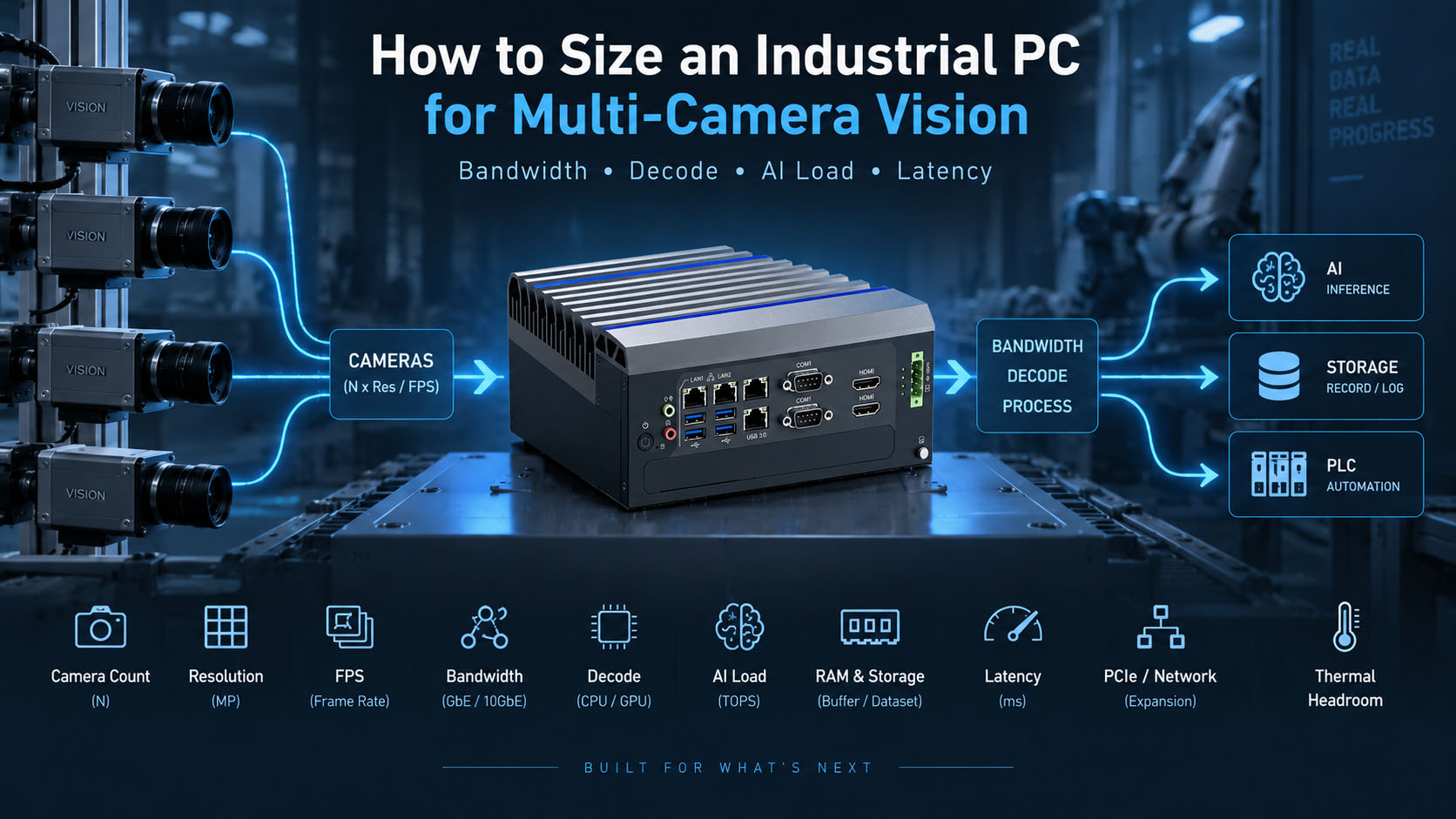
The fastest way to specify the wrong vision computer is to start with the camera count. “We have eight cameras” tells you almost nothing about the machine you need, because four cameras alone can mean four completely different systems.
4 x 2MP @ 5 FPS != 4 x 12MP @ 30 FPS != 4 x 5MP triggered RAW != 4 x 1080p H.265 RTSP
All four use four cameras. They can demand wildly different network bandwidth, USB/PCIe topology, CPU capacity, GPU or NPU performance, RAM, storage, synchronisation and thermal headroom.
Two systems with the same number of cameras can require completely different computers.
So the method below is not “how many cameras can one GPU handle.” It is the opposite: size the entire data path, one stage at a time, from the sensor to the PLC. Get that right and the CPU, GPU or NPU choice mostly falls out of the numbers.
The 30-second answer: camera count is not a sizing spec
Every input below changes the computer more than the camera count does.
| Input | What it actually determines |
|---|---|
| Camera count | Number of concurrent data sources |
| Resolution | Data per frame |
| FPS / trigger rate | Frames to acquire and process per second |
| Pixel format | RAW acquisition bandwidth |
| H.264 / H.265 | Video-decode workload |
| Camera interface | NIC / USB / PCIe transport limits |
| AI model | GPU / NPU compute requirement |
| Number of models | Concurrent inference load |
| Required latency | Whether batching and buffering are acceptable |
| Image recording | SSD capacity and sustained write load |
| PLC / robot cycle | Maximum acceptable result time |
| Ambient temperature | Sustained thermal performance |
Don’t ask “how many cameras?” before asking “what does each camera produce, and what must happen to each frame?”
Step 1 — Define the imaging workload before choosing the computer
Before any silicon, define the optics and motion: object speed, smallest defect, field of view, global versus rolling shutter, colour versus mono, exposure time, trigger rate, motion-blur tolerance and lighting stability. Engineering discussions about conveyor tracking consistently land on motion blur, frame pacing, shutter and FPS long before compute becomes the issue.
If the source image doesn’t contain a stable defect signal, a larger GPU cannot recover information that was never captured.
The chain is object → lighting → lens → sensor → exposure/trigger → image → compute. Everything before “compute” sets the ceiling — the same lesson as Machine Vision & AOI: Why Factory Inspection Fails Outside the Lab.
Step 2 — Separate industrial machine vision from video analytics
These are two different sizing problems, and mixing them produces wrong numbers.
Architecture A — industrial machine vision
industrial camera → RAW/Bayer/Mono → GigE Vision, USB3 Vision or CoaXPress → industrial PC → vision/AI → PLC → reject or robot.
Triggered acquisition, RAW data, global shutter, deterministic cycle, low-latency inspection.
Architecture B — multi-camera video analytics
IP camera or NVR → H.264/H.265 RTSP → industrial edge AI PC → decode → AI → alert, dashboard or database.
Compressed video, continuous streaming, hardware decode, batching, frame dropping, tracking, event recording.
A 5MP GigE Vision RAW camera and a 5MP H.265 IP camera should not be sized with the same bandwidth formula.
Step 3 — Calculate camera bandwidth for uncompressed streams
Raw data rate = Width x Height x Bytes-per-pixel x FPS x Number-of-cameras
- Four 5MP Mono8 @ 20 FPS: 5,000,000 x 1 x 20 x 4 ≈ 400 MB/s
- Four 12MP Mono8 @ 30 FPS: 12,000,000 x 1 x 30 x 4 ≈ 1.44 GB/s
Same “four cameras,” roughly 3.6x the payload. Then reserve margin for protocol overhead, bursts and system variability. Camera-vendor guidance on multi-camera setups also warns that several cameras can compete for the same USB host controller or network adapter — so the aggregate number, not the port count, is what you budget.
Step 4 — Choose the camera transport architecture
The interface can decide the platform before AI does.
GigE Vision. Four cameras through a switch still share one uplink into the PC.
Don’t count camera ports. Count uplink bandwidth.
Rough host-side direction by aggregate payload: below ~1GbE, a single 1GbE port may do; above 1GbE, move to 2.5/5GbE or multiple NICs; several high-resolution cameras point at 10GbE or multiple independent NICs; very high-speed cameras point at a PCIe frame grabber or CoaXPress.
USB3 Vision. A common field surprise: plenty of physical ports, but a shared bandwidth wall, because multiple USB cameras often funnel through one host controller.
Six USB ports are not necessarily six independent USB controllers.
GMSL2. Best suited to robotics, AMR, autonomous machines and vehicles — see GMSL2 vs GigE Vision.
CoaXPress, Camera Link and frame grabbers. When the interface needs a frame grabber, PCIe architecture becomes part of the vision design: the host’s lanes and slots are now a specification, not an afterthought. Our PCIe expansion guide covers how to read those lanes.
Step 5 — Decide whether the cameras must be synchronised
No strict sync is fine for independent stations or security analytics. Timestamp sync suits event correlation and multi-camera tracking. PTP and hardware triggering are needed for stereo, 3D reconstruction, conveyor multi-view, robot perception and synchronised inspection.
Synchronisation is an application requirement, not a camera-count requirement.
Step 6 — Separate camera FPS, AI FPS and decision rate
Camera FPS != Processing FPS != Decision FPS
A realistic system might run the camera at 30 FPS, preview at 15, AI at 5, and issue a PLC decision every 50 ms per event. Assuming every camera must run AI at full frame rate is how projects massively over-buy GPU.
Step 7 — Separate source resolution from model input resolution
A 12MP camera feeding a 640 x 640 model is common. Source resolution drives acquisition, network bandwidth, memory copies and preprocessing. Model input resolution drives much of the inference cost.
Source resolution determines acquisition load. Model resolution determines much of the inference load.
Don’t size the GPU as if it processes 12MP frames when it actually processes cropped or resized tiles.
Step 8 — Budget video decode as its own resource
For RTSP systems, decode is a separate budget from inference: RTSP → H.264/H.265 decode → resize and colourspace conversion → AI. Track codec, resolution, FPS, stream count and the hardware decoder’s published capacity.
AI inference capacity and video decode capacity are two different budgets.
A platform can have plenty of AI headroom and still be decode-bound.
Step 9 — Trace every memory copy
camera -> NIC -> system RAM -> decode -> CPU preprocess -> system RAM -> PCIe -> GPU VRAM -> inference
Then ask: how many times does one frame move? An optimised path — hardware decode straight into GPU memory, preprocess there, then infer — removes copies that the naive path repeats per frame, per camera, per second.
Multi-camera systems can become memory-movement problems before they become AI-compute problems.
Step 10 — Size the CPU from the whole pipeline, not the model
The GPU gets the attention; the CPU quietly runs the camera SDK, packet receive, decode orchestration, preprocessing, application logic, PLC communication, SQL, logging, HMI, file writing and postprocessing. CPU demand grows with camera count plus decode overhead plus preprocessing plus application threads plus database, HMI and comms.
GPU utilisation does not tell you whether the CPU has enough headroom.
Plenty of “the GPU is only at 40% but the system is slow” cases turn out to be CPU, memory-copy or decode limits.
Step 11 — Size the GPU or NPU from inference load, not camera count
Inference load = Streams x AI-FPS-per-stream x Models-per-frame x Model-cost
- 8 cameras x 5 AI FPS x 1 detector = 40 inference frames/s
- 8 cameras x 15 AI FPS x (detector + pose) = 240 model passes/s
Same eight cameras, six times the compute. That number sizes the accelerator.
Count inferences, not cameras.
Step 12 — CPU, iGPU, NPU, Jetson or discrete GPU
NPU
Supported INT8/INT4 models and power-sensitive continuous inference — the AE-3588BT class. Verify compiler and operator support, quantisation accuracy, memory and bandwidth, not just the TOPS figure.
Jetson or integrated GPU
Embedded AI, robotics, CUDA and TensorRT, multi-camera pipelines with GMSL2 ingress — the AE-NJ60BT.
Discrete GPU
Larger models, higher AI frame rates, segmentation and multi-model inference — the AE-760EBT with an RTX MXM module. See MXM vs desktop GPU.
Don’t buy the largest GPU first. Eliminate camera, interface, decode and latency bottlenecks first.
Step 13 — Balance batch size, throughput and latency
Batching raises throughput by processing frames in groups, but a frame waiting to fill a batch waits longer.
More throughput can mean more latency.
Throughput answers “how many frames per second can the system process?” Latency answers “how long does one important event wait for a result?” A safety or reject decision is a latency question, not a throughput one.
Step 14 — Control frame queues
If a camera produces 30 FPS and AI processes 20, queuing every frame makes the queue — and the latency — grow without bound. Two correct strategies for two different jobs:
- Continuous analytics: latest-frame strategy, drop stale frames, bounded latency.
- Deterministic AOI: every triggered inspection may have to be processed, so the pipeline must be sized to keep up rather than to drop.
Step 15 — Size RAM from buffers, not just applications
Vision RAM is dominated by frames in flight: camera buffers plus decoded frames plus AI batch plus application plus database plus image cache plus OS.
Count buffered frames, not just installed software.
Step 16 — Size storage from the recording strategy
The range is huge: pass/fail metadata only is tiny; defect-only NG images are moderate; continuous recording needs sustained write endurance rather than headline capacity; pre- and post-event clips are common in PPE, safety, traffic and security systems. For continuous compressed video especially, size the SSD for sustained write rate and endurance, not peak capacity.
Step 17 — Calculate end-to-end PLC or robot latency
trigger -> acquire -> transfer -> decode/preprocess -> inference -> postprocess -> result -> PLC -> actuator
Average FPS is not a substitute for end-to-end latency.
If the PLC reject window is 100 ms, every stage in that chain has to fit inside it — including the parts that aren’t the GPU.
Step 18 — Validate sustained thermal performance
Multi-camera vision is a continuous load: capture, decode, preprocessing, inference, database writes and image storage run together for shifts at a time. A platform that hits its numbers for 60 seconds on a bench can still throttle after an hour in a closed cabinet at 45°C ambient. Ask for sustained-load evidence at your ambient — clock behaviour, temperature and throughput over hours — which is what our validation lab documents.
Get a multi-camera vision PC sizing review
Send the workload, not the camera count. A useful request looks like this.
| Parameter | Example |
|---|---|
| Camera count | 8 |
| Camera type | GigE Vision |
| Resolution | 5MP |
| Pixel format / codec | Mono8 |
| Camera FPS | 20 |
| Required AI FPS | 5 |
| Model | YOLO11m |
| Interface | 2.5GbE |
| Trigger / sync | Hardware trigger |
| PLC | EtherNet/IP |
| Result latency | under 100 ms |
| Recording | NG images only |
| Ambient | 0–50°C |
With that, BITECH engineering returns a CPU recommendation, GPU or NPU recommendation, RAM, NIC/USB/PCIe topology, storage, thermal assumptions, the closest platform and a sample configuration.
Get a multi-camera sizing review
Send the camera workload — we'll size the whole data path.
Don't ask "how many cameras can this GPU handle?" Send the workload and BITECH engineering sizes the entire path — bandwidth, transport, decode, memory movement, inference load, latency and sustained thermals — and returns a platform, not a guess.
Send the workload
- Camera count & type (GigE / USB3 / GMSL2 / CXP)
- Resolution, pixel format / codec & camera FPS
- Required AI FPS & model (e.g. YOLO11m)
- Interface & trigger / synchronization
- PLC protocol & required result latency
- Recording strategy & ambient temperature
We size and return
- CPU + GPU/NPU recommendation
- RAM sized from buffers, not just software
- NIC / USB / PCIe topology
- Storage & thermal assumptions
- Closest BITECH platform + a sample configuration
Sized from the data path, not camera count · benchmarked, not assumed · sustained-load validated · 10-year platform lifecycle
Machine Vision · PC Sizing
Frequently asked questions
-
There's no useful fixed number. It depends on resolution, FPS, pixel format/codec, interface, decode, preprocessing, AI model, AI FPS, storage and latency target — camera count is only one input into the total data path.
-
Not necessarily. Classical vision, low-rate OCR or deterministic image processing can run on CPU or integrated GPU. A discrete GPU should be selected only when the inference load requires it.
-
Not automatically. Higher source resolution increases acquisition and preprocessing load, but AI compute depends heavily on the final model input size — a 12MP frame is often cropped or resized before inference.
-
Usually not, unless the application requires it. Camera FPS, AI FPS and decision rate are separate numbers — running AI at full camera frame rate is a common way to massively over-buy GPU.
-
Camera count alone can't answer this. Calculate the aggregate payload (width x height x bytes x FPS x cameras) and reserve margin for protocol overhead and bursts — then choose the uplink.
-
Yes for some workloads, but they share host-controller bandwidth. Physical USB ports do not equal independent USB controllers, so several cameras can hit a bandwidth wall despite enough ports.
-
Neither is universally better. Compare camera interface, power budget, software ecosystem, decode capacity, AI workload and expansion — the right platform follows the sized data path, not a brand.
-
It often improves throughput but can increase latency, because a frame waits to fill a batch. Evaluate batch size against the required decision time, not just frames per second.
-
Size RAM from frames in flight, not installed software: camera buffers + decoded frames + AI batch + application + database + image cache + OS.
-
At minimum: dropped frames, end-to-end latency, CPU usage, GPU/NPU usage, clocks, temperature, RAM, storage write rate, queue depth and sustained performance — measured at the real camera count and ambient, over hours, not one minute.
Related products & guides
Once the data path is sized, match it to a platform
Pick the platform from the sized workload — inference load, transport, decode and latency — not from camera count. These BITECH platforms map to the tiers in the sizing table, and the guides go deeper on each stage.