
How to Size Edge AI Computing for Local LLM and Medical AI
A practical hardware guide to GPU, VRAM, system RAM, thermal design and local-vs-cloud deployment for local LLM, medical AI and other 24/7 Edge AI workloads.
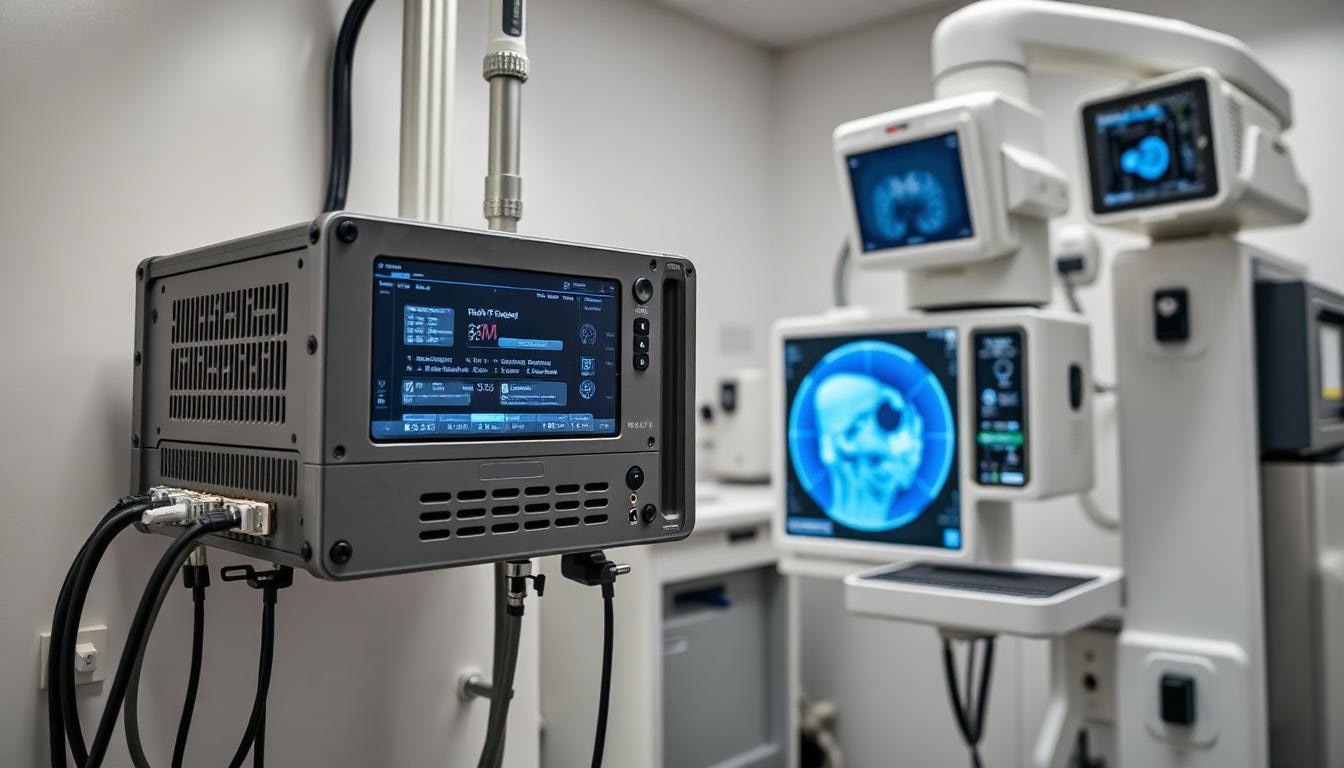
Edge AI is defined by where data is processed — not by where the GPU sits.
Table of Contents
Edge AI is not about replacing the cloud. It is about deciding which AI workloads should stay close to the data, which should still use cloud models, and how to design memory, networking, storage and thermal capacity around those decisions.
Get the placement right and the workload is fast, controllable and maintainable. Get it wrong — by fixating on a GPU model name and ignoring the system around it — and the deployment throttles, runs out of memory, or cannot integrate with the equipment it was meant to serve.
A note on evidence: community discussions are used here to surface real questions and pain points, not as benchmark data. Hard performance claims should come from controlled lab testing and vendor specifications.
1. Why more AI workloads are moving closer to the data
The honest framing is not “cloud is out, edge is in.” It is narrower and more useful: AI workload placement is becoming a design decision. Three drivers push specific workloads local.
Privacy and data control
Before choosing hardware, ask whether raw data needs to leave the local system at all, whether confidential documents or patient information are involved, and whether the operator needs control over model telemetry and outbound connections.
Local inference gives the designer more control over where data is processed — but local execution alone does not automatically make a system private or compliant.
Offline availability and predictable access
Local AI suits environments without reliable Internet, fixed-purpose controlled systems, pinned model versions with no silent upstream changes, freedom from API rate limits, and private handling of internal documents. What it is not automatically is cheaper — total cost depends on hardware, electricity, maintenance, usage level and the cloud API price it is compared against.
Local and cloud solve different problems
| Local AI is strong for | Cloud AI is strong for |
|---|---|
| Data control and locality | Frontier model capability |
| Predictable, repeatable workloads | Variable or infrequent demand |
| Offline operation | No local GPU maintenance |
| Model customization and RAG | Elastic scaling |
| Low-latency access to local data | Access to the largest models |
Hybrid is the practical architecture
The durable pattern is local first, cloud escalation when needed: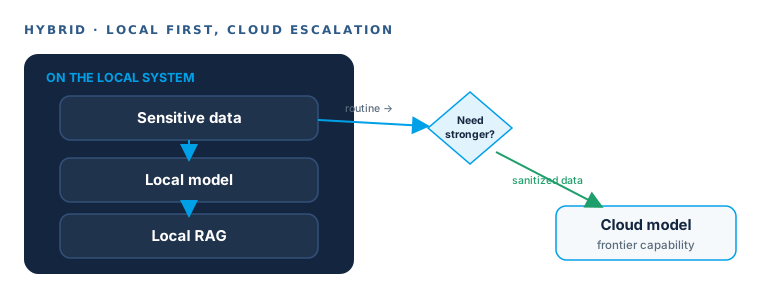
2. VRAM is usually the first hardware limit
VRAM does not only determine whether a model loads. It governs quantization quality, context length, KV cache, offloading strategy, and how many models or sessions can stay resident at once. The tiers below are reasoning reference points, not promises.
8GB VRAM — a real but bounded entry point
Practical for smaller quantized models, lightweight assistants, controlled-context document workflows and experimentation. It becomes restrictive as model size, context length, session count, or KV cache grows.
16GB VRAM — the awkward middle ground
Clearly wider than 8GB, but users only fit larger models by combining aggressive quantization, smaller context, compressed KV cache and CPU/RAM offloading. 16GB expands options; it does not remove trade-offs.
24GB VRAM — room, not unlimited room
Larger quantized models, longer contexts, more GPU-resident layers, higher-quality quantization and practical local RAG. Limits still come from architecture, context length, KV cache, concurrent users and OS overhead.
Capacity is not throughput
A second GPU or more VRAM lets you run bigger models and quantize less aggressively — it does not double tokens per second. Specify capacity and speed as two separate requirements.
3. Model size is only part of the memory requirement
Quantization changes what fits
Higher precision means more VRAM and often higher quality; Q4/Q6/Q8, IQ4 and KV-cache quantization shrink the footprint with model-specific quality and speed trade-offs. No quantization is universally best.
Context length consumes memory
Loading a model is not running the workload. Long patient histories, technical manuals and RAG prompts inflate the KV cache — a model that fits at load time can still run out of memory in production. Size for the real prompt.
System RAM, bandwidth and NVMe still count
Partial offloading, large local RAG databases, document and image preprocessing, and multiple containers all land on system RAM and storage. A GPU number in isolation hides the real bottleneck.
4. GPU selection is a system-design problem
Evaluate compute and memory separately. GPU compute drives inference throughput, tokens per second, image-processing throughput and concurrent inference. VRAM drives model size, quantization quality, context, KV cache and the number of resident models. A GPU can be strong on one axis and limiting on the other; specifying only one guarantees a surprise in the other.
Desktop PCIe GPU
Strengths: Standard format, broad card availability, easy replacement, strongest performance options.
Trade-offs: Larger enclosure, higher airflow requirement, larger PSU, harder to integrate into compact industrial systems.
MXM GPU module
Strengths: Compact form factor, integrates into small edge-AI chassis, cooling designed into the enclosure, suited to embedded design.
Trade-offs: Cooling must be matched to the specific module, power delivery validated, compatibility is platform-dependent, upgrades are not plug-and-play.
This is where non-industrial upgrades go wrong. Swapping a GTX 1080 MXM for an RTX 4060 MXM turns immediately into questions of module compatibility, added power, heatsink fit, cooling and missing documentation — the variables a properly engineered MXM platform validates up front. An MXM GPU is a system integration, not a card you drop in.
5. Thermal design decides whether AI performance is sustained — and here’s the proof
This is where edge AI meets industrial computing, and where many “fast” systems quietly fail. AI inference is a sustained load, not a burst. A benchmark taken at 25°C ambient says nothing about what the system holds after hours of continuous inference in a cabinet, a vehicle, or a clinical technical room.
So instead of asserting it, we measure it. In BITECH’s DVT validation lab, GPU-class edge platforms are run under continuous load while we log the numbers that actually predict field behaviour.
A representative AE-760EBT sustained-load run (x86 + RTX MXM GPU)
| Ambient temperature | 30°C |
| Test duration (continuous) | 5 hours |
| GPU load / CPU load | 100 % / 100% |
| GPU sustained clock (vs. peak) | (contact us to get it) |
| CPU sustained frequency | (contact us to get it) |
| GPU / VRAM temperature | (contact us to get it) |
| Chassis surface temperature | (contact us to get it) |
| Total system power | 320 W |
| Sustained inference throughput | (contact us to get it) |
| Thermal throttling | none observed / onset at |
Measured figures are filled from DVT lab runs before publication — we publish only what we have measured.
The point isn’t any single number — it’s the shape: does the clock, and therefore the throughput, hold flat across hours, or does it decay? That flat line is what separates a deployable edge-AI computer from a fast benchmark.
What a buyer should demand — of us or anyone
Use this as a checklist against any GPU-equipped edge-AI proposal:
- Sustained, not peak. Ask for throughput at the maximum ambient of the real installation, held over hours — not peak tokens/s at 25°C.
- Cooling matched to the module. The chassis, airflow path, and heatsink are part of the GPU decision, not an afterthought — especially for MXM.
- Power validated under combined load. CPU + GPU together, including transient peaks, not each in isolation.
- A 24/7 story. The throttling curve, the fan or fanless strategy, and the filter/serviceability plan for unattended operation.
- A stated test duration. “It’s fast” means nothing without “for how long, at what ambient.”
Home-lab rigs solve heat with open frames and extra fans. A deployed medical, factory, mobile, or cabinet system can’t — the thermal solution has to live inside a sealed, serviceable enclosure and hold up unattended. That is exactly what the numbers above are meant to prove, and what the DVT validation lab exists to measure before a unit ships.
Platform used above: the AE-760EBT x86 + RTX MXM GPU edge-AI computer.
6. Local processing improves data control — it does not create compliance
Local inference is a data-location decision. Compliance is a complete-system and process requirement.
Even when inference runs locally, the surrounding system can still expose sensitive data through user access, local storage, backups, logs, remote access, browser access, model telemetry, software updates, cloud connectors and management tools. “The model runs on this box” closes one door; it does not lock the building.
“Local LLM = HIPAA compliant” is not a valid assumption. Regulated deployments still have to govern what the AI can reach — email, chat, browsers, enterprise data, sensitive applications — and define data boundaries and user access. This article keeps compliance wording technical and non-legal; actual determinations require qualified specialists.
7. Medical edge AI should start with narrow, verifiable workflows
Skip the marketing about AI replacing doctors. Useful medical edge AI starts narrow and keeps a human in the loop.
Medical record summarization
Previous Medical Reports → Local LLM → Structured Medical History → Doctor Review
A physician pre-summarizes prior reports before an appointment while patient data stays on the local machine. The AI drafts; the clinician reviews.
Clinical notes and AI scribes
Clinical Notes / Bullet Points → Local Language Model → Structured Draft → Human Review
AI scribes can introduce incorrect information. The workflow has to make review mandatory, not optional — an unreviewed draft in a medical record is a liability.
Medical imaging
PACS / DICOM / RIS / HL7 → Prior Studies → Edge AI Preprocessing → Result Routing
Imaging AI depends on identifiers, prior studies, network, storage and routing. Medical edge AI does not start at the neural network; it starts with reliable access to clinical data.
8. Legacy medical infrastructure is often the real integration problem
Most hospitals run legacy databases, proprietary interfaces, point-to-point integrations, limited APIs, local PACS, old devices and vendor-specific software. DICOM image transfer and HL7 order/result messaging — with mapping and an interface engine — are where an integration succeeds or stalls. The model is rarely the hard part.
The practical pattern uses an edge computer as an integration layer instead of a rip-and-replace: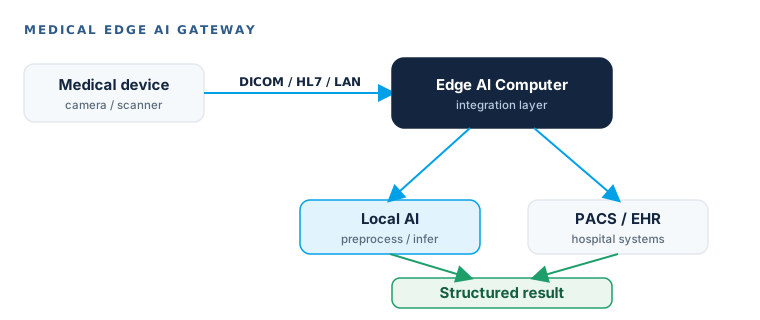
The edge computer sits between existing equipment, local AI, the hospital network, local storage and PACS/EHR — adding capability without demanding the whole environment be rebuilt. That is usually the difference between a project that ships and one that never clears procurement.
9. Three architectures cover most real-world use cases
Architecture A — Fully local LLM
User → Local UI → Local LLM → GPU → Local Documents / RAG
Best for: Confidential documents, offline environments, fixed workloads, private internal knowledge, predictable usage.
Architecture B — Hybrid local + cloud
Sensitive Data → Local Model → Local RAG → (stronger reasoning?) → Sanitized Data → Cloud Model
Best for: Sensitive data stays local, routine work runs locally, cloud is called selectively for frontier capability.
Architecture C — Medical edge AI gateway
Medical Device / Scanner → DICOM / HL7 / LAN → Edge AI Computer → (Local AI ↔ PACS/EHR) → Structured Result
Best for: Imaging preprocessing, existing equipment integration, hospital-network integration, raw data remaining local.
10. How to size an edge AI computer
Finish by sizing the system, not by picking a GPU. Start from the workload.
| Workload | GPU | VRAM | System RAM | Storage | Network |
|---|---|---|---|---|---|
| Small local LLM | Medium | High | Medium | NVMe | Low |
| Local RAG | Medium | High | High | High | Medium |
| Medical document AI | Medium | Med-High | High | High | Medium |
| Medical imaging AI | High | High | High | High | High |
| Multi-camera AI | High | High | Medium | High | High |
| Edge gateway + AI | Medium | Medium | Medium | Medium | High |
Questions to answer before choosing the GPU
- Which model will run, at what size, and at what quantization?
- What context length, and how many concurrent users or sessions?
- Is RAG required, and over how many documents?
- How many images or cameras, and is video preprocessing required?
- What inference latency is acceptable? Is offline operation required?
- How much system RAM, local storage and network bandwidth are needed?
- Will it run 24/7? What is the power envelope and the ambient temperature?
- Is the deployment medical, industrial or office-based?
Red flags in edge AI proposals
- “Local LLM, therefore HIPAA compliant” — data locality is one control, not a compliance programme
- A GPU model name quoted with no VRAM, context length or KV-cache budget behind it
- Peak tokens-per-second benchmarked at 25°C ambient, with no sustained figure at rated temperature
- An MXM upgrade sold as a drop-in card, with no heatsink fit, power delivery or BSP validation
- A medical AI proposal with no DICOM, HL7 or PACS integration path
Bottom line: put the right workload in the right place
- Cloud AI — frontier capability matters most, demand is variable, and data can legally leave the site.
- Local AI — data control matters, workloads are predictable, offline operation and local-data latency matter.
- Hybrid AI — sensitive data stays local, cloud is called selectively for stronger reasoning.
- Medical edge AI — clinical data stays near the source, DICOM/HL7 or legacy integration is required, and the hardware environment must be controlled.
Edge AI is not defined by where the GPU sits. It is defined by where data is processed, how the workload is placed, and whether the complete system can deliver the required performance, privacy, maintainability and integration over its lifecycle. For GPU-class local AI that means an enclosure and thermal design built to sustain the load, not just survive a benchmark — the whole-system view BITECH’s edge-AI platforms are engineered around.
Edge AI · System Design
Frequently asked questions
-
There's no single number. VRAM governs not just whether a model loads but quantization quality, context length, KV cache, offloading, and how many models or sessions stay resident. As reference points: 8GB suits smaller quantized models and controlled-context workflows; 16GB expands options but keeps trade-offs (often called “VRAM purgatory”); 24GB allows larger models, longer contexts and practical local RAG but still isn't unlimited. What fits depends on the model, quantization and workload — not the VRAM figure alone.
-
Not automatically. VRAM capacity and inference throughput are different axes. More VRAM can let you run a larger model, quantize less aggressively and hold a bigger KV cache — but it doesn't automatically raise tokens-per-second.
-
They solve different problems. Local is strong for data control, predictable workloads, offline operation, customization and low-latency local access; cloud is strong for frontier capability, scaling and variable demand. Many deployments go hybrid: local first, cloud escalation when needed.
-
A PCIe GPU is standard, available and easy to replace but needs a bigger enclosure, airflow and PSU. An MXM module is compact and integrates into small chassis with enclosure-integrated cooling, but cooling must match the module, power must be validated, and upgrades aren't always plug-and-play. MXM is a system integration, not just a card swap.
-
A 10-minute benchmark isn't 24/7 inference. Sustained performance depends on temperatures, clocks, power, chassis heat and throttling over a long run. Deployed systems can't rely on open frames and extra fans — the proof should come from sustained-load testing, not a spec sheet.
-
No. Local inference is a data-location decision; compliance is a whole-system and process requirement. A local system can still expose data through access, storage, logs, telemetry, updates and connectors. Locality can be part of a compliant design but isn't compliance by itself.
-
An edge computer can act as an integration layer — connecting legacy devices over DICOM/HL7/Ethernet/serial, running local AI, and routing structured results to PACS/EHR — adding capability without a full replacement.
Scope the workload before you scope the GPU
Send us the model, context length, camera or document volume, ambient temperature and the equipment it has to integrate with. Our engineers will size the GPU, VRAM, memory, storage and thermal envelope against the real workload.
Talk to an EngineerGo deeper
The five deep-dives behind this guide
This pillar is the map; each cluster below goes deep on one decision. Start with whichever question you're facing — hardware sizing, form factor, workload placement, or medical deployment.