
Adding AI to Legacy Medical Equipment Without Replacing the Existing System
Keep the validated device as the system of record, and add a controlled AI processing layer around it — read-only first, human review always, interfaces mapped before hardware.
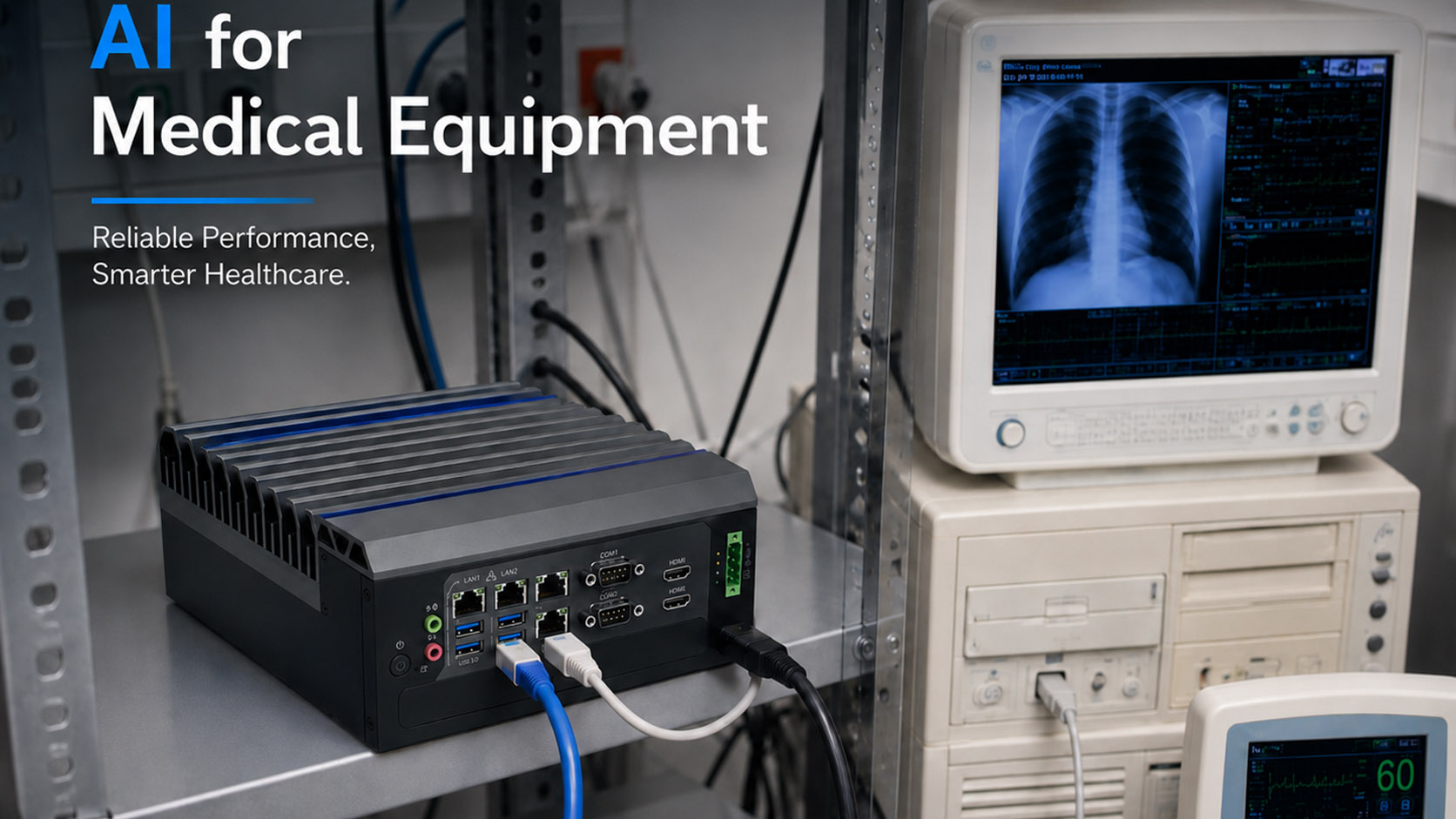
The retrofit question is not which GPU — it is which interfaces already exist, what the AI is allowed to write, and who reviews the result.
Table of Contents
Adding AI to a hospital rarely requires replacing the medical device, PACS, EHR, or clinical workflow. In many projects the more practical architecture is the opposite: keep the existing equipment as the system of record or data source, and add a controlled AI processing layer around it. The goal is not to make old equipment look modern — it is to add a useful processing capability without destabilizing a clinical system that already works.
This is not universally possible. Feasibility depends on the available interfaces, data access, intended use, cybersecurity requirements, workflow, and regulatory context.
And a physically separate AI computer does not automatically sit outside medical-device regulation. With those two caveats fixed, the rest of this guide is a practical architecture for retrofitting AI around existing medical equipment.
1. The hard part is usually the integration layer, not the AI model
Medical AI projects tend to open with hardware questions — which GPU, which LLM, how many TOPS, how much VRAM. Many real projects never get that far, because they fail earlier, at integration.
Where legacy medical AI projects actually stall
The blockers are rarely about model quality. They are about access: no API, a proprietary protocol, an old HL7 feed, awkward DICOM routing, an unsupported database, vendor lock-in, no FHIR endpoint, a screen-only workflow, or cybersecurity restrictions that forbid the connection the project assumed. A 2026 healthcare-IT community discussion captured the pattern exactly — teams planned an AI pilot assuming an API layer existed, then discovered the legacy clinical environment never exposed the interfaces they had designed around. Treat that as a real integration pain point, not a technical standard.
In legacy healthcare environments, the integration layer can be harder than the AI model itself.
“Legacy” often means established and validated, not obsolete
Do not read “legacy” as “outdated.” A legacy medical system often has stable clinical function, validated workflows, experienced staff, proven PACS/RIS integration, a long equipment lifecycle, and a high replacement cost. All of that is value, not liability.
2. Replacing the core system can create more risk than adding an AI layer
A full replacement touches far more than the device. It affects the medical equipment, PACS, RIS, EHR, HL7 interfaces, user training, cybersecurity, validation, and downtime — all at once. An AI project meant to add summarization, segmentation, anomaly detection, or workflow assistance can quietly turn into a hospital-wide infrastructure migration.
Don’t turn an AI project into an infrastructure migration
Don’t turn an AI project into an infrastructure replacement project unless replacement is actually required.
If the clinical function still works, the cheaper and safer move is usually to leave it in place and add AI beside it.
3. Start by mapping the existing data interfaces, not choosing a GPU
The first question in a legacy medical AI project is not “which GPU?” It is “what interfaces are already available?” The retrofit is shaped by the data you can reach, so map that before you spec any hardware.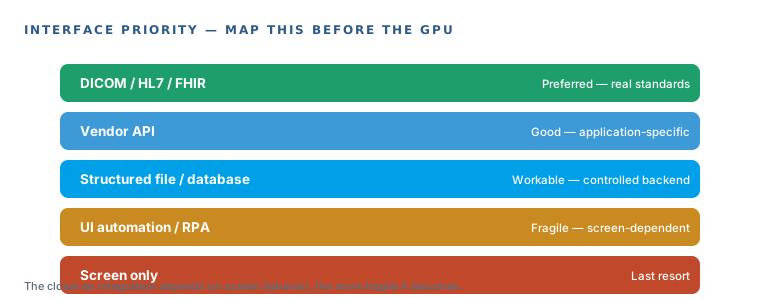
The interface priority — from DICOM to last-resort screen scraping
| Interface | Typical AI integration potential |
|---|---|
| DICOM | Medical imaging |
| DICOMweb | Web-based imaging exchange |
| HL7 v2 | Orders, results, ADT |
| FHIR | Modern healthcare APIs |
| REST / vendor API | Application-specific integration |
| Ethernet / TCP-IP | Standard or proprietary protocol |
| Serial RS-232 / RS-485 | Older instruments and devices |
| File export | CSV / XML / PDF / image |
| Database access | Controlled backend integration |
| Screen only | Last-resort UI automation |
Order of preference runs from a real standard down to a fragile workaround: DICOM / HL7 / FHIR → vendor API → structured file or database → UI automation / RPA → last resort. The closer an integration depends on screen behaviour, the more fragile it becomes — UI automation belongs at the bottom of the list, used only when nothing better exists.
4. DICOM is often the first integration point for medical imaging AI
For imaging systems — CT, MRI, X-ray, ultrasound, mammography, pathology imaging — it is usually more practical to integrate around DICOM than to modify the scanner. The DICOM standard already defines how images and metadata move, so the AI joins an existing pipeline instead of altering a validated device.
A practical DICOM AI retrofit architecture
Inline via PACS
Modality → DICOM → PACS → edge AI computer → AI result → PACS / reporting system
Parallel via DICOM router
Modality → DICOM router → PACS (primary) + edge AI (parallel copy)
The primary imaging path is never in the critical line of the AI.
Adding AI to an imaging workflow often means integrating with DICOM — not modifying the scanner itself.
5. HL7 carries the workflow around the image
DICOM moves images. The workflow around the image — orders, results, patient context — moves over HL7. A 2026 PACS-administrator discussion of a teleradiology workflow described exactly this split: DICOM carried the images, HL7 carried the orders and results, and the project still required field mapping and interface-engine configuration to make them line up.
The AI must know which patient, study and order a result belongs to
An AI result is useless — or dangerous — if it is attached to the wrong study.
The AI system needs to understand not only the image, but which patient, study, order and workflow the result belongs to.
6. FHIR helps, but legacy hospitals are rarely “pure FHIR”
FHIR, the modern HL7 API standard, genuinely reduces integration friction. It does not, on its own, solve legacy integration. Real deployments still need vendor-specific mapping, conditional logic, translation, normalization, HL7 conversion, and interface-engine work.
Medical device interoperability is still an active problem in 2026
The gap is not a sign that the standards failed. HL7 launched the Caliper FHIR Accelerator in 2026 specifically to advance medical and personal-health device interoperability — evidence that the industry is still actively working the problem.
The need for an AI integration layer is not a sign that healthcare standards have failed; it reflects how heterogeneous real medical environments still are.
7. The edge AI computer can act as the integration layer
This is the core architecture of the whole guide: position the edge AI computer as a processing and interoperability layer between the legacy equipment and the modern AI workflow — not as a replacement for the medical device.
Sitting between the legacy device’s existing interface and the hospital network (PACS/EHR), an edge AI computer can perform protocol conversion, data preprocessing, AI inference, local buffering, a local database, event generation, result formatting, and network-boundary control. It becomes the medical AI middleware — the gateway that lets old equipment participate in an AI workflow without being modified.
Keep the existing device as the system of record
The role split matters. The existing medical system stays the system of record; the AI layer is a processing and assistance layer.
The AI layer should initially complement the existing system rather than become its new control plane.
8. Read-only integration is usually the safest first step
The lowest-risk way to start a retrofit is to read, not write. The AI reads data from the legacy system, produces a separate result or draft, and hands it to a human for review — without ever writing back into the clinical system. That lets the team validate data quality, model quality, latency, workflow value, user acceptance, and operational stability before anything touches the record.
Add write-back only after the workflow is validated
Write-back — returning AI output into the clinical system over HL7, FHIR, or DICOM — is a different risk class, and it comes later. It requires careful handling of patient matching, order matching, field mapping, permissions, audit, error handling, duplicate prevention, and rollback. Treat read-only and write-back as two distinct stages, not one feature.
9. Interoperability is not the same as semantic normalization
Getting the data out is often the easy half. Understanding what it means is the hard half. A single clinical concept can appear as Heart Rate, HR, HeartRate, Pulse, or Vitals.HR across systems, and the AI layer has to know those are the same thing.
Interoperability without semantic normalization can still produce unreliable AI inputs.
Bad input data is a medical AI problem before inference starts
Data quality determines AI quality, upstream of the model. Missing data, duplicates, incorrect mapping, stale values, wrong-patient association, inconsistent units, and incomplete context are all problems the retrofit has to catch before inference — because the model will faithfully process bad input into a bad, confident-looking result.
Patient and study matching must be designed explicitly
Identity is not automatic. AI output usually has to map correctly to a Patient ID, Study Instance UID, Accession Number, order, encounter, device, and timestamp. Identity and context mapping are part of the AI architecture.
10. Human review belongs in the first production workflow
The first production retrofit should keep a person in the loop: existing device → AI processing → AI draft, flag, or measurement → human review → existing clinical workflow. The AI drafts and flags; the clinician decides.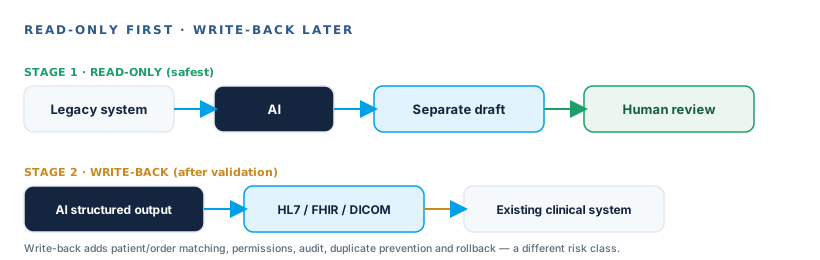
Do not design the first retrofit around autonomous clinical action unless the complete intended use and regulatory path support it.
There is no autonomous diagnosis in this architecture. Where software influences clinical decisions, the U.S. FDA’s guidance on Clinical Decision Support software defines when it is regulated as a medical device — a boundary to check early.
11. Adding AI can change the regulatory context, box or no box
A separate box is not a regulatory escape hatch. Adding AI can change intended use, turn advisory output into controlling output, influence clinical decisions, write back into the system, or alter the behaviour of the original device.
A physically separate AI computer can reduce the amount of original hardware being modified, but regulatory impact depends on the software function and intended use — not only on where the computer is installed.
12. An AI retrofit is also a cybersecurity retrofit
Adding an edge AI computer adds attack surface: Ethernet, a Linux or Windows OS, GPU drivers, APIs, remote management, containers, and additional credentials. Every one of those has to be governed. Ask about network segmentation, firewalling, Secure Boot, TPM, disk encryption, patch strategy, remote access, credential management, audit logging, and recovery.
The FDA’s medical-device cybersecurity guidance treats security as a lifecycle responsibility, and in a retrofit that responsibility is new work you are introducing — budget it into the project rather than discovering it at the security review.
13. Narrow the pilot to one device, one department, one AI task
A retrofit that tries to do everything at once usually does nothing safely. A practical pilot narrows to one device, one modality, one department, one data type, and one AI task — read-only, with human review — so the team can prove value and stability before expanding.
Three low-risk pilot examples
Medical report summarization
Legacy EHR export → local AI → draft summary → doctor review
Reading time is saved before the appointment; the clinician still approves every summary.
Imaging segmentation
PACS → DICOM → edge AI → segmentation result → PACS or viewer
The modality is untouched. A radiologist validates the overlay before it counts for anything.
Device anomaly monitoring
Legacy device → data interface → edge AI → alert → human response
Read-only telemetry watching, ending in a person deciding what to do about the alert.
14. A practical four-layer medical AI retrofit architecture
Most successful retrofits resolve into four layers, top to bottom: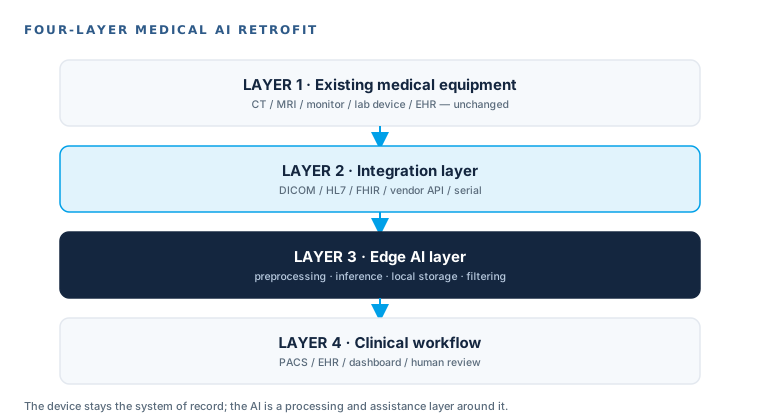
- 1Existing medical equipmentCT, MRI, patient monitor, lab device, or EHR. Unchanged.
- 2Integration layerDICOM, HL7, FHIR, vendor API, or serial. How data gets in and out.
- 3Edge AI layerPreprocessing, AI inference, local storage, and data filtering, on the edge AI computer.
- 4Clinical workflowPACS, EHR, dashboard, and human review, where the result lands.
15. Three ways to add AI without replacing the core equipment
Architecture A — parallel AI observer
Legacy device data → edge AI (read-only) → separate AI result
Lowest workflow risk. Nothing is written back. The right shape for a first pilot.
Architecture B — AI middleware
Legacy device → integration layer → AI processing → structured output back to PACS / EHR
Higher integration complexity: patient and order mapping, field mapping, and validation all become project work.
Architecture C — hybrid edge + cloud gateway
Legacy device → edge AI (sensitive processing local) → selected data → cloud model
Use when a large model is genuinely required, with controlled and documented data movement.
16. When a retrofit is not the right answer
“Keep the old equipment” should not become its own dogma. A retrofit is the wrong approach when no usable data interface exists, the vendor explicitly blocks access, an unsupported OS creates unacceptable security risk, the hardware cannot support the required workload, integration would alter safety-critical behaviour, the data quality is too poor to trust, a replacement is already planned, or the regulatory burden exceeds the expected value.
“Keep the old equipment” should not become another dogma.
Sometimes replacement genuinely is the right call. The point is to decide it deliberately, not by default.
17. How to evaluate a legacy medical AI project
Run the project through these before committing to hardware or a model:
| Area | Questions |
|---|---|
| Existing device | Model, year, OS, and clinical function? |
| Data interface | DICOM, HL7, FHIR, vendor API, LAN, or serial? |
| Data type | Image, waveform, text, report, or telemetry? |
| AI task | Summarization, segmentation, detection, or classification? |
| Workflow | Where should the output appear? |
| Write-back | Read-only, or does the result return to the record? |
| Human review | Who approves the result? |
| Network | Hospital VLAN, offline, or cloud allowed? |
| Security | TPM, Secure Boot, encryption, logging? |
| Hardware | CPU, GPU, VRAM, storage? |
| Reliability | What happens when the AI layer fails? |
| Regulatory | Does the intended use change? |
| Lifecycle | How long must the retrofit stay supported? |
18. Matching the workload to a medical edge AI computer
Those answers point to a system class for the edge AI computer that sits in the integration layer. Used as general-purpose industrial edge AI computers for workflow assistance with human review, BITECH platforms map to the retrofit like this:
- Read-only observers, anomaly monitoring, light preprocessing → an RK3588-class platform such as the AE-3588 family — fanless, low-noise, with serial and LAN for older device interfaces.
- Vision preprocessing and mid-size inference near the modality → a Jetson-class module such as the AE-NJ60BT.
- DICOM imaging AI or local LLM document work needing discrete VRAM → an x86 + RTX MXM platform such as the AE-760EBT, with dual/segmented LAN and serial interfaces to bridge legacy equipment, plus sustained-load cooling and a multi-year lifecycle.
Two boundaries stay explicit. These are general-purpose industrial computers, not cleared medical devices — where a project requires a certified medical device, medical-device certification (for example IEC 60601-1) and the associated regulatory validation are separate requirements to confirm for that deployment. And adding AI can itself change the regulatory context, regardless of which computer runs it. The hardware is the integration layer, not a regulatory shortcut.
Bottom line: a good retrofit leaves the existing workflow more stable, not less
The objective is not to make old equipment look modern. It is to add a useful processing capability without unnecessarily destabilizing a clinical system that already works.
A successful retrofit keeps the existing device doing what it already does well, adds AI where it provides measurable value, and creates the smallest possible new integration and cybersecurity boundary.
Start read-only. Keep a human in the loop. Map identity and interfaces before choosing hardware. Design a failure mode. And add write-back and autonomy only when the workflow, the validation, and the regulatory path all support it.
Edge AI · Medical Retrofit
Frequently asked questions
-
Not always. In many projects the practical architecture is to keep the existing device as the system of record and add a controlled AI layer around it — but feasibility depends on the available interfaces, data access, intended use, cybersecurity requirements, workflow and regulatory context. Sometimes replacement genuinely is the right call.
-
Usually the integration layer, not the AI model. Real projects stall on missing APIs, proprietary protocols, old HL7 feeds, DICOM routing, unsupported databases, vendor lock-in, no FHIR endpoint, screen-only workflows, or cybersecurity restrictions. In legacy healthcare environments, the integration layer can be harder than the AI model itself.
-
It acts as an integration layer, not a replacement for the scanner. A practical flow is modality → DICOM → PACS → edge AI computer → result back to PACS or reporting; a routing variant forwards studies to both PACS and the edge AI in parallel so the primary imaging path is never in the AI’s critical line. Adding AI to imaging often means integrating with DICOM, not modifying the device.
-
Start read-only. The safest first step reads data, produces a separate draft, and sends it to a human — without writing to the record. Add write-back only after the workflow is validated, because it introduces patient/order matching, permissions, audit, duplicate prevention and rollback, which is a different risk class.
-
No, not automatically. A physically separate AI computer can reduce how much original hardware is modified, but regulatory impact depends on the software function and intended use — not only on where the computer is installed. Adding AI can change intended use or turn advisory output into controlling output, which may bring it into scope.
-
Design a failure mode before deployment. For an assistive retrofit, the AI going offline should not stop the core equipment — a bypass architecture keeps the legacy device feeding the existing system directly while the AI runs on a parallel branch. AI failure should not automatically mean core-equipment failure.
-
The platforms referenced are general-purpose industrial edge AI computers used as the integration layer for workflow assistance with human review. Where a certified medical device is required, medical-device certification (for example IEC 60601-1) and the associated regulatory validation are separate requirements to confirm per deployment. The hardware is the integration layer, not a regulatory shortcut.
This content is for architecture and infrastructure planning only. It is not legal, compliance or clinical advice; medical-device certification, intended-use classification and HIPAA compliance must be confirmed by qualified specialists for each deployment.
Related
The edge computer that sits in the integration layer
A retrofit adds a controlled AI layer around existing equipment. These general-purpose industrial edge AI computers serve as that integration layer — protocol bridge, local inference, network boundary — for workflow assistance with human review. Certified medical devices require separate certification (e.g. IEC 60601-1) per deployment.
Edge-AI platforms (general-purpose industrial)
Solutions
Engineering & guides
These are general-purpose industrial edge AI computers used as an integration layer for workflow assistance with human review — not cleared medical devices. Adding AI can change the regulatory context; medical-device certification and HIPAA compliance must be confirmed by qualified specialists for each deployment.
Standards, regulatory and cybersecurity points reference official sources: the DICOM standard; HL7 FHIR, including the FHIR overview and the 2026 HL7 Caliper FHIR Accelerator for medical-device interoperability; and U.S. FDA guidance on Clinical Decision Support software and on medical-device cybersecurity. Healthcare-IT community discussions (r/HealthTech, r/healthIT, r/PACSAdmin) are cited as real-world integration pain points — community signals, not standards or benchmark data. Nothing here is a compliance determination or clinical advice; medical-device certification, intended-use classification, and HIPAA compliance must be confirmed by qualified specialists for each deployment.