
How Much VRAM Do You Need for a Local LLM? 8GB vs 16GB vs 24GB
Size VRAM for the workload you will actually run — model weights plus KV cache, context, runtime and companion models — not for the smallest card that loads the model.

VRAM decides what fits; the enclosure and thermal path decide what keeps running.
Table of Contents
The wrong way to size VRAM is to find the smallest card that lets the model load, then buy it. Loading is the easy part. What decides whether the system is usable is everything that sits in memory alongside the weights: the KV cache, the context you actually feed it, runtime overhead, a vision encoder, companion models, batch size, other services on the box, and whatever the display stack already reserves.
The real question is not “does the model fit in 8, 16 or 24GB?” It is: how much VRAM does your workload need to run at the context length your application requires, at a speed you can live with?
This guide answers by workload, not by model name. Pinning “8GB = model X” ages badly — a new quantization or a longer context changes the answer overnight.
1. Model weights are only the first line of the VRAM budget
Before comparing tiers, get the memory model straight. On a running system VRAM is consumed by eight things, and the weights are only one of them.
Model weights
The starting point — and the only figure most spec comparisons quote.
KV cache
Grows with context length and is held in VRAM, not system RAM.
Active context
8K, 32K or 100K+ tokens is a design decision with a memory price.
Runtime overhead
The inference engine’s own buffers, allocators and workspace.
Vision encoder
Multimodal models carry an image tower on top of the language weights.
Embeddings / companion models
RAG stacks usually keep an embedding model resident too.
Batch processing
Concurrency multiplies the KV cache, not just the compute load.
OS and display stack
A 16GB card does not hand 16GB to the model — Windows reserves a slice.
A model fitting into VRAM does not mean the whole workload fits into VRAM.
Context length costs more memory than most buyers budget for
Asking “does the model fit?” answers half the question. The other half is: at what context — 8K, 16K, 32K, 64K, 100K+? That matters most for RAG, medical records, technical manuals, code repositories, long-document summarization and multi-turn agent workflows, all of which push context and the KV cache far past the idle model.
A card sold as 16GB does not hand 16GB to the model
The OS and display stack take a slice, and that slice matters most exactly when the model is already near the ceiling. On Windows especially, reserved GPU memory is why the nominal number and the usable number do not match.
2. 8GB runs narrow workloads well — and stalls when the job grows
Treat 8GB (an RTX 4060-class card) as a real entry point, not an obsolete one. It handles focused local AI work: small assistants, summarization, classification, lightweight coding help, basic local RAG, document processing, local automation, proof-of-concept development and smaller specialized models. What actually runs depends on architecture, quantization, context length and software stack — not on the 8GB figure alone.
It gets tight with larger dense models, advanced coding models, long context, complex agents, several AI services at once, larger multimodal models or heavier concurrency. The usual responses are stronger quantization, CPU offloading, reduced context, or a smaller model.
8GB is a useful entry point when the workload is narrow, the model size is controlled, and maximum model capability is not the goal.
3. 16GB doubles your options and still makes you negotiate with memory
The community has a name for this tier: “16GB VRAM purgatory.” Against 8GB it buys real flexibility — larger quantized models, better quantization quality, longer context, a bigger KV cache, less CPU offloading, room to experiment with multimodal. Moving from 8GB to 16GB is a meaningful upgrade.
You still manage memory to make larger models practical: Q4-class quantization, a quantized KV cache, trimmed context, components moved to the CPU, smaller batches, or closing other GPU-using applications.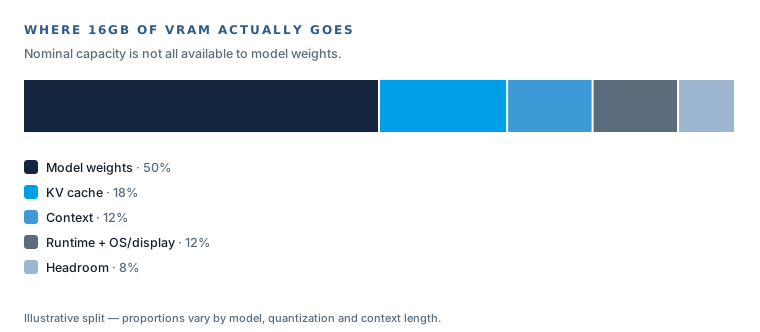
The LLM is rarely the only workload on the box
Agent systems also run browsers, IDEs, embedding models, vector databases, tool servers and secondary models — often with larger context on top. There is a large difference between standalone chat inference and a complete local AI application stack, and 16GB feels very different depending on which one you are running.
4. 24GB buys fewer compromises, not more tokens per second
24GB means larger models, less aggressive quantization, longer context, a bigger KV cache, less CPU offload, more practical RAG, room for multimodal work and slack during development. The benefit is fewer compromises — not, by itself, higher inference speed.
That headroom suits work where the local LLM is a serious part of the system: larger coding assistants, enterprise knowledge assistants, larger local RAG, medical-document AI, complex agent workflows, multimodal inference, and local development and validation.
24GB is not “enough for everything.” Very large models, high-precision weights, very long contexts, several resident models, many concurrent users or large multimodal systems all exceed it. The honest next step is 32GB, 48GB, multi-GPU, unified-memory systems or server-class GPUs.
5. 8GB vs 16GB vs 24GB, compared by workload rather than model name
| Requirement | 8GB | 16GB | 24GB |
|---|---|---|---|
| Small local assistant | Good | Excellent | Excellent |
| Summarization | Good | Excellent | Excellent |
| Small RAG | Good | Very good | Excellent |
| Larger RAG | Limited | Good | Very good |
| Coding assistant | Basic–Good | Good | Very good |
| Complex agents | Limited | Better | Better headroom |
| Long context | Limited | Medium | Better |
| Larger models | Limited | Medium | Much better |
| Quantization flexibility | Low | Medium | Higher |
| CPU offloading need | Higher | Medium | Lower |
| Entry cost | Lowest | Medium | Highest |
A workload guide, not a compatibility guarantee — what actually runs depends on model architecture, quantization, context length and the software stack.
6. Quantization changes the requirement more than the card does
Quantization is the lever that moves every row in that table. Higher precision means more VRAM and potentially better fidelity, so fewer models fit; lower precision means less VRAM, so larger models may fit, with quality and speed trade-offs that depend on the model and the method. Q4, Q5, Q6, Q8, IQ4 and a quantized KV cache all appear constantly in community threads — none is universally best.
Never discuss whether a model “fits” without stating the quantization and the context in the same breath.
7. The same model loads at 8K, strains at 32K and fails at 64K
This is what separates real sizing from a spec-sheet comparison. A model that loads fine can fail once you raise the context:
- Loads at 8K context — fine.
- Raised to 32K — memory pressure.
- Raised to 64K — possible out-of-memory.
Exact numbers depend on model and runtime, but the principle holds: the KV cache grows with context, and it grows in VRAM. The number that matters is weights plus KV cache plus context plus runtime — loading the model is not the same as running the workload.
8. CPU offload lets you run a bigger model, at a slower speed
System RAM is part of the local-LLM architecture, not an afterthought. With CPU offloading a model runs across GPU VRAM and system RAM instead of fitting entirely in the GPU, so you can run models larger than VRAM alone allows. The catch is latency: PCIe transfers, CPU load and slower token generation.
A hardware claim therefore has to distinguish three states — the model can technically run, the model runs primarily in GPU memory, and the model runs at a useful target speed. “Supports model X” without stating memory and offload conditions is close to meaningless.
9. VRAM sets capacity; compute and bandwidth set tokens per second
| More VRAM lets you… | More GPU compute + bandwidth lets you… |
|---|---|
| Run a larger model | Generate more tokens per second |
| Use higher-quality quantization | Run more concurrent inference |
| Hold a longer context and bigger KV cache | Lower per-request latency |
| Offload less to the CPU | Sustain throughput under load |
A GPU with more VRAM does not automatically run faster than a quicker GPU with less VRAM. Multi-GPU builders add cards mainly to raise total memory, improve quantization or extend context — not because throughput scales linearly. Specify capacity and speed as two separate requirements.
10. Multi-GPU raises total VRAM and adds power, cooling and integration debt
Multi-GPU can split a model across cards, raise total VRAM, allow better quantization, extend context and reduce CPU offload. It also adds PCIe-lane pressure, chassis size, power-supply load, cooling load, software-support requirements, model-parallelism complexity, GPU-to-GPU transfer overhead and integration work. On a home bench you can throw cards and fans at the problem. In a deployed system every one of those is a constraint you must design around.
11. In a cabinet, a vehicle or a clinical room, three constraints re-rank the tiers
Single-GPU beats multi-card once the enclosure is fixed
A deployed edge system has a fixed enclosure, a sealed thermal path, a power budget and a serviceability plan. One well-integrated GPU with the right VRAM is almost always a better architecture than three cards you then have to cool and power inside a box. Size the VRAM so you can stay single-GPU.
Discrete VRAM and unified memory are different budgets
On x86 plus a discrete GPU, VRAM is a fixed, dedicated pool. On a Jetson-class platform memory is unified — GPU/NPU and CPU share one LPDDR pool, so “VRAM” and system RAM come out of the same budget. Unified memory is efficient and compact for vision and mid-size inference; a discrete GPU gives a larger dedicated pool when the local LLM is the primary workload.
Sustained clocks, not peak benchmarks, decide real throughput
VRAM decides what fits; the GPU and its cooling decide what throughput you hold over hours. On a 24/7 platform the number worth trusting is measured under sustained load in validation, not a peak figure from a short benchmark.
Mapped to real edge hardware
- Small, focused edge LLM or vision inference — an NPU or unified-memory platform (RK3588-class) is compact, fanless-friendly and efficient when the model is controlled and the context bounded. See the RK3588 selection guide.
- Mid-size inference with unified memory — a Jetson Orin module such as AE-NJ60BT shares one memory pool across compute and system; plan VRAM and system RAM as a single budget.
- Serious local LLM with dedicated discrete VRAM — an x86-plus-RTX-MXM platform such as AE-760EBT gives a dedicated GPU VRAM pool in a compact, thermally validated enclosure built to hold clocks under sustained load.
12. Pick the tier from the workload, then confirm the model fits it
Choose 8GB when
models are small, the assistant is narrow-purpose, RAG is simple, the task is classification, summarization or basic automation, it is a proof of concept, or cost and power are strictly limited.
Choose 16GB when
you need a larger local assistant, stronger coding, moderate RAG, more context, some multimodal or agent work. Expect to keep tuning memory.
Choose 24GB when
the local LLM is a primary workload — larger RAG, larger coding models, medical-document AI, long context, complex agents, higher-quality quantization and less CPU offload.
Go above 24GB when
you run very large models, several resident models, many concurrent users, large multimodal systems, or enterprise inference. Paths: 32GB, 48GB, multi-GPU, server GPUs, large unified-memory systems.
13. Collect these four groups of answers before anyone names a GPU
Model
- Model name and parameter size
- Dense or MoE architecture
- Multimodal or text-only
Inference
- Quantization (Q4 / Q5 / Q8 / IQ4)
- Context length at production, not demo
- Target tokens per second
- Concurrent users and batch size
Application
- Chat, RAG, coding, agent workflows
- Medical documents, vision, voice or multimodal
- Companion models resident at the same time
System
- System RAM and NVMe capacity
- Operating system and 24/7 duty cycle
- Thermal environment and power limit
- Network, and whether it must run fully offline
Only after those answers should the system be classified as 8GB / 16GB / 24GB / 48GB+.
Bottom line: size VRAM for the workload, and validate the speed it holds
Do not size VRAM for the smallest configuration that loads the model. Size it for the workload you expect to run.
- 8GB — entry-level local inference for focused workloads.
- 16GB — more flexibility than 8GB, still memory-constrained for demanding LLM work.
- 24GB — a practical starting point for serious local LLM work where model quality, context, RAG and low CPU offload matter.
- Above 24GB — when model size, concurrency, context or multimodal work becomes the dominant requirement.
For an industrial edge AI computer add one line: size the VRAM to stay single-GPU, match the memory model (discrete vs unified) to the workload, and validate that the platform holds its speed under sustained load. That is the difference between a spec that reads well and a system that keeps running in the field.
Frequently asked questions about VRAM sizing
How much VRAM do you need for a local LLM?
Enough for the whole workload, not just the weights — VRAM also holds the KV cache, active context, runtime overhead and OS display usage. 8GB suits small focused models and bounded context; 16GB adds flexibility but still forces trade-offs; 24GB gives more headroom for serious work but isn’t enough for everything. Fit depends on model, quantization and context — not the VRAM number alone.
Is 8GB VRAM enough for a local LLM?
Yes, for focused workloads — small assistants, summarization, classification, lightweight coding, basic RAG. It gets tight with larger models, long context, complex agents or multiple services. A useful entry point, not obsolete.
Why do people call 16GB VRAM the awkward middle ground?
It’s a real step up from 8GB, but you still manage memory constantly — Q4-class quantization, quantized KV cache, reduced context, CPU offload. The community calls it “16GB VRAM purgatory,” and it shrinks fast in a full local AI stack (browsers, IDEs, embeddings, vector DBs).
Does 24GB VRAM run every local LLM?
No. It’s substantially more headroom, but very large models, very long contexts, multiple resident models or many users can still exceed it — pointing to 32GB, 48GB, multi-GPU or unified-memory systems.
Does more VRAM make a local LLM faster?
No. VRAM capacity and inference throughput are different axes. More VRAM lets you run a larger model, use higher-quality quantization, hold a longer context and offload less to the CPU. Tokens per second are driven by GPU compute and memory bandwidth. A GPU with more VRAM does not automatically run faster than a quicker GPU with less VRAM, and adding a second card usually adds capacity and quality rather than linear speed.
How does VRAM sizing differ for an industrial edge AI computer?
A sealed, thermally- and power-constrained edge box favours a compact single GPU sized to the workload. Discrete-GPU platforms give a dedicated VRAM pool; Jetson-class platforms use unified memory shared with system RAM. And sustained throughput under continuous load — not a peak benchmark — is the figure that matters for 24/7.
Is unified memory on a Jetson the same as discrete GPU VRAM?
No. On a Jetson-class module the GPU/NPU and CPU share one LPDDR pool, so VRAM and system RAM come out of the same budget — efficient and compact for vision and mid-size inference. An x86 platform with a discrete MXM GPU gives a dedicated VRAM pool, which is what you want when the local LLM is the primary workload.
ext length and environment
Our engineers will size the GPU, VRAM, system memory, storage and thermal envelope against your real workload — not against a benchmark.
Talk to an EngineerRelated products & guides
Match the VRAM tier to real edge hardware
Once you've sized VRAM to the workload, these BITECH platforms and guides turn "how much VRAM" into a deployable edge AI computer. Discrete VRAM and unified memory are planned differently — pick by the memory model, not just the number.