
MXM GPU Compatibility: Power, BIOS, Cold Plate & Thermal Validation
MXM is modular at the connector. Compatibility is validated at the system level.
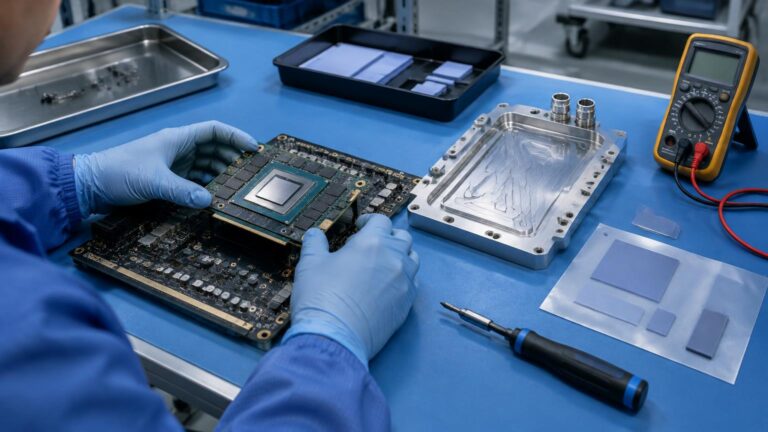
In Short
No — an MXM GPU that fits the connector is not automatically compatible with the system. The module also has to work with the carrier board’s power delivery, the system BIOS and the GPU’s VBIOS, the display routing, the cold plate (for the GPU die, VRAM and VRM), the driver stack, and a sustained application workload. Treat every replacement module as a new configuration candidate until it has passed that validation.
Four limits are easy to confuse and have to be checked separately: the electrical limit (VRM, connectors, input power), the firmware limit (VBIOS and BIOS power policy), the thermal limit (cold plate, airflow or liquid loop, ambient), and the workload (what the application actually demands for 8, 16 or 24 hours).
1. “It fits the MXM slot” is the first check, not the last
A matching MXM Type A or Type B form factor is only the beginning. A working system integrates the GPU module with the carrier board, firmware, power architecture, cooling solution and software stack.
| Layer | Initial check | What validation actually requires |
|---|---|---|
| Mechanical | PCB and connector fit | Component height, mounting, keep-out zones, cold plate |
| Electrical | MXM interface present | Rails, peak current, sequencing, VRM capability |
| PCIe | Device enumerates | Generation, lane count, signal integrity |
| Firmware | GPU detected | BIOS, VBIOS, DCB, display routing |
| Thermal | Cooler touches the GPU | Die, VRAM, VRM, TIM, mounting pressure |
| Software | Driver installs | CUDA, NVML, power management |
| Application | Benchmark starts | Sustained FPS, latency, throughput |
Each row can pass its initial check and still fail in the field.
2. Power: TGP is not the whole power story
The real system budget is GPU power plus transient current, CPU and GPU loading together, DC/DC conversion losses, storage, networking, cameras, I/O, and pumps and fans where present. The engineering question is:
Can the complete power architecture deliver the required GPU load without rail droop, reset, instability or clock collapse?
Measure DC input voltage and current, GPU power, the GPU’s enforced power limit, CPU package power, total system power, peak and average power, and rail stability during workload transitions. A “115 W GPU” therefore does not mean a 115 W system.
3. Power limit versus thermal limit
These are separate budgets:
- Electrical power limit: the carrier board, VRM, connectors and system power policy.
- VBIOS power limit: the GPU module’s firmware and platform configuration.
- Thermal limit: the heatsink or cold plate, airflow or liquid loop, ambient temperature and thermal interfaces.
A real example is the AE-760EBT, which specifies a 115 W Total Graphics Power as a mainboard hard cap. That ceiling is set by the board, not by the heatsink.
Cooling headroom does not automatically remove an electrical or firmware power limit.
A liquid loop can lower temperature while the GPU keeps running at the same firmware-defined power limit.
4. BIOS and VBIOS: a compatible-looking GPU can fail before the OS loads
Before any MXM upgrade, confirm:
5. Why “universal MXM upgrade” is a risky promise
Public engineering discussions of MXM modules keep returning to the same causes: VBIOS and OEM BIOS mismatches, heatsink geometry, power limits, drivers and thermal behavior. MXM is best treated as a serviceable, modular GPU architecture, not as a universal GPU socket.
6. Mechanical compatibility goes beyond Type A versus Type B
Validate PCB dimensions, connector position, mounting holes, component height, keep-out zones, GPU package height, VRAM and VRM location, the cold-plate interface, thermal pad thickness, screw and standoff positions, and board flex.
7. Cold-plate compatibility: the GPU die is not the only heat source
A safe GPU core temperature does not prove the whole MXM module is thermally validated.
Thermal interfaces are a tolerance-stack problem. Pads that are too thick can leave the GPU die with too little contact pressure; pads that are too thin can leave VRAM or VRM with poor contact; uneven screw torque can deform the PCB or load the die unevenly. DVT should inspect:
- Contact imprint and TIM spread
- Pad compression and mounting torque
- GPU, VRAM, VRM and hotspot temperature
- PCB deformation
8. Air cooling and liquid cooling: two different heat paths
AE-760EBT (air-cooled). Heat moves from the GPU through four composite copper heat pipes into an aluminium fin array, cooled by dual 80 mm industrial PWM fans, then to ambient. It suits applications where a validated 115 W-class architecture is enough and internal airflow is acceptable.
AE-960EBT (liquid-cooled). CPU and GPU liquid cold plates feed a coolant loop that carries heat out of the compute zone to a remote radiator or heat exchanger, where external fans reject it.
The compute zone itself is fanless, but the system as a whole is not: the fans move out of the compute zone to the radiator. The AE-960EBT should be described that way, not simply as “fanless.” Liquid cooling is most relevant where the heat needs to go somewhere better than the electronics enclosure: continuous machine vision, outdoor and transportation systems, dust- or oil-prone sites, sealed or semi-sealed enclosures, remote radiator placement, and high sustained GPU utilization. The value is not only a lower peak temperature; it is the ability to reject heat at a more suitable location.
9. Cooling headroom is not electrical headroom
Even when a liquid loop can remove more heat, the system may still be bounded by the carrier-board VRM, input power architecture, connector current, VBIOS, BIOS, the GPU module design or firmware policy. Cooling headroom and electrical headroom are two different engineering budgets.
10. Validate sustained performance, not a short benchmark
Industrial edge AI workloads can run 8, 16 or 24 hours continuously, and a short benchmark does not prove production readiness. A realistic machine-vision chain is:
A typical vision requirement is 2–4 cameras with continuous inference, 24/7 operation in an industrial enclosure with limited maintenance and a long product lifecycle. The question is then: which GPU can sustain the required inference performance within the system’s power, thermal and environmental limits? The same logic applies when a customer asks whether an industrial MXM system can match a desktop GPU: same architecture is not the same TGP, the same cooling or the same sustained performance.
What a real validation run should log
| Group | Log |
|---|---|
| Environment | Ambient temperature, enclosure internal temperature, radiator inlet and outlet temperature |
| GPU | Temperature, hotspot, VRAM temperature, utilization, GPU and memory clocks, instantaneous and average power, enforced power limit, throttling reason |
| CPU | Package power, temperature, sustained frequency, utilization |
| Application: vision | FPS, frame latency, dropped frames, inference latency |
| Application: LLM | Prompt processing rate, tokens/s, VRAM utilization, context size, concurrent sessions |
| Power | DC input voltage and current, total system power, peak power, transient behavior, voltage stability |
| Liquid cooling | Coolant inlet and outlet temperature, flow rate, pump speed, radiator fan speed, pressure where applicable |
11. Where embedded GPUs are heading
NVIDIA’s RTX PRO embedded GPUs, delivered mainly as compact MXM and PCIe modules through embedded partners, now span roughly 35 W to 150 W. The Blackwell-based models use GDDR7 memory, and the higher-tier models add ECC. For an OEM, the key question is not peak TOPS. It is how much sustained application performance the complete system can deliver inside its validated power and thermal envelope. Newer modules raise the stakes on exactly the items above: memory bandwidth, power transients, and tight thermal budgets.
12. AE-760EBT or AE-960EBT?
| AE-760EBT | AE-960EBT | |
|---|---|---|
| Heat path | Heat pipes, fin array, internal PWM fans | CPU and GPU liquid cold plates, coolant loop, remote radiator |
| Fans | Inside the system | On the remote radiator, outside the compute zone |
| GPU power | 115 W Total Graphics Power (mainboard hard cap) | Final GPU TGP under DVT validation |
| Remote heat rejection | No | Yes |
| Custom cold plate | Not the design focus | Available as an OEM/ODM option |
| Operating temperature | −20 °C to +60 °C | 0 °C to +50 °C (under DVT validation) |
| Fits best | Validated 115 W-class workloads with acceptable internal airflow | Sustained GPU heat, protected electronics, dust or oil exposure, remote heat rejection |
Choose on required sustained GPU power, ambient temperature, enclosure constraints, workload and maintenance strategy. The product value in both cases is the validated integration of MXM compute, industrial I/O, power and thermal architecture, not the GPU module alone.
13. Common MXM compatibility mistakes
| Assumption | Reality |
|---|---|
| “The connector fits, so it works.” | BIOS, VBIOS, power and thermal integration can still fail. |
| “A 115 W GPU means 115 W of system power.” | CPU, storage, networking, I/O, conversion losses and transients add to it. |
| “GPU temperature is fine.” | VRAM and VRM can still be the limiting components. |
| “Liquid cooling removes the power limit.” | Cooling and electrical or firmware limits are separate. |
| “Desktop and MXM versions of the same GPU perform the same.” | TGP, thermal design and firmware can differ. |
| “A short benchmark proves stability.” | Industrial workloads need sustained validation. |
| “One cold plate fits every MXM module.” | Component placement and package heights vary. |
14. MXM GPU compatibility checklist
GPU module: Exact part number, manufacturer, architecture, MXM type and revision, VRAM capacity and type, target sustained TGP, maximum power, VBIOS version.
System: CPU, carrier board, PCIe generation and lane configuration, BIOS version, OS, NVIDIA driver, CUDA version.
Power: Input voltage, GPU and system power budgets, peak current, VRM capacity, connector rating, PSU or DC/DC capacity.
Thermal: Cooling type, ambient temperature, GPU die, VRAM and VRM interfaces, cold-plate geometry, TIM specification, maximum component temperatures.
Application: AI model, framework, precision, camera count, FPS, latency, duty cycle, concurrency.
Environment: Indoor or outdoor, dust and oil exposure, vibration, shock, installation orientation, sealing, operating temperature.
15. How BITECH engineers an MXM configuration
Frequently asked questions
Is every MXM 3.1 Type B GPU interchangeable?
No. Type B compatibility is only one part of system compatibility; power, BIOS, VBIOS, cooling and software must also match.
Can I replace an existing MXM GPU with a newer Blackwell module?
Possibly, but the exact module has to be evaluated against the carrier board, power architecture, BIOS and VBIOS, cooling solution and workload before it can be called a supported configuration.
Can liquid cooling raise an MXM GPU's power limit?
No, not by itself. It adds thermal headroom, but electrical and firmware-defined power limits stay in place unless the board and firmware allow more.
Why does nvidia-smi show a lower GPU power limit than I expected?
The enforced limit can come from the GPU module, its VBIOS, the system firmware or the platform power policy, so check each of them, not only the cooling.
Does the cold plate have to cool VRAM and VRM as well as the GPU die?
Depending on the module and power level, yes. GPU die temperature alone is not enough to call a module thermally validated.
Is an MXM GPU field-upgradable?
It can be serviceable and modular, but a replacement module should belong to a validated system configuration rather than be treated as a drop-in part.
Is the AE-960EBT completely fanless?
No. The compute zone is fanless because it relies on liquid cold plates, but the remote radiator uses fans to reject the heat.
Which is better, the AE-760EBT or the AE-960EBT?
Neither in general; choose by sustained GPU power, ambient conditions, enclosure constraints, airflow and workload.
Will your MXM configuration validate?
Send us the constraints, not just a GPU model. We evaluate the complete configuration — power, BIOS/VBIOS, mechanical fit, cooling and sustained workload — rather than qualify the GPU by connector compatibility alone.
Talk to an Engineer →What to send
- Exact MXM GPU part number
- Target sustained GPU power and input voltage
- AI workload, and the FPS, latency or tokens/s you need
- Ambient temperature and enclosure constraints
- Cooling preference and operating duty cycle
- Required product lifecycle
From Validation Theory to a Validated Platform
The two MXM platforms this guide describes, and the guides that cover the neighboring decisions.
Platforms
AE-760EBT — Core i9 + RTX MXM
Air-cooled: four heat pipes, an aluminium fin array and dual PWM fans, with a 115 W graphics-power cap set at the mainboard.
View product → ProductAE-960EBT — Liquid-Cooled MXM
CPU and GPU liquid cold plates, a fanless compute zone, and a remote radiator that carries the fans.
View product → CategoryEdge AI Industrial Computers
The full range: RK3588, Jetson Orin and x86 + RTX MXM platforms.
Browse platforms →Go deeper
MXM vs Desktop GPU for Edge AI Computers
The form-factor decision this guide assumes you have already made.
Read the guide → InsightsAir Cooling vs Liquid Cooling for Edge AI
When the heat path, not the GPU, decides sustained performance.
Read the guide → InsightsThermal Throttling in Edge AI: Peak vs Sustained GPU Performance
Why a short benchmark proves very little about a 24/7 deployment.
Read the guide → InsightsHow Much VRAM for a Local LLM? 8GB vs 16GB vs 24GB
Size the memory first, then validate the module that carries it.
Read the guide →