
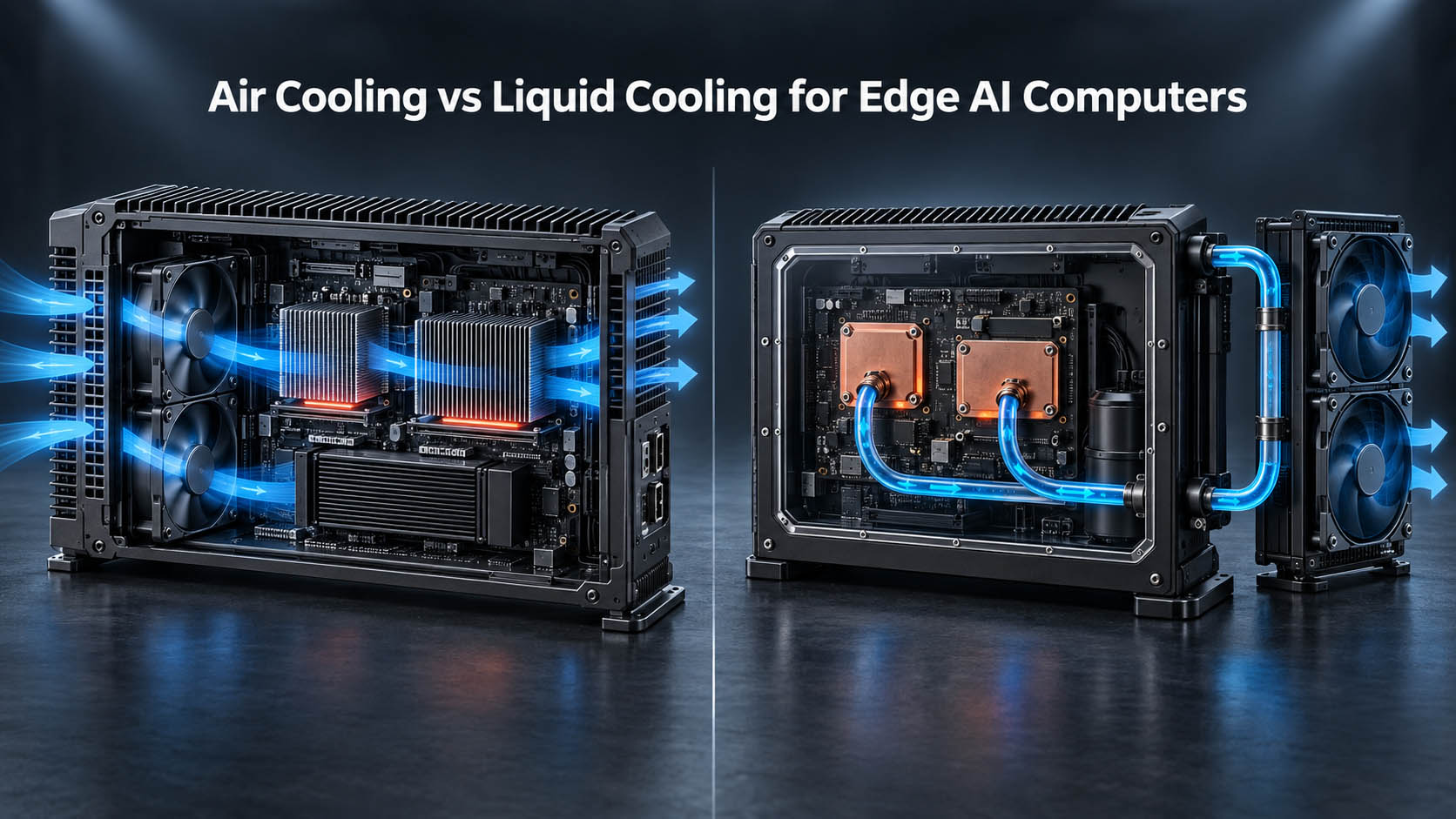
Documentary visualization of an instrumented thermal-validation setup; final AE-960EBT hardware remains under engineering validation.
Liquid cooling does not make heat disappear. It changes where heat can be rejected—and trades one maintenance profile for another.
Most comparisons stop at “liquid cooling handles more heat.” That is true and incomplete. A liquid loop solves an airflow problem by introducing a pump, tubing, fittings and coolant, each with its own failure mode. This is a systems decision: define the heat, define the environment, then choose the architecture that survives the worst real condition.
The real difference is the heat path
Do not start with “fan vs pump.” Start with where the heat actually goes.
Air cooling rejects heat near the source

Air cooling is mechanically simple: no pump, coolant or loop to maintain, and a fan is a commodity service part. Its limitation mirrors that simplicity—it depends on enough clean air moving through the enclosure, and dust follows that airflow path.
Liquid cooling separates transport from rejection

A liquid loop can carry CPU and GPU heat out of a compute compartment with no useful airflow and reject it somewhere that does. That separation—not the presence of water—is the core architectural advantage.
Peak GPU performance is not sustained GPU performance

A GPU that reaches advertised performance for thirty seconds may not hold it for eight hours inside a machine. Track ambient, CPU/GPU temperatures, clocks, power, inference FPS, end-to-end latency, dropped frames and test duration. Thermal problems may appear first as application symptoms—not a thermal fault.
Field reports reveal three distinct thermal situations
Sealed mobile enclosures under sustained load
Jetson-class fleet-camera discussions report dropped frames and reduced inference throughput in sealed, hot, continuously loaded installations. These are engineering signals, not universal benchmarks.
Closed equipment cases
A fan inside a sealed box circulates air, but circulation is not heat rejection. If the enclosure has no path to release that heat, its internal temperature keeps climbing.
A fan moves heat. It does not create a path for heat to leave a sealed enclosure.
Fully passive conduction cooling
Conduction-cooled systems eliminate internal airflow and couple heat to an external cold surface. This third architecture matters even though BITECH’s current line addresses active air cooling with AE-760EBT and liquid cooling with AE-960EBT.

Ask four questions before choosing a cooling architecture
- How much heat must be rejected continuously? Include CPU, GPU, VRAM, VRMs, SSD, NICs, camera interfaces and DC/DC conversion losses.
- What is the worst-case ambient? A lab at 25°C is not a 45°C roadside cabinet or sun-heated agricultural compartment.
- Is clean cooling air actually available? Dust, crop debris, oil mist, metal particles, salt air and humidity constrain open airflow.
- Where can heat actually leave the machine? Evaluate direct venting, chassis conduction and a remote radiator location.
Air cooling is often the better choice
Choose active air cooling when clean airflow is available, vents are acceptable, ambient is controlled, the sustained thermal load fits the chassis, fan replacement is acceptable and remote rejection adds no value. This is the deployment profile for AE-760EBT: an RTX MXM Edge AI platform intended for factory floors, cabinets and machine environments where reliable airflow is a reasonable assumption.
Liquid cooling makes sense when constraints occur together
There is no universal GPU wattage that makes liquid cooling mandatory. It becomes more relevant when sustained discrete-GPU inference, high combined CPU/GPU load, compact volume, limited clean airflow, dust sensitivity, long duty cycles and a viable remote rejection point occur together. Deployment geometry often matters more than GPU wattage alone.
AE-960EBT uses a fanless compute zone and remote radiator

AE-960EBT carries CPU and MXM GPU heat through liquid cold plates to a remote radiator. It does not eliminate airflow; it moves airflow away from the compute electronics.
A fanless compute zone still needs conduction paths, thermal pads and heat spreaders for GPU VRAM and VRM, motherboard VRM, RAM, NVMe, Ethernet controllers, industrial I/O and DC/DC conversion. Cooling the CPU and GPU is not cooling the whole computer.
Liquid cooling introduces its own failure modes
- Pump reliability: a moving part with its own MTBF and a more involved replacement process.
- Leak risk: tubing, fittings and cold-plate seals introduce a failure mode air cooling does not have.
- Coolant aging: corrosion inhibitors and freeze protection may require lifecycle maintenance.
- Vibration resilience: pumps, tubes and fittings must be secured for vehicles, agriculture and heavy machinery.
- Field serviceability: a compromised loop is not the same five-minute event as a commodity fan swap.
Liquid cooling trades airflow dependency for loop reliability. Neither risk profile is automatically better.
Liquid cooling does not automatically mean IP65 or IP67
Water cooling is a thermal architecture. IP rating is a complete-enclosure validation result covering joints, connectors, cable glands, coolant passthroughs, seals, mounting and assembly. AE-960EBT makes no IP65 or IP67 claim until the final enclosure is validated.
Air vs conduction vs liquid cooling
| Requirement | Active air cooling | Conduction cooling | Liquid cooling |
|---|---|---|---|
| Clean airflow available | Strong fit | Not required | Not required |
| No internal cooling fan | No | Yes | Yes, in the compute zone |
| Dust-sensitive compute electronics | Moderate | Strong | Strong |
| High discrete-GPU thermal load | Good, if airflow is sufficient | More difficult at high heat density | Strong candidate |
| Remote heat rejection | No | Limited by the conductive path | Yes |
| Compact compute zone | Moderate | Good at lower heat loads | Strong |
| Service simplicity | Strong | Strong | More complex |
| Pump / coolant loop | No | No | Yes |
| External radiator fans | No | No | Typically yes |
| New failure modes introduced | No | Minimal | Pump, leak, coolant aging |
| Thermal design complexity | Low–medium | Medium | High |
Do not choose liquid cooling because it sounds more sophisticated. Choose it when deployment geometry makes remote heat transport valuable and the project can support its maintenance profile.
MXM cooling must match the specific module
MXM is modular, but the thermal solution is module-specific.
The module, mechanical layout, GPU/VRAM/VRM contact geometry, power budget, BIOS/vBIOS support, cold plate and thermal capacity all have to align. A standard connector does not make every MXM module a drop-in replacement. A shared CPU/GPU loop must also resolve series-versus-parallel flow, pressure drop, freeze protection and coolant service life.
See MXM vs Desktop GPU for Edge AI Computers for the broader mechanical, power and lifecycle trade-offs.
Cooling technology cannot make heat disappear
The radiator still has to reject CPU heat, GPU heat and loop losses. An undersized radiator only reaches equilibrium at an unwanted temperature. Cooling capacity, CPU power limits, GPU TGP and workload profile must be engineered together.
Thermal validation must measure the complete system over time
- Environment: ambient, compute-zone and radiator inlet-air temperatures.
- CPU / GPU: package, GPU and hotspot temperatures; clocks and power.
- Workload: inference FPS, latency, dropped frames, decode, cameras, NVMe and network load.
- Liquid loop: coolant inlet/outlet temperature, flow rate and radiator air inlet/outlet.

A system that looks stable at thirty minutes can behave differently at hour four. Plan production-equivalent testing through the BITECH validation process, not a short peak benchmark.
A practical cooling selection workflow
- Define the sustained CPU + GPU workload.
- Define the worst-case ambient temperature.
- Define enclosure volume, orientation and mounting.
- Check whether clean airflow is available.
- Define dust, moisture and contamination constraints.
- Identify where heat can actually be rejected.
- Compare air, conduction and liquid cooling—including failure modes.
- Build the real mechanical prototype.
- Run sustained thermal validation.
- Freeze the production configuration.
Choose the cooling architecture after defining the deployment environment—not after choosing the GPU.
AE-760EBT vs AE-960EBT: where each architecture fits
| Platform | Cooling architecture | Best fit |
|---|---|---|
| AE-760EBT | Active chassis air cooling | High-performance Edge AI where reliable clean airflow is available |
| AE-960EBT | Fanless CPU/GPU compute zone + liquid cold plates + remote radiator with external fans | High sustained GPU workloads where direct airflow through the compute electronics is limited or undesirable |
AE-960EBT is under engineering validation. Final GPU support, TGP, operating temperature and sustained thermal performance will be published after DVT. This guide does not claim exact temperature reduction, no throttling, IP rating, loop service life, noise level or benchmark numbers ahead of that evidence.
Choose the architecture from the real heat path
Send the sustained workload, model, camera topology, worst ambient, enclosure size, clean-air availability, duty cycle, radiator constraints and—where relevant—the vibration environment. If conventional air cooling is sufficient, that is the simpler answer. For camera-heavy systems, first quantify the workload with the multi-camera vision sizing guide.
Community and developer-forum discussions are used as field signals, not formal benchmarks. NVIDIA documentation informs platform thermal behavior. AE-960EBT-specific figures remain provisional until BITECH DVT is complete.