
Industrial PC vs Commercial Mini PC
An industrial box PC costs 3–5× a mini PC with the same CPU, weaker graphics and less RAM. Part of that premium buys real engineering. Part of it buys a logo. This is how to tell them apart — written by people who sell the expensive one.
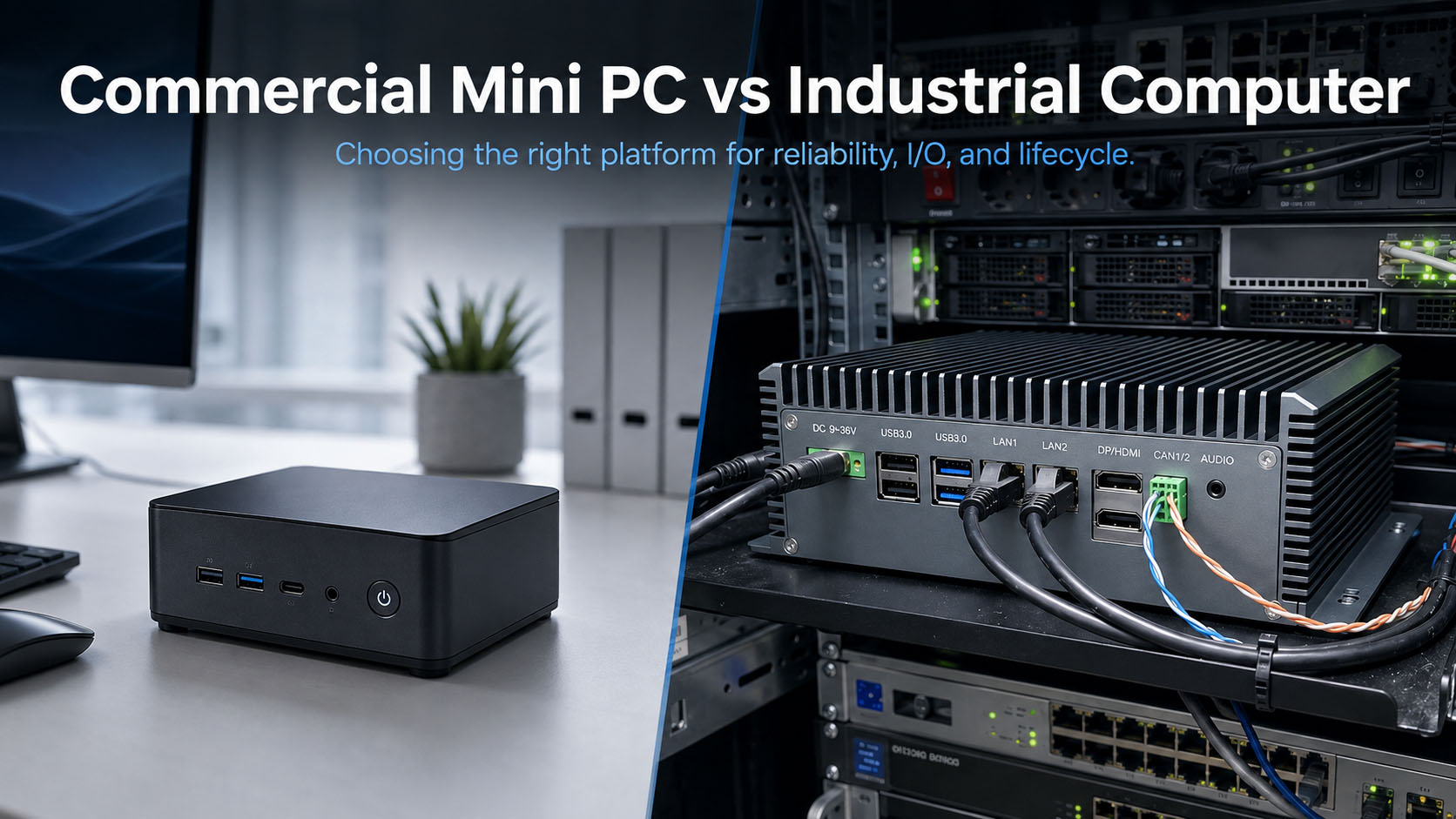
Same CPU, same cabinet. The difference shows up in month eighteen, not on the bench.
Table of Contents
An industrial box PC costs 3–5× a commercial mini PC with the same CPU, weaker graphics, and less RAM. Part of that premium buys real engineering — fanless thermal design, wide-range DC input, native isolated fieldbus, a frozen BOM, an OS you control. Part of it buys a logo.
Quote A
Commercial mini PC or business desktop. Core i5-1235U, 32 GB DDR5, 1 TB NVMe. Around $450.
Quote B
Industrial box PC. Same i5-1235U. 16 GB. 256 GB SATA SSD. Around $1,600.
Same CPU. Less RAM. Slower storage. Weaker display support. Three and a half times the price. The reasonable reaction is that someone is being ripped off. The honest answer is partly yes, partly no — which is why this article starts with the criticisms that are correct.
What you are not paying for
Not a faster CPU
Usually the same silicon, frequently an older generation, often clocked lower to fit a fanless envelope. On raw throughput per dollar the commercial machine wins and it is not close.
Not more RAM or storage
Industrial units ship less of both, because industrial-grade SKUs cost more per GB and a frozen BOM cannot chase whatever DRAM is cheap this quarter.
Not a nicer chassis
The extruded aluminium block is a heatsink doing a job, not industrial design.
Where the complaints are right
Three criticisms that are simply correct. Any vendor who will not say these out loud is not worth listening to on the rest.
The graphics are genuinely weak
Industrial box PCs typically run integrated graphics on a low-TDP CPU, often a generation or two behind. Many units cap at two outputs, so a control room with three or four 4K screens sits outside what a typical fanless U-series unit does comfortably. Anything GPU-accelerated — 3D visualisation, heavy WPF or web rendering, video walls — runs better and cheaper on a commercial machine with a discrete GPU.
If your operator workstation is fundamentally a display problem rather than a control problem, the industrial box may be the wrong tool. In a clean control room, moving operator HMI stations onto standard business desktops is a defensible engineering decision.
Most “the IPC is slow” reports are underspec, not failure
When a SCADA or HMI application runs badly on an industrial PC, the instinct is that industrial hardware is inherently underpowered. Far more often the unit was specified too low for the actual workload — and the same thing would happen on any hardware bought to the same spec.
The pattern is consistent: a project buys the entry model because “it is just an HMI,” then adds a historian, then a few VMs, then more tags than the original sizing assumed. Nothing broke. It was never sized for what it ended up running. Before concluding that industrial hardware cannot keep up, find out whether the bottleneck is CPU single-thread, RAM, or disk.
The price gap is real and sometimes indefensible
A mainstream business desktop can land at roughly a quarter the price of a name-brand industrial PC with comparable or better CPU and graphics. That gap is not entirely engineering — part of it is distribution margin, brand, and a market that historically had little price pressure. Some of the premium buys real engineering and some buys the logo.
1. The thing that actually breaks: thermal
A mini PC dissipates 15–28 W through a small heatsink and a small fan. That fan is a mechanical bearing spinning continuously in whatever air your site has — metal dust, coolant mist, textile fibre, flour, concrete dust.
intake clogs -> airflow drops -> CPU throttles ->
internal ambient rises -> fan spins faster -> clogs faster ->
bearing noise -> seizure or thermal shutdown
Typical time to first failure in a dirty environment: 12–30 months. It almost never shows up on the bench and almost never in year one — which is precisely what makes it expensive. By the time it fails, the unit is out of warranty, in production, and three hours away.
A fanless design moves heat by conduction into the chassis. No intake, no filter, no bearing, no consumable. The cost is engineering: CFD-simulated fin geometry, heat pipes or direct-touch copper, a thermal interface material that does not pump out after thousands of cycles, and a chassis that is structural and thermal simultaneously.
The test that matters is not “does it boot.” It is whether the unit holds sustained full CPU load at your maximum ambient without throttling, for days. Ask any vendor for that number — and ask what ambient it was measured at. A “−20 °C to +60 °C” spec measured in still air at 25 °C tells you very little. Our own procedure is documented in the QC and burn-in process and the validation lab.
2. Windows: three problems that get blamed on each other
A machine reboots for a feature update mid-shift. A driver update breaks a vision library. The golden image that worked on unit 1 fails on unit 21.
Three problems, three different owners.
The OS licence — usually the customer’s call
Windows IoT Enterprise LTSC fixes forced restarts: 10-year servicing, security updates only, no feature upgrades. It is the right SKU for a machine that must not change under you.
It is also two to three times the price of Pro OEM, obtained through OEM distribution, and built on an older kernel that sometimes complicates driver support for new hardware. Many integrators re-image on arrival with their own volume licensing anyway, making whatever shipped on the box a wasted line item.
So most industrial PCs — ours included — ship Windows 11 Pro by default, with LTSC available when a project specifies it.
There is also a fair objection to the whole discussion: unpatched machines are usually a process problem. A plant with no patch window and no change control will have unpatched machines whatever SKU is installed. LTSC does not create a patch process — it makes one possible, by separating security updates from feature updates.
Treating the OS SKU as what separates industrial from consumer hardware is a mistake. It is a licensing decision, not an engineering one.
The driver package — this one is the vendor’s job
Buy a mini PC and you get a machine with drivers installed. What you do not get is a complete driver set you can redeploy in year four, any guarantee it is identical on unit 51 and unit 1, or any warning when the Ethernet PHY changes mid-production.
That last one breaks deployments. A consumer vendor can swap the NIC between production runs and keep the model number. Your golden image then blue-screens on a machine nominally identical to twenty already in the field — and there is no frozen BOM to validate against, because the download page is gone 18 to 24 months after launch.
The question that matters more than the OS SKU: if I rebuild this in year four, can you supply the exact driver package it shipped with? Answer that well and the Windows edition becomes a decision you can make freely.
Ask for Unified Write Filter regardless
UWF works on Pro as well as Enterprise and is underused on both. It redirects writes to a RAM overlay so the system volume is effectively read-only — a hard power cut cannot corrupt the OS, and the machine boots to a known state every time. Costs nothing extra. It just has to be configured, and documented.
What to ask a supplier
- If I rebuild this in year four, can you supply the exact driver package it shipped with?
- Is it validated against a frozen BOM, with a PCN before anything changes?
- Can you supply IoT Enterprise LTSC if the project specifies it?
- Is Unified Write Filter configured and documented?
- Linux equivalents: maintained BSP, pinned kernel version, and who rebuilds it when a component changes.
A supplier who answers the first two well is doing the work. One who only quotes OS SKUs is selling licences.
3. The seven ways people spec this wrong
The third-most-common frustration is not the hardware — it is discovering after deployment that the wrong thing was specified.
Using the datasheet temperature instead of the cabinet ambient
A datasheet says −20 °C to +60 °C and the plant runs at 25 °C, so the engineer moves on. But the spec is ambient at the unit, not room temperature. Inside a sealed steel cabinet with a VFD and a PSU, internal air in July sits 20–25 °C above the room. That 25 °C room is a 50 °C cabinet. Measure the cabinet in summer, door shut, everything running — that is your ambient.
Buying CPU headroom instead of I/O
Projects rarely fail because the CPU was too slow. They fail because there was no second CAN channel, the fourth camera would not fit on the available NICs, or six serial devices had to hang off USB dongles. Count ports before you compare processors.
Comparing i5 versus i7 when the software is single-threaded
SCADA runtimes, HMI clients and many historian and OPC components are bound by single-thread performance, not core count. Establish whether the workload is single-thread bound (prioritise single-core clock), RAM bound (the most common real bottleneck once VMs or a historian appear), disk bound (endurance, IOPS, SATA vs NVMe), or GPU bound (reconsider the fanless platform entirely).
Not counting displays and resolution before anything else
Display requirements come from the operator interface, not the compute, and they are one of the few requirements that disqualify a platform outright. A typical fanless U-series unit handles two independent displays comfortably. Three or four independent outputs, or multiple 4K screens, narrows the field very quickly. Discovering this after the cabinet is designed is expensive.
Confusing burst TDP with sustained TDP
A U-series CPU quoting 15 W base and 55 W turbo delivers that 55 W for a short boost window before the power limit drops back. In a fanless chassis under continuous load you get the sustained number. Ask specifically: what is PL1, and what is the sustained wattage at my ambient?
Paying for an IP rating the cabinet already provides
An IP65 box PC inside an IP54 cabinet is usually wasted money — the cabinet is the sealing boundary, and the box inside needs thermal performance and vibration tolerance instead. A unit mounted openly on a machine frame in a washdown area does need the rating. Decide where the sealing boundary is before you spec ingress protection.
Specifying isolation everywhere, or nowhere
Isolation everywhere adds cost and propagation delay on interfaces that do not need it. Isolation nowhere is worse: when CAN or RS-485 crosses ground references, a ground potential difference flows through your transceiver into the motherboard — intermittent errors first, dead board eventually. Rule of thumb: if the signal leaves the cabinet and terminates on something powered from a different source, isolate it.
Related reading: Isolated vs non-isolated I/O · Industrial panel PC selection guide
4. Supply and configuration consistency
This is the one procurement engineers care about most and spec sheets never mention. A consumer mini PC vendor can change the Ethernet PHY, the DRAM vendor, the SSD controller or the power stage between production runs and keep the same model number. Nothing in the consumer market punishes it.
You find out when unit 51 of 100 will not PXE boot, or your golden image blue-screens on the new NIC, or the machine that passed EMC last year does not this year.
Industrial suppliers with real BOM control freeze the component list after design validation and issue a formal PCN (Product Change Notification) with a last-time-buy window before anything changes. The second half is availability: a commercial mini PC has a market life of roughly 18–24 months, after which the model is gone and the successor has a different board. If you are shipping a machine your customer will run for ten years and expect spares for, that is a structural problem.
What to ask: the committed availability window in years, and the PCN notice period. Vendors doing this properly answer immediately. See lifecycle management for platform-by-platform availability.
5. The last 20%: when no standard product fits
A recurring frustration does not fit neatly into price or reliability: the standard catalogue covers 80% of the requirement and stops. A mobile HMI project shows the shape — a full-HD panel, industrial compute, an integrated camera, HTML/web application deployment, a safety-rated emergency stop, a three-position enabling switch, and a custom keypad layout. Every individual item exists somewhere in some catalogue. The combination exists nowhere.
Assemble from parts
Fastest to a prototype, and you own every integration problem afterwards — enclosure sealing, EMC as an assembled system, safety certification of the e-stop circuit, and sourcing when one part goes EOL. Viable for one or two units. Painful at twenty.
Modify a standard product
Some suppliers will cut a custom panel, change the I/O layout, or integrate a module into an existing validated platform. Lower risk than building from scratch, because the base platform is already qualified. Constrained by what it can physically accommodate.
Full custom design
A carrier board or complete unit designed to your requirement. Highest NRE and longest lead time, but the only route when the requirement has no adjacent product — particularly where safety-rated circuits or specific mechanical envelopes are involved.
The question that decides between them is volume against integration risk. Below roughly 20 units, assembling from parts is usually cheaper even accounting for the pain. Above 100, a modified or custom platform is usually cheaper and lower risk, because integration is done once and validated once rather than repeated per unit. The failure mode to avoid is assembling from parts at a volume where you will have to do it a hundred times — and then owning support for all hundred. See Industrial ODM for how a modified platform runs in practice.
6. The rest of the field-reliability list
Power input
Mini PC: a 19 V barrel jack from an external brick that expects clean power. Industrial: 9–36 V wide range on a locking terminal with reverse-polarity protection, over-voltage clamping and transient suppression. A motor starting on the same feed browns out a 19 V brick; a 24 V bus is 21 V discharged and 29 V charging; and a barrel jack backs out under vibration in a way that looks exactly like a random crash.
Native isolated fieldbus
A USB-to-serial adapter renumbers COM ports when devices are re-plugged, provides no galvanic isolation, and hangs off a USB port as a mechanical failure point. A native controller enumerates at a fixed address and survives reboots.
Component temperature grade
Commercial parts are 0 °C to +70 °C; industrial are −40 °C to +85 °C, and capacitor rated life roughly halves per 10 °C above rating. Consumer SSDs are the sleeper problem — small continuous writes in a logging application burn endurance far faster than the datasheet TBW suggests.
Mechanical
Socketed M.2 and SO-DIMM walk under vibration. The symptom is random reboots or a drive that vanishes, and it is slow to diagnose because reseating fixes it temporarily. Industrial designs use retention brackets, cable-less internal layouts, and validation to MIL-STD-810 methods (commonly 15 G / 11 ms shock, 5–500 Hz at 1 Grms).
BIOS behaviour
Auto power-on after AC loss. Hardware watchdog. Locked boot order. Accessible RTC battery. And on remote units, out-of-band management — the difference between a ten-minute remote fix and a 400 km drive.
Related reading: Vehicle power (9–36 V) design · CAN bus field integration
The actual math
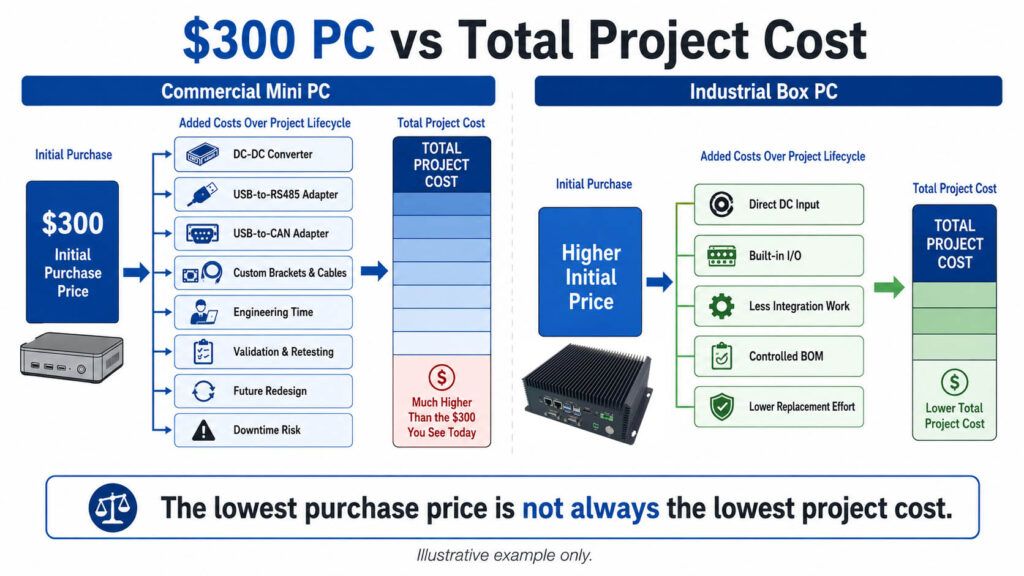
Price-per-unit is the wrong comparison. The numbers below are illustrative — the structure is the point. Run it with your own figures. Scenario: 20 units, production floor, 5-year horizon.
| Cost line | Commercial mini PC | Industrial box PC |
|---|---|---|
| Unit price | $300 | $1,200 |
| 20 units | $6,000 | $24,000 |
| Failures over 5 yr (fan, PSU, SSD) | ~35% → 7 units | ~5% → 1 unit |
| Replacement hardware | $2,100 | $1,200 |
| Field service (4 h @ $120/h incl. travel) | $3,360 | $480 |
| Downtime (avg 3 h @ $500/h) | $10,500 | $1,500 |
| USB-serial adapters + spares | $1,000 | $0 |
| Windows feature-update incidents (2 × 2 h line stop) | $2,000 | $0 |
| Underspec remediation (1 unit replaced mid-project) | $300 | $1,200 |
| Requalification after silent BOM change (1 event) | $6,000 | $0 |
| Model EOL mid-programme — re-image + revalidate | $8,000 | $0 |
| Additional cost | $33,260 | $4,380 |
| 5-year total | $39,260 | $28,380 |
Note the underspec row runs against the industrial unit — replacing an undersized industrial PC costs more than replacing an undersized mini PC. That is a real cost and it belongs in the table. The gap still closes and reverses, and the model is generous to the mini PC: one BOM change, one EOL event, two Windows incidents, and no warranty or reputation cost with your end customer.
Two variables dominate everything else: your hourly cost of downtime, and whether a failure means someone gets in a vehicle. If downtime costs nothing and the machine is in the next room, the mini PC wins this math easily. If downtime costs $500/hour and the site is three hours away, the industrial unit pays for itself on the second failure it prevents.
When a commercial mini PC is genuinely the right answer
We manufacture the expensive one. Here are the cases where we would tell you not to buy it.
Clean, climate-controlled, on a UPS
Server room, control room, office cabinet. Ambient under 30 °C, clean air, conditioned power — most of the premium buys protection against threats that are not present.
The requirement is display-led, not control-led
Multiple high-resolution screens, 3D visualisation, video wall. A commercial machine with a discrete GPU does this better and cheaper, and no amount of ruggedisation changes that.
Short deployment life, accessible location
A two-year pilot, a demo rig, a lab bench. Buy two, keep one as a cold spare, still well ahead.
Failure is genuinely cheap
If a unit dying means someone walks over and swaps it in ten minutes with no production impact, buy on price and keep spares on the shelf. Redundancy is often cheaper than ruggedisation — a legitimate engineering strategy, not a compromise.
Where the line actually is
Not “factory versus office.” These seven questions:
- 1
Is there a fan, and is the air clean?
Dirty air plus a fan is a scheduled failure.
- 2
Is the power conditioned?
If a motor on the same feed can dip your rail, a 19 V brick is a liability.
- 3
Does anything talk over RS-485, RS-232 or CAN — and does it cross a ground boundary?
If yes, native isolated ports, not USB dongles.
- 4
Is the workload display-bound or control-bound?
Display-bound points away from a fanless industrial box.
- 5
Can the supplier give you the exact driver package in year four?
This matters more than which Windows edition is preinstalled. If neither can, the rebuild problem is yours either way.
- 6
Will this still need support in five years?
If yes, you need BOM control and a supplier who will still exist.
- 7
What does one hour of downtime cost, and how far away is the site?
Multiply those two numbers. That product decides more than any spec sheet.
Three or more “yes” answers and the industrial unit is cheaper over the programme. Zero or one, and you are buying insurance against risks your deployment does not have.
Frequently asked questions
Why does an industrial PC have a slower CPU than a mini PC at 3x the price?
Because it has to run that CPU at sustained full load without a fan, inside a sealed chassis, at an ambient that may reach 55 °C. A fanless thermal envelope caps sustained TDP. A mini PC’s higher clock is a short-burst number achieved with active cooling in a 25 °C room — under continuous industrial load in a hot cabinet the gap narrows substantially and sometimes inverts once the mini PC starts throttling.
My SCADA runs slowly on an industrial PC. Is the hardware failing?
Usually not. Most reports of a slow IPC turn out to be specification rather than failure — the unit was sized for the original scope and the scope grew. Check what the application is bound by before replacing anything: single-thread CPU, RAM, or disk. Genuine hardware failure presents differently — intermittent faults, new thermal throttling, errors in logs. Consistent slowness from day one is a sizing problem.
Should I compare i5 versus i7 for a SCADA or HMI machine?
It is close to the least useful comparison you can make. Most SCADA runtimes, HMI clients and OPC components are bound by single-thread performance, so a CPU with a higher single-core boost and fewer cores often feels faster on the screen operators watch. Establish whether the workload is single-thread, RAM, disk or GPU bound first.
Can an industrial PC drive four independent 4K displays?
Some can, most cannot comfortably. A typical fanless U-series unit with integrated graphics handles two independent displays well. Three or four independent outputs, especially at 4K, requires either a platform specified for it or a discrete GPU — and a discrete GPU generally means active cooling, which changes the enclosure requirements.
Does buying an industrial PC solve the Windows Update reboot problem?
Not automatically. The fix is the OS SKU, not the chassis. Windows IoT Enterprise LTSC provides 10-year servicing with security updates only, no feature updates and no forced restarts. An industrial PC shipped with Windows 11 Pro OEM has exactly the same reboot exposure as a mini PC. Ask whether Unified Write Filter is configured and whether the supplier will hold your golden image against a frozen BOM.
Can I just put a commercial mini PC in an IP65 enclosure?
You can, but it changes the problem rather than solving it. A sealed enclosure has no air exchange, so the fan circulates the same hot air until the CPU throttles. Sealed enclosures work with conduction-cooled fanless units that use the enclosure as a thermal path. Otherwise budget for a cabinet cooler or heat exchanger — that cost often exceeds the price difference you were avoiding.
What operating temperature should I actually specify?
Measure your cabinet ambient in summer, door closed, all equipment running, rather than using room temperature. A sealed steel cabinet containing a VFD and a power supply commonly sits 20 to 25 °C above the room, so a 25 °C plant can present a 50 °C ambient to the PC. Datasheet temperature specifications are ambient at the unit, not the ambient of the building.
Is the word industrial on a product listing meaningful?
Not by itself — it is not a certified term. Ask for five things: the sustained-load thermal result with the ambient it was measured at, the DC input range and transient protection standard, whether the BOM is frozen with formal PCN, the committed availability window in years, and whether Windows IoT Enterprise LTSC is available. Vendors doing real industrial engineering answer all five quickly.
How much of the price difference is the enclosure?
Less than most people assume. On a properly engineered unit the mechanical enclosure is typically 15 to 25 percent of BOM cost. The larger shares go to temperature-rated components, the isolated I/O section, the wide-range power stage with transient protection, and the validation and per-unit test programme. Some of the remaining gap, on some products, is brand and distribution margin rather than engineering.
What if no standard product meets my requirement?
Common on custom HMI and mobile equipment. Three routes exist: assemble from parts, modify a standard validated platform, or commission a full custom design. Volume decides — below roughly 20 units assembling from parts is usually cheaper despite the integration work, while above 100 units a modified or custom platform is normally cheaper and lower risk because integration is done and validated once.
Does buying an industrial PC solve the Windows Update reboot problem?
Not on its own, and three things get blamed on each other here.
Forced restarts are an OS licensing question. Windows IoT Enterprise LTSC gives 10-year servicing, security updates only, no forced restarts — but costs two to three times Pro OEM, and many integrators re-image on arrival with their own licensing anyway. Most industrial PCs ship Windows 11 Pro by default with LTSC available on request.
The driver package is the hardware vendor’s responsibility. A complete versioned driver set, validated against a frozen BOM, still available in year four, with a PCN before anything changes. That is where an industrial supplier differs from a consumer one — not in which Windows edition is preinstalled.
Unpatched machines are usually a process problem. LTSC makes a patch process possible; it does not create one.
Separately, Unified Write Filter — available on Pro as well as Enterprise — makes the system volume effectively read-only so a power cut cannot corrupt the OS. Underused, and costs nothing extra.
The short version
The premium on an industrial PC is not performance. Where it is justified, it buys the engineering that keeps a known level of performance available in conditions that would degrade a commercial unit — plus a commitment that the same board, with the same image, is still purchasable in five years. Where it is not justified, it buys a logo.
Whether it is worth paying for is a function of your environment and your cost of downtime, not a matter of principle. Anyone who tells you industrial hardware is always the right answer is selling something. So is anyone who tells you it never is.
Not sure which side of the line you're on?
Send us the environment, the duty cycle, and the failure cost — not a part number. We'll tell you honestly whether a commercial mini PC is enough, or where a standard industrial platform (or a modified one) actually earns its keep.
What to send
- Ambient temperature range & enclosure
- Duty cycle and expected service life
- Display count / I/O / fieldbus needs
- Cost of a field failure, if you know it
Spec It Right the First Time
The platforms and field-reliability guides this comparison points back to.
Platforms built for the failure modes above
Industrial Box PCs
Fanless, conformal-coated, wide-temperature platforms — the thermal and reliability margin a commercial mini PC doesn't carry.
Browse platforms → Product categoryIndustrial Panel PCs
Display-led HMI and control-panel platforms, for the deployments this guide flags as display-led rather than control-led.
Browse platforms → ComparisonAX-234BT vs AX-238BT: Two I/O Philosophies
Same chassis, same thermal envelope, same 9–36V input — four displays and dual CAN, or Intel AMT and a third storage path. Isolated I/O is available as an ODM option on either.
Compare platforms →Engineering guides
Isolated vs Non-Isolated I/O Selection Guide
When native isolated fieldbus is worth the added cost — the exact field-reliability item this guide lists.
Read the guide → EngineeringPowering an Industrial PC in a Vehicle
9–36V wide-input power design — the "Power input" item on this guide's field-reliability list, in depth.
Read the guide → EngineeringCAN Bus Isolation Engineering
Native CAN and isolation, applied specifically to the fieldbus integration this guide references.
Read the guide → InsightsIndustrial Panel PC Selection Guide
How to spec a display-led deployment correctly — the counterpart to this guide's box-PC-focused comparison.
Read the guide → EngineeringQC & Burn-In Testing Process
What "industrial" is supposed to mean on a listing — the testing behind it, not just the label.
Read the guide → EngineeringLifecycle Management & PCN
Supply and configuration consistency over years, not months — the guide's "Supply and configuration consistency" point, expanded.
Read the guide →