
What Is a Fanless Industrial Computer?
The straight definition and thermal design — then the questions that actually decide deployments: lifecycle, fleet OS, legacy compatibility, and ten-year cost.
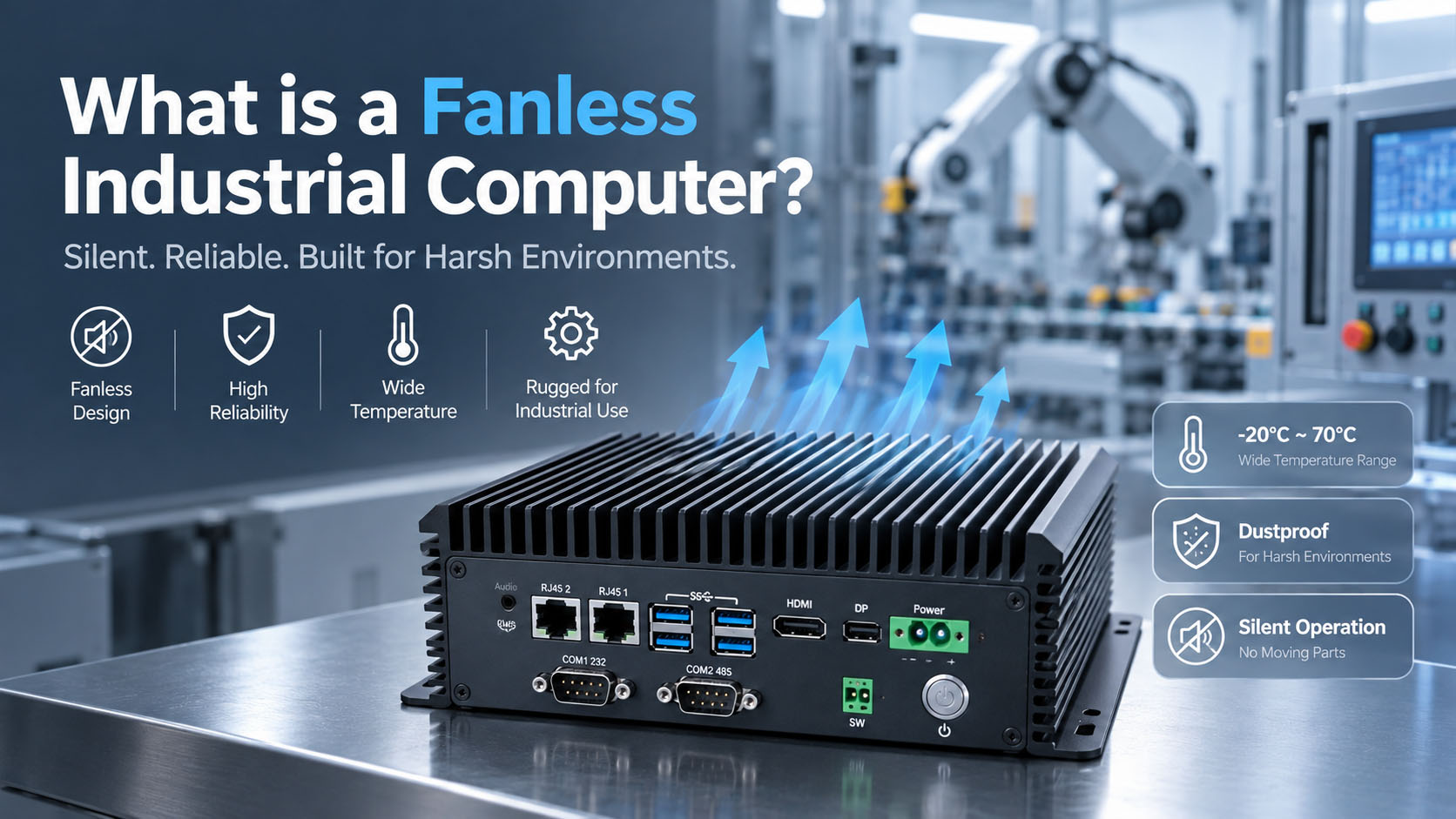
The chassis is the heatsink — and there is no fan to rescue a marginal thermal design.
Table of Contents
“Fanless.” “Industrial.” “Rugged.” Every metal-boxed mini PC wears these words now, and engineers have stopped believing them. In the communities where people actually deploy this hardware, the loudest complaints are not about fans at all — they are about spare parts that vanished, a fleet of OS images nobody can keep consistent, and legacy lines everyone is afraid to touch.
So this guide does two things: the straight definition and design of a fanless industrial computer, and then the part that decides real deployments — whether the platform can survive alongside you for ten years. Fanless is the entry point. Longevity is the real question.
1. What is a fanless industrial computer?
A fanless industrial computer is a rugged, embedded PC that cools itself with no moving fan. Instead of pulling air across a heatsink, it conducts heat out of the processor, through a thermal interface, into the metal chassis itself — built as a large finned aluminium heatsink — and radiates it to the surrounding air.
Removing the fan removes the single most failure-prone moving part in a computer, and it seals the enclosure against the dust, particulates, moisture, and airborne contaminants that kill fan-cooled machines in the field. Fewer failures, no dust ingress path, silent operation, lower maintenance.
A consumer mini PC that removed its fan
A low-TDP chip in a metal case, validated on a 25°C desk, with a single memory slot and no environmental rating.
A fanless industrial computer engineered for the role
Designed around a thermal budget at a specified ambient temperature, built from wide-temperature components, sealed for ingress, fitted with industrial I/O and wide-voltage input, and committed to a long production life.
Both say “fanless industrial” on the listing. Only one survives a factory floor. Telling them apart is the whole point of this guide.
2. How fanless cooling actually works
CPU → thermal pad / heat spreader → chassis → external fins → ambient air
The extruded aluminium chassis is the heatsink. There is no fan to compensate for a marginal design, which makes fanless performance bounded by two numbers, not one.
Number 1
Sustained TDP
How much heat the processor produces continuously — not in a brief turbo burst.
Number 2
Maximum ambient temperature
The air temperature around the box in its real installation — not on a bench.
A design that dissipates 15 W at 25°C on a bench may not hold the same clocks at 55°C inside a sealed cabinet. This is exactly where consumer “fanless” collapses: the cooling was sized for an office, not a plant. A true fanless industrial computer holds its rated performance at its rated ambient — and a serious vendor can show you the temperature-versus-throttling curve to prove it, not just an “operating temperature” line on a datasheet.
3. The pain that starts after year one: lifecycle and spare parts
This is the loudest complaint in the field right now, and it has nothing to do with heat: the machine still works, but the parts to keep it working are disappearing.
A processor goes end-of-life. A motherboard revision is discontinued. A memory module is no longer made. The application runs fine, the hardware is physically healthy — and yet a single failed unit now means a redesign, a re-validation, and often a re-certification. Across hundreds of units in a plant or fleet, this is the most expensive problem in industrial computing.
Fixed BOM with component locking
The exact same board ships years later — no silent substitutions.
A committed supply window
A real number: industrial-grade platforms target 7–10+ years, not “we’ll see”.
Formal PCN / EOL process
Minimum 6 months advance notice before any change, plus a last-time-buy (LTB) window.
Modular SOM-on-carrier design
The compute module upgrades across CPU generations while the carrier board — and its certifications and I/O — stays put, avoiding full re-qualification.
If a supplier cannot state a supply-year commitment and show you a PCN/EOL process, the low purchase price is a deferred, worse-timed bill.
How BITECH handles lifecycle and PCN4. The pain nobody put on the datasheet: patching and managing the fleet
A working line cannot take an unscheduled reboot. A security patch that changes behaviour can halt production. Managing a dozen — or a hundred — slightly different OS images, each drifting from the last, turns every update into a risk.
Buyers who used to ask only about hardware now ask about OS lifecycle: how long the OS is supported, whether the image can be locked and reproduced, and whether a bad update can be rolled back. Evaluate the software side as seriously as the silicon.
A long-supported, version-locked OS
Windows IoT Enterprise LTSC or an LTS Linux — not a consumer build that forces feature updates.
A reproducible golden image
Documented rollback, so every unit in the fleet is identical and recoverable.
A maintained BSP / driver stack
Someone owns kernel and driver support across the platform’s life, so a new OS or security patch doesn’t strand your hardware.
Clear guidance on who maintains what
Patching becomes a plan, not a scramble.
Ask who maintains the BSP and how long the OS is supported before you buy — it decides how much of your team’s time the fleet will cost.
5. The pain of being stuck: legacy software, protocols, and hardware
A line runs on an application nobody can recompile, talking a serial or fieldbus protocol to equipment that predates most of the team, on a PC running an OS that went out of support years ago. Everyone knows it is a risk. Nobody touches it, because “upgrade” means “the line might not come back.” A good industrial computer is the bridge out of this trap, not another dead end.
Legacy I/O that is actually native
Real RS-232/422/485 COM ports and, where needed, PCI/PCIe slots — old equipment connects without fragile USB adapters.
A migration path
Run legacy software via a supported older OS, virtualization, or containers on modern, supportable hardware.
Driver and source continuity
Documented drivers and BSP so the old stack keeps working on the new box.
The goal is old-and-new coexistence: modern, supportable hardware that still speaks to the equipment you cannot replace yet.
Legacy PCI / COM selection guide6. Will it survive the floor? Reliability is a number, not an adjective
Heat, vibration, dust, humidity, and exposed mounting are real — but the field’s verdict is blunt: “fanless” and “industrial” as words no longer convince anyone. Demand data instead of vocabulary.
Ambient temperature rating with a throttling curve
The box holds rated clocks from −20°C to +60°C — wide-temp designs reach −40°C to +80°C — continuously, not just at 25°C.
Sustained vs. burst
Confirm it holds rated performance at maximum ambient 24/7, not a turbo number it cannot maintain.
MTBF with a stated calculation method
Telcordia or MIL-HDBK-217 — the method matters as much as the number.
Shock and vibration to a cited standard
MIL-STD-810G / IEC 60068, with the actual test methods and g-levels.
Conformal coating
For humidity, condensation, and salt-air environments.
100% burn-in, not sample testing
Every unit aged and traceable to its serial number.
What that looks like in practice
At BITECH, this is how we answer the “will it survive” question with numbers instead of adjectives — these are the figures a buyer should be able to hold any supplier to.
−40°C to +80°C
Wide-temperature operating range
MIL-STD-810G
Shock and vibration test standard
18 h
Full-load burn-in on 100% of units
100%
Serial-number and component-lot traceability
< 0.5%
Field RMA rate, trailing 12 months
MTBF
Stated per platform with calculation method
A fanless chassis is necessary but not sufficient — ask for the numbers that prove it holds up under sustained load in your actual environment.
7. Stop comparing purchase prices: TCO and vendor lock-in
The right comparison is not sticker price. It is cost across the deployment’s life: the machine that throttles or fails under real load, the unplanned downtime on a production line, the redesign when a part goes EOL, the hours spent patching an unmanageable fleet, and the premium a single locked-in vendor can charge because switching is painful. A box that is a little cheaper today but under-spec, unsupported, or proprietary is the most expensive option over ten years.
Open, standard interfaces and OS
Avoid proprietary connectors, locked BIOS, or a closed software stack only one vendor can service.
Modular, upgradeable design
So you are not forced into a full replacement — or a full re-certification — to move forward.
A supplier who quantifies TCO with you
Spares, downtime cost, and lifecycle, not just unit price.
Price the ten years, not the purchase order.
8. Selection checklist
Run any “fanless industrial computer” through these, in the order the field actually cares about.
- Lifecycle: stated supply-year commitment (7–10+ yr), fixed BOM, PCN/EOL process, LTB window
- OS & fleet ops: version-locked long-support OS, reproducible golden image, rollback, maintained BSP
- Legacy compatibility: native COM/PCI, migration path for old software and protocols, driver continuity
- Reliability data: ambient rating + throttling curve, sustained-load holds, MTBF with method, MIL-STD-810G / IEC 60068, conformal coating, 100% burn-in
- Memory & expansion: dual-channel where it matters, a real upgrade path (not a single soldered module)
- I/O & power: isolated CAN/serial where needed, wide-voltage input, ingress protection for the environment
- EMC tier matched to environment: true-industrial (EN 61000-6-2 / 6-4 with immunity levels) for plant, motor-drive, and vehicle
- TCO & openness: total-cost math, standard interfaces, no lock-in
9. Red flags: the marketing traps to catch
- “Fanless” with no ambient temperature rating or throttling data
- A turbo TDP quoted while the sustained TDP stays hidden
- Single SODIMM or soldered RAM with no upgrade path
- Labelled “industrial” but carrying only consumer-grade EMC (EN 55032/55035) and no wide-temp rating
- No MTBF, no burn-in disclosure, no stated supply years — and no answer on OS support or BSP maintenance
Bottom line
A fanless industrial computer, done right, is a genuinely better machine for the field: no fan to fail, sealed against dust and moisture, silent, low-maintenance. But “fanless” is where the evaluation starts, not where it ends. The problems that derail industrial deployments show up after the box is installed — when a part goes EOL, when a fleet needs patching, when a legacy line cannot be touched, when the ten-year bill comes due.
Choose on what the field is actually losing sleep over: a long, committed lifecycle; a manageable, supportable OS; a real path off legacy; reliability proven in numbers; and honest total cost. A platform that answers those will still be running — and still serviceable — long after the ones sold on the word “fanless” have quietly disappeared from the catalogue.
Frequently asked questions
What is a fanless industrial computer?
A fanless industrial computer is a rugged embedded PC that cools itself with no moving fan. Heat is conducted from the processor through a thermal interface into the metal chassis — built as a large finned aluminium heatsink — and radiated to the surrounding air. Removing the fan removes the most failure-prone moving part and seals the enclosure against dust, particulates, and moisture.
How does fanless cooling actually work?
The path is CPU → thermal pad / heat spreader → chassis → external fins → ambient air. The extruded aluminium chassis is the heatsink, and there is no fan to compensate for a marginal design. Performance is therefore bounded by two numbers: the processor’s sustained TDP and the maximum ambient temperature in the real installation.
What is the difference between a fanless industrial PC and a fanless mini PC?
A consumer mini PC that removed its fan is a low-TDP chip in a metal case, validated on a 25°C desk, often with a single memory slot and no environmental rating. A fanless industrial computer is designed around a thermal budget at a specified ambient temperature, built from wide-temperature components, sealed for ingress, fitted with industrial I/O and wide-voltage input, and committed to a long production life.
How long should a fanless industrial computer be available?
Industrial-grade platforms target a 7–10+ year supply window backed by a fixed BOM, a formal PCN/EOL process with at least 6 months advance notice, and a last-time-buy window. If a supplier cannot state a supply-year commitment, the low purchase price is a deferred and worse-timed bill.
What operating system should an industrial PC fleet run?
A version-locked, long-supported OS — Windows IoT Enterprise LTSC or an LTS Linux — with a reproducible golden image, documented rollback, and a maintained BSP/driver stack. Consumer builds that force feature updates are the main source of fleet drift and unplanned reboots on production lines.
Can a modern fanless industrial PC still talk to legacy equipment?
Yes, if it carries native legacy I/O rather than adapters: real RS-232/422/485 COM ports and, where needed, PCI or PCIe slots, plus documented drivers and BSP so the old software stack keeps working. The goal is old-and-new coexistence — modern supportable hardware that still speaks to equipment you cannot replace yet.
Is a fanless design enough to prove industrial reliability?
No. A fanless chassis is necessary but not sufficient. Ask for the ambient rating with a throttling curve, sustained-load behaviour at maximum ambient, MTBF with its calculation method, shock and vibration test methods to MIL-STD-810G or IEC 60068, conformal coating where the environment demands it, and 100% burn-in with traceability.
Related reading
Not sure whether a platform will survive your ten years?
Send us the deployment — environment, workload, lifecycle expectation, and the legacy equipment it has to talk to — and our engineers will tell you straight what it takes.
Talk to an Engineer