
Legacy PCI Industrial Computer Selection Guide: What Actually Matters in 2026
Why the PCI slot refuses to die — and the engineering details that decide whether a modern PCI industrial PC will actually run your legacy card.
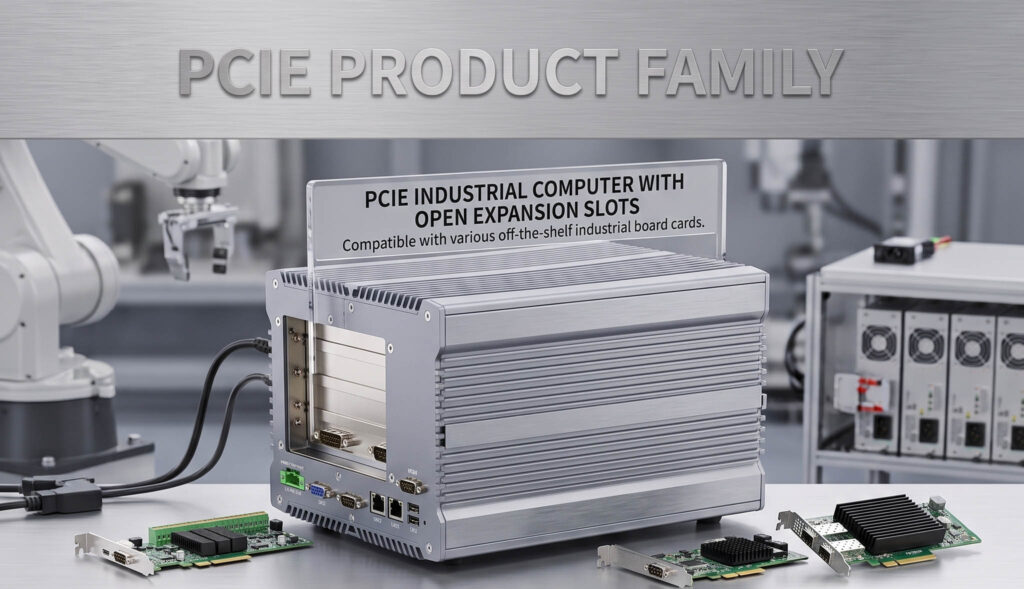
On a modern industrial board, the PCI slot is produced by a PCIe-to-PCI bridge — that translation layer is where compatibility succeeds or fails.
Table of Contents
A modern PCI industrial computer *can* run a legacy PCI card — but no current chipset supports PCI natively; every slot is bridged through a PCIe-to-PCI chip. Whether your specific card works comes down to five details: the bridge chip, 5V vs 3.3V signaling, bus width (PCI vs PCI-X), the driver-and-OS pairing, and how many true slots you need. The CPU barely matters. This guide covers each, plus when to choose a bridged motherboard over a passive backplane.
When you specify a legacy PCI industrial computer, the CPU and RAM barely matter. What decides whether your card runs are seven details: the bridge chip, the 5V vs 3.3V signaling voltage, the bus width and speed (PCI vs PCI-X), the number of true slots, the driver-and-OS pairing, the form factor (motherboard vs passive backplane), and industrial longevity. Get these right and you can keep a proven, fully depreciated production asset running for another decade.
First, the uncomfortable truth: nothing is “native PCI” anymore
A production line has run reliably for fifteen years on a PCI-based motion-control card, a Profibus master, a frame grabber, or a proprietary data-acquisition board. The host computer is finally dying — bulging capacitors, an original Windows install held together by hope — but the card itself works perfectly. Replacing it means a five- or six-figure requalification of the whole line. So the request lands on someone’s desk: find me a new industrial computer that still has a real PCI slot.
The single most important fact before you buy: no modern chipset supports the PCI bus natively. Intel and AMD removed native PCI support well over a decade ago. Every current motherboard that advertises a PCI slot — industrial or otherwise — produces it through a PCIe-to-PCI bridge chip.
The PCI slot on a 12th- or 13th-Gen board is not the same electrical animal as the slot on a Pentium 4 board from 2004. The bridge silicon — most commonly an ASMedia ASM1083/1085 or an ITE IT8893 — translates between the host’s PCIe lanes and the legacy 32-bit/33~MHz PCI bus. As one controls engineer put it: every board maker still offers PCI, but it is bridged, and the bridge chips “don’t agree with everything.” That sentence is the reason this guide exists.
Why the PCI slot survives anyway
If it is this much trouble, why not just move on? Because for a large class of industrial users, moving on is either impossible or absurdly expensive:
- The card has no PCIe equivalent. Proprietary interface cards, custom FPGA boards, and obsolete-vendor hardware were never re-released in PCIe. The vendor may not even exist anymore.
- The driver only exists for an old OS. Many legacy cards have drivers for Windows XP or 7 32-bit and nothing newer. The card and its software are a matched pair.
- Requalification cost dwarfs hardware cost. In regulated lines (pharma, aerospace, medical device), re-validating a changed I/O path can cost orders of magnitude more than the computer.
- It simply works. A card running a CNC, test instrument, or RF rig in a hostile environment full of metal dust is not something anyone replaces casually.
The seven specifications that actually decide compatibility
When you evaluate a legacy PCI industrial computer, the CPU and RAM are almost beside the point. These seven details determine whether your card will run.
| # | Check | What to confirm before you buy |
|---|---|---|
| 1 | PCIe-to-PCI bridge chip | Which chip (ASM1083/1085, IT8893). Test known-difficult cards. |
| 2 | Signaling voltage | 5V / 3.3V / universal keying — many bridged slots are 3.3V-only. |
| 3 | Bus width & speed | 32-bit/33 MHz PCI vs 64-bit PCI-X — slot’s bridge must match. |
| 4 | Number of true PCI slots | Most modern boards have one; multi-slot → passive backplane. |
| 5 | Driver + OS pairing | 64-bit signed driver for your target OS, or plan XP/7 passthrough. |
| 6 | Form factor | Bridged motherboard vs passive backplane + slot SBC. |
| 7 | Longevity & environment | Fanless, wide-temp, conformal coat, long-term availability. |
1. The PCIe-to-PCI bridge chip
The single most important spec, and the one most vendors bury. The bridge silicon (commonly ASMedia ASM1083/1085 or ITE IT8893) decides interrupt handling, bus-mastering, and whether your card enumerates. A product page that names the CPU but not the bridge controller is a warning sign — ask for it by name.
2. Signaling voltage — 5V vs 3.3V
This quietly kills more legacy deployments than anything else. Older cards are keyed for 5V signaling, newer ones for 3.3V, and ‘universal’ cards accept either. Many bridged slots and risers only support 3.3V. If your card is 5V-only from the early 2000s, confirm 5V support explicitly.
3. Bus speed and width
Standard legacy PCI is 32-bit at 33MHz (133MB/s). Some data-acquisition and frame-grabber cards are PCI-X (64-bit, up to 133~MHz). A 64-bit PCI-X card in a 32-bit-only bridged slot is a common, costly mismatch — confirm width and speed against the bridge.
4. Number of true PCI slots
Finding a board with more than one real PCI slot is genuinely hard today. Many ‘PCI-capable’ boards offer exactly one bridged slot. Need two, three, or four cards in one chassis? You are no longer shopping for a motherboard — you are shopping for a passive backplane system.
5. OS and driver compatibility
The slot is only half the problem — the driver must load on your target OS. Many legacy drivers have no 64-bit signed version and won’t install on Windows 10/11. Confirm a driver exists, whether you need XP-era virtualization/passthrough, and that the BIOS still exposes legacy boot modes.
6. Form factor — motherboard vs backplane
Two architectures dominate the legacy PCI market today. An industrial motherboard with onboard bridged PCI is the simplest path for one or two cards. A passive backplane plus slot CPU card (SBC) is the right choice when you need many slots, mixed bus types, or a field-replaceable CPU module without rewiring the rest of the system.
| Industrial motherboard w/ PCI | Passive backplane + slot SBC | |
|---|---|---|
| Slot count | 1–2 bridged slots | Many (mixed ISA / PCI / PCIe) |
| Best for | Compact builds, 1–2 cards | High slot count, mixed buses, field-swappable CPU |
| CPU replacement | Board swap | Pluggable SBC module |
| Relative cost | Lower | Premium |
7. Industrial longevity and environment
If you are building around a legacy card, the host should outlast the next host too: wide-temperature, fanless, conformal-coated construction, industrial power and protection for floors shared with welders — and a genuine long-term availability commitment so you are not back here in two years.
A practical decision path
- 1
Inventory the card. Exact model, signaling voltage (5V/3.3V/universal), bus type (PCI/PCI-X), width, and how many you need.
- 2
Find the driver. Confirm a driver exists for your target OS — this can eliminate options before hardware is even discussed.
- 3
Pick the architecture. One or two cards → industrial motherboard with bridged PCI. Many cards or mixed buses → passive backplane with slot SBC.
- 4
Vet the bridge chip. Ask the manufacturer which PCIe-to-PCI bridge they use; for difficult cards, test before volume.
- 5
Confirm environment and lifecycle. Wide-temp, fanless, conformal coating as needed, and a real availability commitment so this is the last migration for a long time.
The bottom line
A legacy PCI industrial computer is not a commodity purchase, and treating it like one is how production lines end up with cards that won’t enumerate. The CPU barely matters. What matters is the bridge chip, the signaling voltage, the slot count, the driver-and-OS pairing, and a supplier honest enough to discuss all of them before you buy. Get those right and you keep a proven, fully depreciated production asset running for another decade — which, for most people who go looking for a PCI slot in 2026, is exactly the point.
Guidance reflects general engineering practice and typical field experience. Always confirm the exact bridge controller, signaling voltage, slot count, and driver/OS support for your specific card and target platform before committing to volume.
FAQ
Do modern industrial computers still have PCI slots?
Yes — many industrial motherboards and backplanes still offer PCI slots, but none are native. No current Intel or AMD chipset supports the PCI bus, so every PCI slot on a modern board is produced by a PCIe-to-PCI bridge chip, and that bridge is where compatibility with your legacy card is won or lost.
Why won't my legacy PCI card work in a new industrial PC?
The usual culprits are the bridge chip, the signaling voltage, and the driver. A bridged PCI slot doesn't behave identically to a native one, many bridged slots support only 3.3V rather than the 5V older cards need, and legacy drivers often have no 64-bit signed version for modern Windows. Confirm all three before buying.
What is the difference between 5V and 3.3V PCI slots?
PCI went through a signaling-voltage transition: older cards are keyed for 5V, newer ones for 3.3V, and "universal" cards accept either. Many bridged industrial slots and PCIe-to-PCI risers support only 3.3V, so a 5V-only card from the early 2000s needs a host that explicitly supports 5V signaling.
Can I run a legacy PCI card on Windows 10 or 11?
Only if a 64-bit signed driver exists for your card. Many legacy PCI drivers are 32-bit and Windows XP or 7 only, and will not install on 64-bit Windows 10/11. If no modern driver exists, you either run the card on an older OS or use a virtualization/passthrough approach — decide this before choosing hardware.
How do I get multiple PCI slots in one industrial computer?
Most modern boards offer just one bridged PCI slot. If you need two or more — common in multi-axis motion or multi-camera vision rigs — move to a passive backplane with a slot CPU card (SBC). The backplane carries the slots and the CPU plugs in separately, which is the standard architecture for high-slot-count legacy systems.
What is a PCIe-to-PCI bridge chip, and why does it matter?
It's the silicon that translates between the host's PCIe lanes and the legacy 32-bit/33 MHz PCI bus — commonly an ASMedia ASM1083/1085 or ITE IT8893. It governs interrupt handling, bus-mastering, and whether your card enumerates at all. A vendor that won't name the bridge chip is a warning sign; a serious supplier will tell you without hesitation.
Where this fits BITECH
This is precisely the kind of “right-sized, long-lived” problem we build for. Our industrial platforms are designed around the realities above — bridged PCI implementations with the bridge silicon specified openly, attention to signaling voltage and slot count, fanless wide-temperature construction for harsh floors, and a 10-year lifecycle commitment with BOM control so a legacy deployment doesn’t get orphaned again in two years.
For high-slot-count or mixed-bus legacy systems, we can advise on the right motherboard-versus-backplane approach rather than forcing a one-size answer. If you have a specific legacy PCI card to keep alive, the most useful things to send us are the card’s exact model, its signaling voltage, and the OS it must run on — that is enough to tell you quickly whether a clean drop-in is realistic.
Related products & solutions
Industrial Box PCs
x86 platforms with bridged PCI, PCIe expansion and long-lifecycle BOM control.
Lifecycle Management
How we keep legacy deployments running for a decade with BOM control and migration planning.
OEM / ODM Engineering
Customization layers, EVT/DVT/PVT process and long-term governance for legacy I/O builds.