
Industrial expansion · Legacy equipment integration · Fanless computing
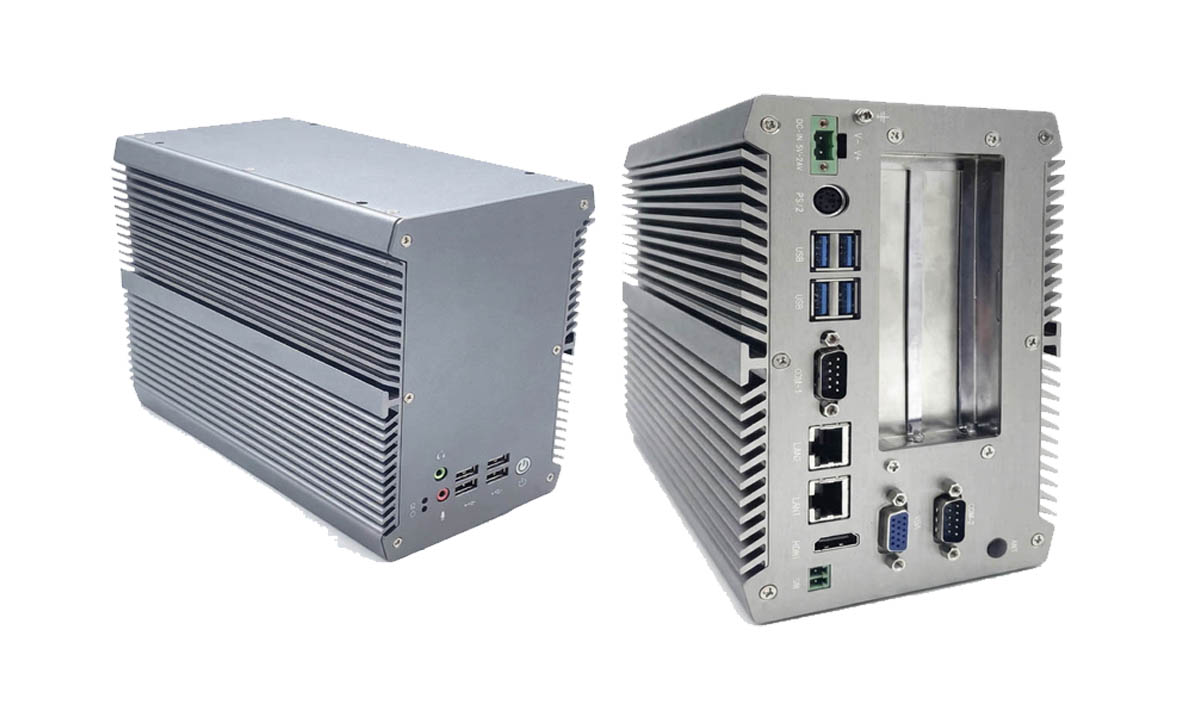
AE-520EBT Fanless Industrial PC with PCI or PCIe Expansion
The AE-520EBT is a fanless industrial box PC for OEMs and system integrators that need physical PCI or PCIe expansion while keeping proven automation hardware in service. The standard build combines an Intel Core i5-6200U, 8 GB onboard memory (2133 MHz), dual Intel i211-AT Gigabit Ethernet, industrial serial ports and 9–36 V DC input in a finned aluminium enclosure.
Two factory configurations
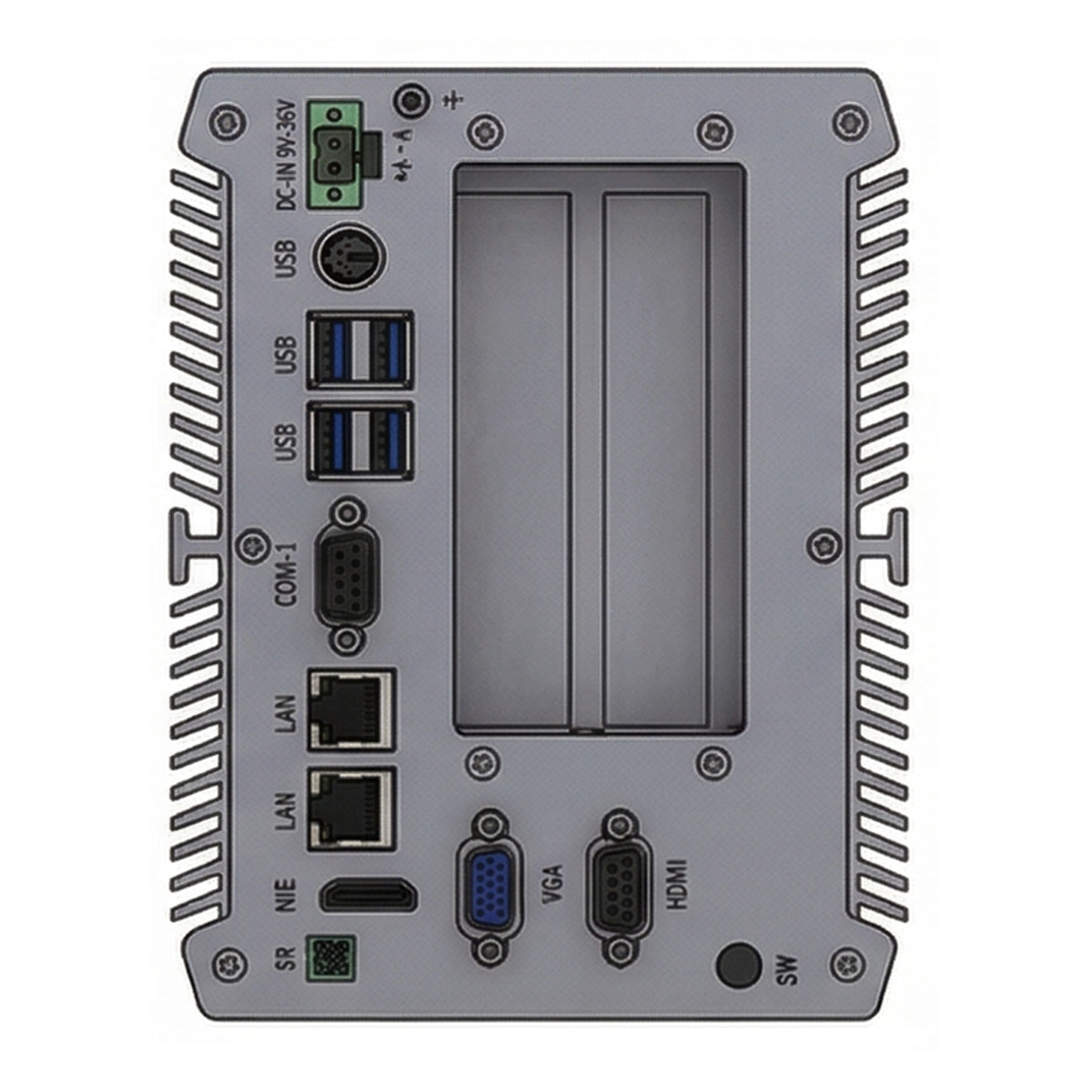
2 × PCI for existing expansion hardware, or 1 × PCIe x1 + 1 × PCIe x4 for PCI Express cards — alternatives, not four slots in one unit. Vertical and horizontal installation fit existing machine cabinets and test stations.
Check your expansion card compatibility →
01 · Expansion options
Two expansion configurations: choose the cards you need
Choose one of two factory configurations when ordering. They are alternatives, not four slots in one unit.
Option 1 · Legacy PCI
2 × PCI
Keep motion-control, fieldbus, DAQ or other specialty PCI cards in service after card-specific qualification.
Option 2 · PCI Express
1 × PCIe x1 + 1 × PCIe x4
For PCIe industrial interfaces, capture cards or DAQ modules with verified lane, power and physical requirements.
Important: the two options are mutually exclusive. The separate Mini PCIe socket is an onboard connector, not a third full-size add-in slot. PCI bus characteristics, PCIe generation, slot power, card clearance and driver compatibility are verified for the selected motherboard revision.
02 · Why an expansion PC
Why system integrators choose an expansion PC
A working production machine may rely on a PCI controller, a proprietary DAQ board, a licensed application or a specific OS and driver combination. Replacing its computer is more involved than upgrading processor speed. The AE-520EBT is built for planned replacements and compatibility evaluation that keep existing equipment where technically feasible.
Motion control & fieldbus
Test the original controller and application rather than assuming every PCI board is plug-and-play.
DAQ & laboratory systems
Verify board enumeration, analog or digital acquisition, data integrity and uninterrupted operation with the required driver.
Machine-vision peripherals
Check PCIe bandwidth, camera SDK, capture-card cooling and slot geometry before choosing the x1 + x4 version.
Licensed applications
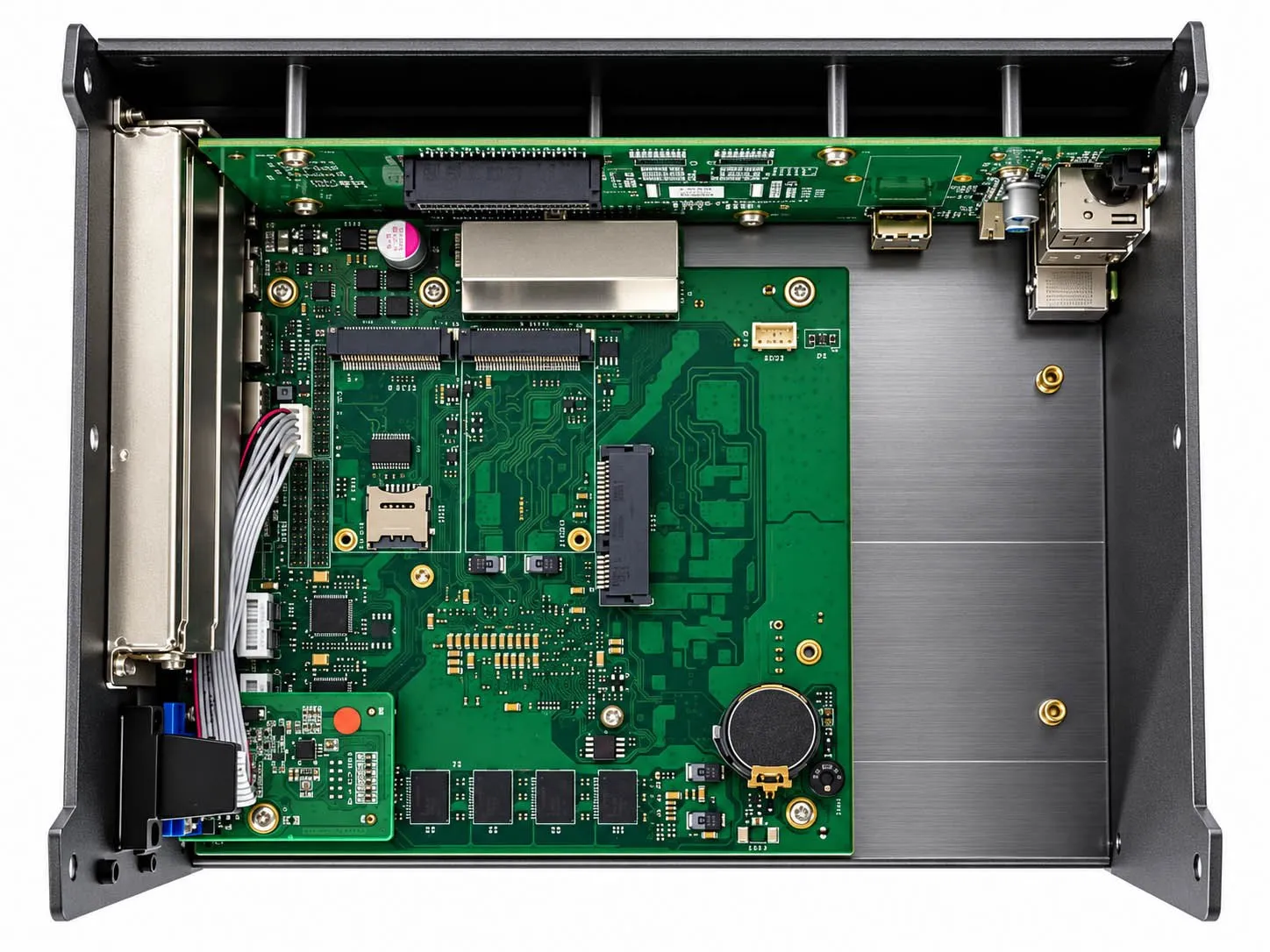
Keep a compatible licence dongle inside the enclosure on the internal USB 2.0 port, subject to the dongle’s own requirements.
03 · Specifications
AE-520EBT technical specifications
| Category | Specification |
|---|---|
| Processor | Intel Core i5-6200U, low-power onboard CPU; other CPU options by project assessment |
| Memory | 8 GB onboard, 2133 MHz |
| Expansion, option 1 | 2 × PCI |
| Expansion, option 2 | 1 × PCIe x1 + 1 × PCIe x4 |
| Additional expansion | 1 × Mini PCIe socket; 1 × SIM-card socket |
| Storage | 1 × mSATA slot; 1 × 7+15-pin direct-connect 2.5″ SATA drive receptacle |
| Ethernet | 2 × Intel i211-AT 10/100/1000 Mbps Gigabit Ethernet |
| Serial | 2 × COM; COM1 configurable for RS-232 / RS-422 / RS-485; COM1 pin 9 powered |
| External USB | 4 × USB 2.0 + 4 × USB 3.0, with overcurrent and short-circuit protection design |
| Internal USB | 1 × USB 2.0 for a hardware licence dongle |
| Display | 1 × HDMI; 1 × VGA |
| Other I/O | 1 × PS/2; 1 × power switch; 1 × 2-pin remote power-switch terminal; 2 × LED indicators; 2 × antenna connections |
| Audio connectors | Line-out and MIC-in present; audio not functional in the default build |
| Power input | 9–36 V DC, 2-pin Phoenix-type connector |
| Cooling | Fanless aluminium chassis with raised, angled cooling fins on both sides |
| Installation | Vertical or horizontal orientation |
| Dimensions (vertical) | 215.0 × 193.2 × 151.5 mm |
| Weight | Approx. 3.6 kg net / 5.0 kg gross |
| Shipping carton | 315.0 × 280.0 × 260.0 mm |
| Operating temperature | -20°C to +65°C (validated for the ordered configuration) |
| Storage temperature | -40°C to +80°C |
| Operating humidity | 10%–95% RH at 40°C, non-condensing |
Configuration note: the Mini PCIe and SIM sockets are integration connectors — Wi-Fi, 4G or a modem is not included as standard. Simultaneous use of both storage connectors and any shared interfaces are confirmed for the selected board revision.
04 · Connectivity
Industrial connectivity for existing equipment
Dual Intel i211-AT Gigabit Ethernet
Two separate 10/100/1000 Mbps interfaces for machine networks, engineering access and segmented equipment communication. The board includes filtering and surge-protection design; no surge rating or isolation level is claimed without a test report.
2 × COM, COM1 configurable
COM1 can be set to RS-232, RS-422 or RS-485; COM2 is not assumed to offer the same modes. COM1 pin 9 can power a connected device, subject to the confirmed pinout, voltage and BIOS or jumper setting.
8 external + 1 internal USB
Four USB 2.0 and four USB 3.0 ports connect test instruments and accessories, with overcurrent and short-circuit protection design. A PS/2 port and the internal USB 2.0 support legacy peripherals and licensing.
Mini PCIe, SIM & antennas
One Mini PCIe socket, one SIM socket and two antenna connectors for wireless projects. Module, signaling, antenna layout and software are defined per configuration.
05 · Storage
Storage and serviceability
Two storage interfaces
An mSATA slot and a 7+15-pin direct-connect receptacle for a 2.5″ SATA drive. For a migration project, confirm:
- Boot-mode compatibility
- OS licensing and drivers
- Connector placement
- Whether both drives can run at the same time
Do not assume an older system image will boot unchanged on new hardware.
Internal licence dongle
The internal USB 2.0 socket keeps a licence dongle inside the enclosure instead of protruding from an external port.
- Check the dongle’s physical height
- Check software or driver binding
- Confirm before final approval
06 · Thermal & installation
Fanless thermal design and flexible installation
Raised, angled fins on both sides of the aluminium enclosure move heat into the surroundings without a chassis fan. Vertical and horizontal installation options fit different cabinet layouts.
Assess for your configuration
- CPU workload
- Expansion-card power dissipation
- Card adjacency
- Cabinet ambient temperature
- Installation orientation
- Free convection around both finned sides
Mechanical reference
Vertical arrangement: 215.0 × 193.2 × 151.5 mm, approx. 3.6 kg net.
Request the mechanical drawing to confirm connector clearance, bracket hole pattern and maximum card length and height before designing the cabinet.
The -20°C to +65°C operating range is qualified for the complete ordered configuration. It is not a guarantee at any PCI or PCIe card load.
07 · Card compatibility
Legacy PCI / PCIe card compatibility: what must be checked?
A matching slot label does not guarantee a compatible system. Send BITECH the card model number and, if possible, photos of the gold fingers and bracket. Our engineering review covers:
- Slot electrical compatibilityPCI signaling voltage and keying, bridge or controller behavior, PCIe lane requirements and generation.
- Operating system & driverExact OS edition and bitness, signed driver availability, application software and any licence key.
- Electrical powerTotal card power, slot limits, auxiliary feeds and special serial-pin power needs.
- Mechanical fitCard length, height, thickness, bracket and connector orientation.
- Functional testsDevice detection, DMA and interrupt behavior, acquisition or motion tests, thermal stability and power-loss recovery.
Compatibility with a third-party card, a specific legacy OS or an unverified bridge or adapter is not assumed without sample testing. PCI and PCIe are different electrical and physical standards.
08 · Deployment checklist
Deployment checklist for OEM and equipment replacement projects
| Step | Information to gather | Engineering outcome |
|---|---|---|
| 1 — Capture the existing system | Photos, installed PCI / PCIe cards, original PC, OS and software versions | Define exactly what must stay compatible |
| 2 — Select the expansion configuration | 2 × PCI or PCIe x1 + PCIe x4 | Choose the correct factory build |
| 3 — Check I/O and storage | COM1 protocol and pin-9 voltage, dual LAN, USB dongle, mSATA / 2.5″ SATA | Confirm interfaces and wiring |
| 4 — Review enclosure and environment | Orientation, card sizes, cabinet space, -20 to +65°C profile | Mechanical and thermal qualification plan |
| 5 — Validate a sample | Drivers, real card workload, restart and recovery, thermal and 24/7 application test | Documented accept / reject decision before production |
09 · OEM & lifecycle
OEM customization and lifecycle planning
BITECH can review project-specific CPU variants, PCI / PCIe configurations, enclosure integration and I/O needs. Alternative CPUs and module options depend on motherboard revision, feasibility, minimum order quantity and qualification.
The Intel Core i5-6200U is discontinued by Intel. Availability, spare CPU inventory, PCN / EOL terms and any future compatible replacement are confirmed by quotation and written supply agreement — see lifecycle management.
FAQ
AE-520EBT frequently asked questions
Does one AE-520EBT contain two PCI slots and two PCIe slots?
No. There are two alternative factory versions: 2 × PCI, or 1 × PCIe x1 plus 1 × PCIe x4. Select one when ordering. The Mini PCIe socket is a separate board-level connector.
Can it replace my old PCI motion-control or DAQ computer?
Possibly, after checking the exact PCI card, electrical keying, operating-system driver, application software, card dimensions and functional performance. Sample qualification is recommended before replacing a production machine’s computer.
Can the AE-520EBT run Windows XP or Windows 7?
Do not assume so. Operating-system and driver compatibility depend on the platform, available drivers and third-party card software. BITECH reviews the requested OS image and cards before any project-specific commitment. Unsupported legacy operating systems need suitable cybersecurity isolation.
Is the memory upgradeable?
The standard configuration has 8 GB of onboard memory at 2133 MHz. No removable memory socket is confirmed for this revision. Contact BITECH about different memory requirements.
Does it support a 2.5-inch SSD and an mSATA SSD?
It has both an mSATA socket and a 7+15-pin 2.5-inch SATA direct-connect receptacle. Whether both can operate at the same time, drive thickness and boot order are confirmed for the selected board revision.
Does Mini PCIe plus a SIM socket mean 4G is included?
No. The board provides the connectors only. A supported cellular module, antennas, drivers and carrier compatibility are specified separately.
Is audio available through Line-out and MIC-in?
The physical connectors are present, but audio is not functional in the default build. Do not specify audio in a project without a separately qualified version.
Are both COM ports RS-232/422/485, and is pin 9 powered?
There are two COM ports. Only COM1 is confirmed as configurable for RS-232, RS-422 or RS-485. COM1 pin 9 is powered, but confirm the voltage and setting before connecting any field device. No galvanic isolation is claimed without a test report.
What is the operating temperature?
The stated operating range is -20°C to +65°C. Final limits depend on the CPU, drives, expansion cards, installation orientation and thermal qualification of the complete unit.
Is the i5-6200U available for long-term procurement?
Intel lists the processor as discontinued. BITECH confirms actual material availability, approved alternatives and any project-specific lifecycle commitment before accepting a long-running OEM program.
Engineering RFQ
Check your expansion card before ordering
Have an existing PCI card, PCIe DAQ card or industrial controller to keep in service? Send us the details and BITECH will review the AE-520EBT configuration and identify which interfaces and tests must be validated.
2 × PCIPCIe x1 + x4
Include in your request
- Card manufacturer and model
- Required OS and driver
- Card dimensions
- Number of units
- Installation environment